
Inspiring
February 22, 2020
Question

Actions: file/folder not found suggestion

  • February 22, 2020
  • 3 replies
  • 3282 views

Hi,


I would like to know if Adobe has a place where we can suggest new features and report bugs, besides the community here?


In many years of using Photoshop, it's a bit hard to believe that no one there ever thought that having the original file/folder name next to a broken step wasn't a good feature. I have many actions that won't play, because I moved the files/folders, but I also have no idea what those files/folders were. 


Here's what I thought it would make sense to have. Just a simple feature that could save us all so much time and work:
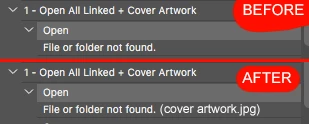
 

What do you think? And where can I suggest this?


Thank you!

This topic has been closed for replies.

3 replies

JJMack
Community Expert
Community Expert
February 22, 2020

The problem is you are not showing the settings recorded for the open step.  Open Steps record like this:

File or Folder not found is not something the Action recorder records into an action step 

JJMack
Inspiring
February 22, 2020

When I record the action it shows me the path and file name. 

Now try to move that file to a different location and you will get the File or Folder Not Found. 

And that's where I think Photoshop is "broken".

Photoshop should save that information and say "File or Folder not found. Original path and file name: /folderX/folderY/filename.jpg".

That way we would be able to know what file/folder is trying to open. If I go back to an action I created 5 years ago, it's hard to remember what Photoshop is trying to open. Maybe I still have that file, but it's just in a different location. If I knew the name of the file and its original path, I could at least remember what I was trying to achieve.


As a musician and producer, when I use Logic Pro and there's a missing file, it shows us that information:

JJMack
Community Expert
Community Expert
February 22, 2020

When the Action failed the Step that failed should be highlighted in the Action Palette panel in the failing Action and should contain the files that can not be found for it has been delete, moved or renamed.


I find the Action Step open a file Open Dialog   The Action step is highlighted you cans see the filename and you can search or navafate to it,. Select a different file or cancel the Open dialog. Here I renamed my png file this is what I see

JJMack
JJMack
Community Expert
Community Expert
February 22, 2020

If an Action has an interactive open Action step there is no original file any file can be open.  If an Action Opens a file the file that is opened is recorder in the action step.  The Path and File is recorded into the action step. Action step have recorded settings.

 If the Raw file or the PNG file is moved, deleted or renamed the Open steps will fail because the files path and file name no longer exists.

JJMack
February 22, 2020

Hi

You can use the Adobe Feedback Forum for bug reports/suggestions

Inspiring
February 22, 2020

Thank you. Done! 🙂

Kukurykus
Legend
February 22, 2020