Known Participant
August 13, 2018
Answered

Adding masks to group layers

  • August 13, 2018
  • 3 replies
  • 2919 views

Allah to all the angels progamators! How do I add a mask in all groups based on the reference to the selection of layers of shapes that are within their respective groups? Thank you.
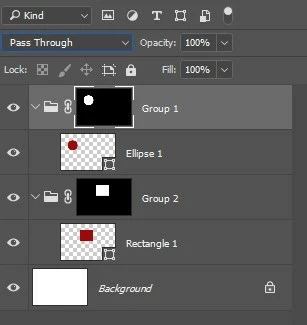

This topic has been closed for replies.
Correct answer Kukurykus

function sTT(v) {return stringIDToTypeID(v)}

(ref = new ActionReference()).putEnumerated

(sTT('document'), sTT('ordinal'), sTT('targetEnum'))

nOL = executeActionGet(ref).getInteger(sTT('numberOfLayers'))

bGL = !executeActionGet(ref).getInteger(sTT('hasBackgroundLayer'))

for(i = nOL - bGL; i >= 0; i--) {

     function ttS(v) {return typeIDToStringID(v) == lS + 'Start'}

     (ref = new ActionReference()).putIndex(sTT('layer'), idx1 = i + bGL)

     if (ttS(executeActionGet(ref).getEnumerationValue(sTT(lS = 'layerSection')))) {

          (ref = new ActionReference()).putIndex(sTT('layer'), idx2 = i - 1 + bGL)

          if (executeActionGet(ref).getInteger(sTT(lS = 'layerKind')) == 4) {

               (ref1 = new ActionReference()).putProperty(sTT('channel'), sTT('selection'));

               (dsc1 = new ActionDescriptor()).putReference(sTT('null'), ref1);

               (ref2 = new ActionReference()).putEnumerated(sTT('path'), sTT('path'), sTT('vectorMask'))

               ref2.putIndex(sTT('layer'), idx2), dsc1.putReference(sTT('to'), ref2), executeAction(sTT('set'), dsc1);

               (ref = new ActionReference()).putIndex(sTT('layer'), idx1);

               (dsc = new ActionDescriptor()).putReference(sTT('null'), ref)

               dsc.putBoolean(sTT('makeVisible'), false);

               executeAction(sTT('select'), dsc);

               (dsc = new ActionDescriptor())

               .putClass(sTT('new'), sTT('channel'));

               (ref = new ActionReference()).putEnumerated

               (sTT('channel'), sTT('channel'), sTT('mask'))

               dsc.putReference(sTT('at'), ref), dsc.putEnumerated

               (sTT('using'), sTT('userMaskEnabled'), sTT('revealSelection'))

               executeAction(sTT('make'), dsc)

          }

     }

}

3 replies

Kukurykus
KukurykusCorrect answer
Legend
August 13, 2018

function sTT(v) {return stringIDToTypeID(v)}

(ref = new ActionReference()).putEnumerated

(sTT('document'), sTT('ordinal'), sTT('targetEnum'))

nOL = executeActionGet(ref).getInteger(sTT('numberOfLayers'))

bGL = !executeActionGet(ref).getInteger(sTT('hasBackgroundLayer'))

for(i = nOL - bGL; i >= 0; i--) {

     function ttS(v) {return typeIDToStringID(v) == lS + 'Start'}

     (ref = new ActionReference()).putIndex(sTT('layer'), idx1 = i + bGL)

     if (ttS(executeActionGet(ref).getEnumerationValue(sTT(lS = 'layerSection')))) {

          (ref = new ActionReference()).putIndex(sTT('layer'), idx2 = i - 1 + bGL)

          if (executeActionGet(ref).getInteger(sTT(lS = 'layerKind')) == 4) {

               (ref1 = new ActionReference()).putProperty(sTT('channel'), sTT('selection'));

               (dsc1 = new ActionDescriptor()).putReference(sTT('null'), ref1);

               (ref2 = new ActionReference()).putEnumerated(sTT('path'), sTT('path'), sTT('vectorMask'))

               ref2.putIndex(sTT('layer'), idx2), dsc1.putReference(sTT('to'), ref2), executeAction(sTT('set'), dsc1);

               (ref = new ActionReference()).putIndex(sTT('layer'), idx1);

               (dsc = new ActionDescriptor()).putReference(sTT('null'), ref)

               dsc.putBoolean(sTT('makeVisible'), false);

               executeAction(sTT('select'), dsc);

               (dsc = new ActionDescriptor())

               .putClass(sTT('new'), sTT('channel'));

               (ref = new ActionReference()).putEnumerated

               (sTT('channel'), sTT('channel'), sTT('mask'))

               dsc.putReference(sTT('at'), ref), dsc.putEnumerated

               (sTT('using'), sTT('userMaskEnabled'), sTT('revealSelection'))

               executeAction(sTT('make'), dsc)

          }

     }

}

Ps-DesignAuthor
Known Participant
August 13, 2018

Wow it was perfect! Kukurykus Glad you understood me, it was exactly as one would like. Congratulations and thank you one more time.

r-bin Thank you for your support

Here the perfect result:

Kukurykus
Legend
August 13, 2018

That was strictly refered to your goal, so it is going to fail if some folder that already contained a shape layer got some mask or else shape layer wasn't first in a row (so top one) in certain folder. That can be easily changed so script can handle it too.

Legend
August 13, 2018

Do you want to duplicate the mask from the current LayerSet to others?

Ps-DesignAuthor
Known Participant
August 13, 2018

The objective would be:

check if there is one or more LayerSet in the document.

If this is true, add a mask in each group layer having as the selection reference the same dimensions of the layer within the respective group.

Irrespective of whether the layer is oval, round, rectangular or square

Legend
August 13, 2018

Maybe this is it

if (activeDocument.activeLayer.typename == "LayerSet")

    {

    var ok = true;

    try {

        var d = new ActionDescriptor();

        var r = new ActionReference();

        r.putEnumerated(stringIDToTypeID("channel"), stringIDToTypeID("channel"), stringIDToTypeID("mask"));

        d.putReference(stringIDToTypeID("null"), r);

        d.putBoolean(stringIDToTypeID("makeVisible"), false);

        executeAction(stringIDToTypeID("select"), d, DialogModes.NO);

        }

    catch(e) { ok = false; alert("No Mask"); }

    if (ok) for (var i = 0; i < activeDocument.layerSets.length; i++)

        {

        try {

            if (activeDocument.layerSets == activeDocument.activeLayer) continue;


           var d = new ActionDescriptor();

           var r = new ActionReference();

           r.putEnumerated(stringIDToTypeID("channel"), stringIDToTypeID("channel"), stringIDToTypeID("mask"));

           r.putIdentifier(stringIDToTypeID("layer"), activeDocument.layerSets.id);

           d.putReference(stringIDToTypeID("null"), r);

           try { executeAction(stringIDToTypeID("delete"), d, DialogModes.NO); } catch(e) {}


           var d = new ActionDescriptor();

           d.putClass(stringIDToTypeID("new"), stringIDToTypeID("channel"));


           var r = new ActionReference();

           r.putEnumerated(stringIDToTypeID("channel"), stringIDToTypeID("channel"), stringIDToTypeID("mask"));

           r.putIdentifier(stringIDToTypeID("layer"), activeDocument.layerSets.id);

           d.putReference(stringIDToTypeID("at"), r);


           var r1 = new ActionReference();

           r1.putEnumerated(stringIDToTypeID("channel"), stringIDToTypeID("channel"), stringIDToTypeID("mask"));

           r.putIdentifier(stringIDToTypeID("layer"), activeDocument.activeLayer.id);

           d.putReference(stringIDToTypeID("using"), r1);

           d.putBoolean(stringIDToTypeID("duplicate"), true);

           executeAction(stringIDToTypeID("make"), d, DialogModes.NO);

           }

       catch (e) { alert(e); break; }

       }

    }

else

    {

    alert("Not a LayerSet");

    }

JJMack
Community Expert
Community Expert
August 13, 2018

Shapes layers have a vector layer mask that is only depicted in the layers palette by the little shape icon in the layer's content thumbnail. You can easily edit this mask with Photoshop vector tools.  Why do you need to create a group for each of your shape layer and add a grayscale layer mask like the shape layers transparency to the group that has a single shape layer?  I don't get it??? You can just as easly added that raster layer masks as an additional layer mask on the shape layer. Why is it even needed? Why is a group needed?

If there are mote than one shape layer in the group you most like could load the groups transparency as a selection and add it to the group as a layer mask.  The Group could also be used as a clipping mask I believe

JJMack
Ps-DesignAuthor
Known Participant
August 13, 2018

It is necessary to automate a very repeatable possession. I'm working on several documents that have numerous photos in the form of composition, and some photos will have different patterns ....

The shape layers are just the reference, it makes me more comfortable to add groups with their respective masks.