Inspiring
September 15, 2017
Answered

Adjusting fx on multiple layers at once?

  • September 15, 2017
  • 1 reply
  • 2086 views

Hello! Im working on a text effect and i have about 9 layers that all have the same color overlay, but different drop shadows. I need to change all the color overlays to a different color and dont know if there is a short cut that will allow me to change them all at once? The only way Ive been able to to it so far, is to go in and just manually enter my color. I could go in and group them as well and just ad a master to the group. But Id rather it be changed on all the individual layers.

Thanks!

Christina
This topic has been closed for replies.
Correct answer davescm

Within Layer Effects no. Unlike illustrator, Photoshop does not have global colors.

However there is a way which does not rely on grouping similar colors together.

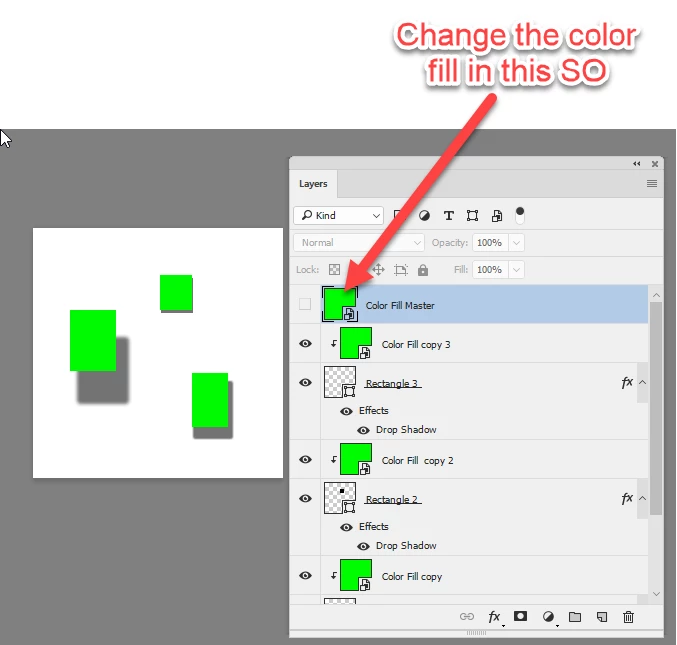
1.Create a color fill layer and turn it into a smart object.

2.Duplicate that smart object as many times as needed.

3.Move each copy above the layers that need the color fill and Alt click to clip them to the layer

4. Turn off the visibility of the original "Master" smart object.

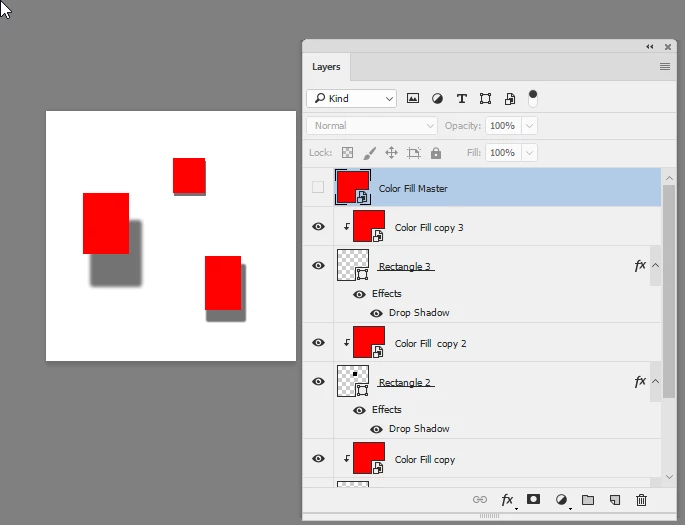
Now to change colors just double click on the master SO, and in the psb change the color of the color fill layer. All the copies will change when the SO is closed and saved.

This can be used with several master layers to create a pallete for your document that can be changed at will

Dave

1 reply

davescm
davescmCorrect answer
Community Expert
September 15, 2017

Within Layer Effects no. Unlike illustrator, Photoshop does not have global colors.

However there is a way which does not rely on grouping similar colors together.

1.Create a color fill layer and turn it into a smart object.

2.Duplicate that smart object as many times as needed.

3.Move each copy above the layers that need the color fill and Alt click to clip them to the layer

4. Turn off the visibility of the original "Master" smart object.

Now to change colors just double click on the master SO, and in the psb change the color of the color fill layer. All the copies will change when the SO is closed and saved.

This can be used with several master layers to create a pallete for your document that can be changed at will

Dave

CCM86Author
Inspiring
October 26, 2017

Fantastic! Its still quicker than going in and manually adjusting.

THanks!

Christina

davescm
Community Expert
October 26, 2017

You're welcome

Dave