
Participant
May 15, 2018
Question

Adobe Photoshop CC 2018 - Stuck as a background process

  • May 15, 2018
  • 3 replies
  • 1635 views

Hello,

Recently Adobe Photoshop CC 2018 has stopped working for me. I try to open the program and nothing happens, so I decided to check my processes, here's what I found.
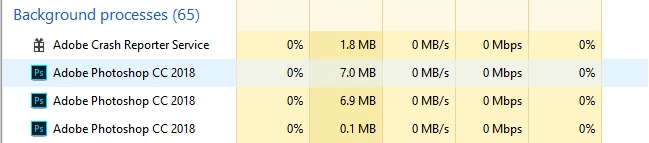
The Adobe Crash Reporter Service process closes a few seconds after I try to open Photoshop. My other Adobe products have been working fine, but Photoshop isn't. I've had this issue before, and but last time it randomly fixed by itself.

I've tried:

  • Updating drivers
  • Restarting computer
  • Running as administrator
  • Completely uninstalling and reinstalling
  • Closing background processes from Adobe

Anyone know how to fix this?

This topic has been closed for replies.

3 replies

mglush
Community Expert
Community Expert
May 30, 2018

Have you tried reinstalling Photoshop? You can use the Cleaner Tool that Adobe provides

Use the Creative Cloud Cleaner Tool to solve installation problems

and then try reinstalling the program. This will help to fix any issues before you reload the program.

Michelle

mglush
Community Expert
Community Expert
May 30, 2018

Sorry, I just re-read that you did try reinstalling the program--but do try the Cleaner tool noted above to see if that will help.

Kanikas
Community Manager
Community Manager
May 29, 2018

Moving to Photoshop

kglad
Community Expert
Community Expert
May 16, 2018

restart your computer and open ps.

if it fails, reset your preferences: https://forums.adobe.com/thread/375776