
Participant
April 9, 2021
Answered

After importing a photo into photoshop it opens in main photoshop window instead in a window where..

  • April 9, 2021
  • 3 replies
  • 2408 views

Hi everyone,

can you please help me with this problem. After importing a photo into photoshop CS6, it opens in main photoshop window, instead ( as it was happening before) in a window where one can make quite a few adjustments, before it moves into the main (more powerful) photoshop window after adjustments or without adjustments.

Not sure if I am clear enough about this problem, still having problems with the technical language, sorry about that.

Could you please help me with fixing this problem, thank you.

Best regards Danny.
This topic has been closed for replies.
Correct answer Jeff Arola

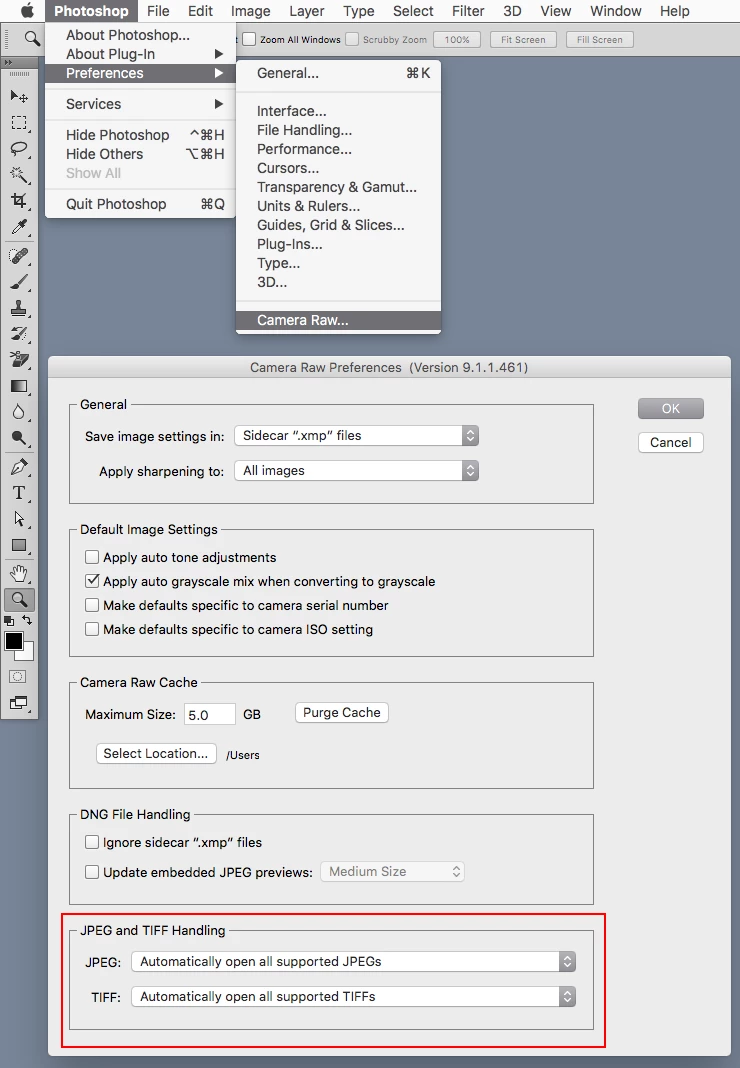
Yes go to Edit>Preferences>Camera Raw (windows) or Photoshop>Preferences>Camera Raw (mac) and

set Jpeg to Automatcally open all supported JPEGS and Tiff to Automatically open all supported TIFFS


3 replies

Jeff Arola
Community Expert
Jeff ArolaCommunity ExpertCorrect answer
Community Expert
April 10, 2021

Yes go to Edit>Preferences>Camera Raw (windows) or Photoshop>Preferences>Camera Raw (mac) and

set Jpeg to Automatcally open all supported JPEGS and Tiff to Automatically open all supported TIFFS


Danny5D38Author
Participant
April 10, 2021

Hello Jeff, tis done!!

Thank you and all the others for helping me with that, muchly appreciated

Best regards Danny 

Trevor.Dennis
Community Expert
Community Expert
April 10, 2021

As Jeff is alluding to, what was originally a RAW file might have been saved as a JPG and it is the JPG you are now opening.  Check the file extensions in File Explorer or the Finder.  You can still open a JPG in Canera RAW by using Ctrl R from Bridge.  You have filters in Bridge that will only display RAW files

Danny5D38Author
Participant
April 10, 2021

Hello Trevor,  my photoshop used to always open in camera raw regardless whether I imported raw or jpeg formats. That suddenly stopped. And as I use the tools in camera raw window much more than in the photoshop it created a problem for me. Would you know how can I make camera raw window open  every time I import a photograph,  regardless of format?

Thank you very much for helping.

Best regards Danny.

Jeff Arola
Community Expert
Community Expert
April 9, 2021

Your referring to the Camera Raw dialog?


Are you opening camera raw, jpeg or tif files?


Danny5D38Author
Participant
April 10, 2021

YES!!! Thats the one I am missing. Whether I was importing raw or jpeg picture photoshop always opened in camera raw dialog, lately I use primarily jpeg photos. Can you please advise, how to make changes to my photoshop so that it always opens in camera raw dialog?  Thank you very much,  best regards Danny.