
Copy link to clipboard
Copied
I have a problem with aligning objects with transparency.
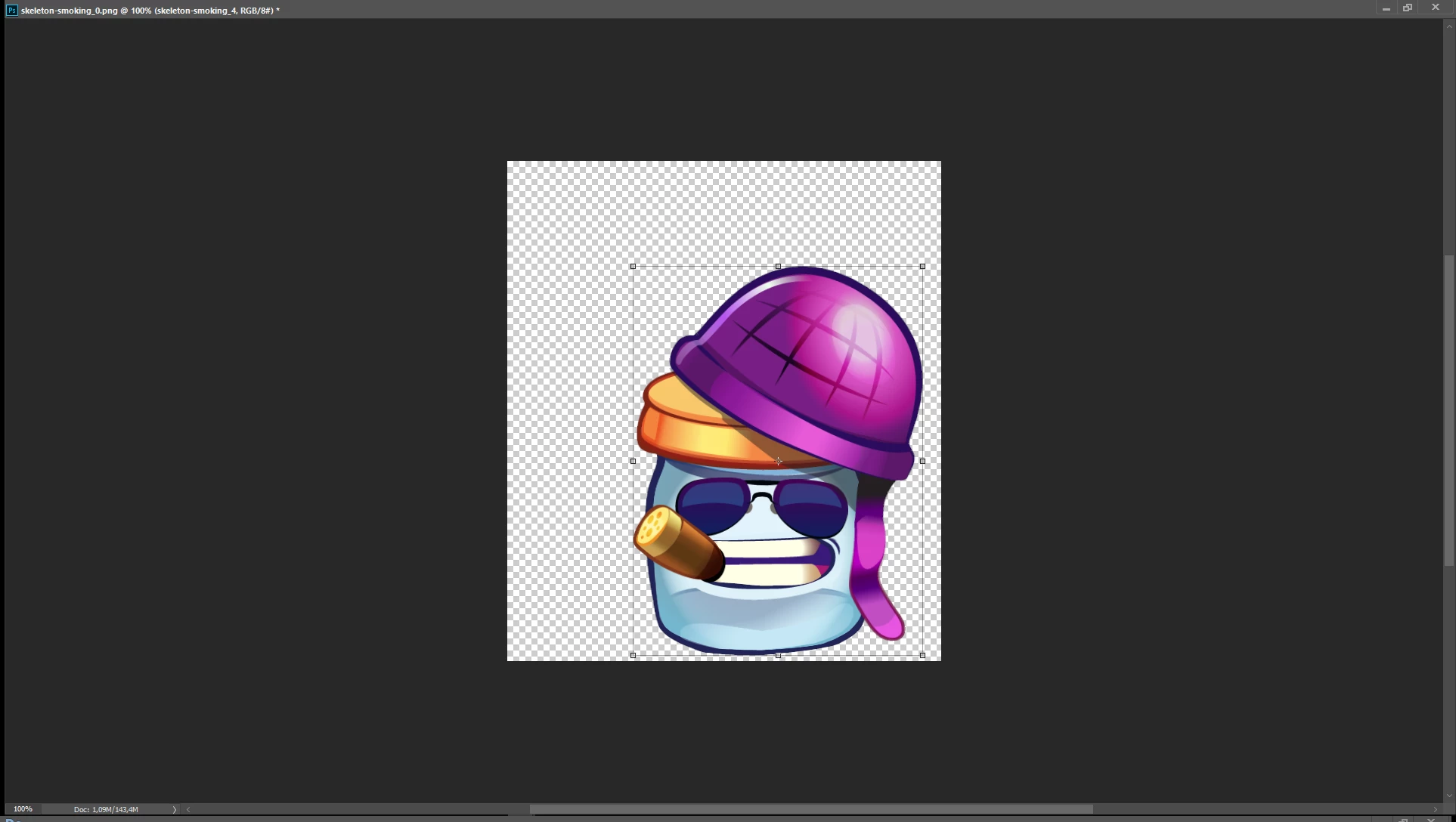
this is what photoshop sees as transform control, but the real size of this object is the whole visable area.
I have 90 frames of animation that can not be aligned properly because of photoshop auto disposal of transparent pixels (every frame is cropped diferently by photoshop in next frames - smoke is comming out).
Why?
It's also annoying in export from layer panel.
Anyone had similar problem?
Copy link to clipboard
Copied
I'm afreaid it's normal.
You work with layers and trying to transform/align layers
Maybe you can try this:
Select all layers in time and go to Align section in Options panel (Top). Try to align all layers to bottom right corner and then move it to destinnation position by hand. If not try to align to bottom midle, bottom left eadges. It should help you
pawel
Copy link to clipboard
Copied
Thanks for advice
but damn
using reference point will work only if the animation isn't performed in all axises (if the jar stays glued to the groud it would be easy). I did it manually though... what a waste of time.
Cheers
Get ready! An upgraded Adobe Community experience is coming in January.
Learn more