Participant
April 5, 2018
Answered

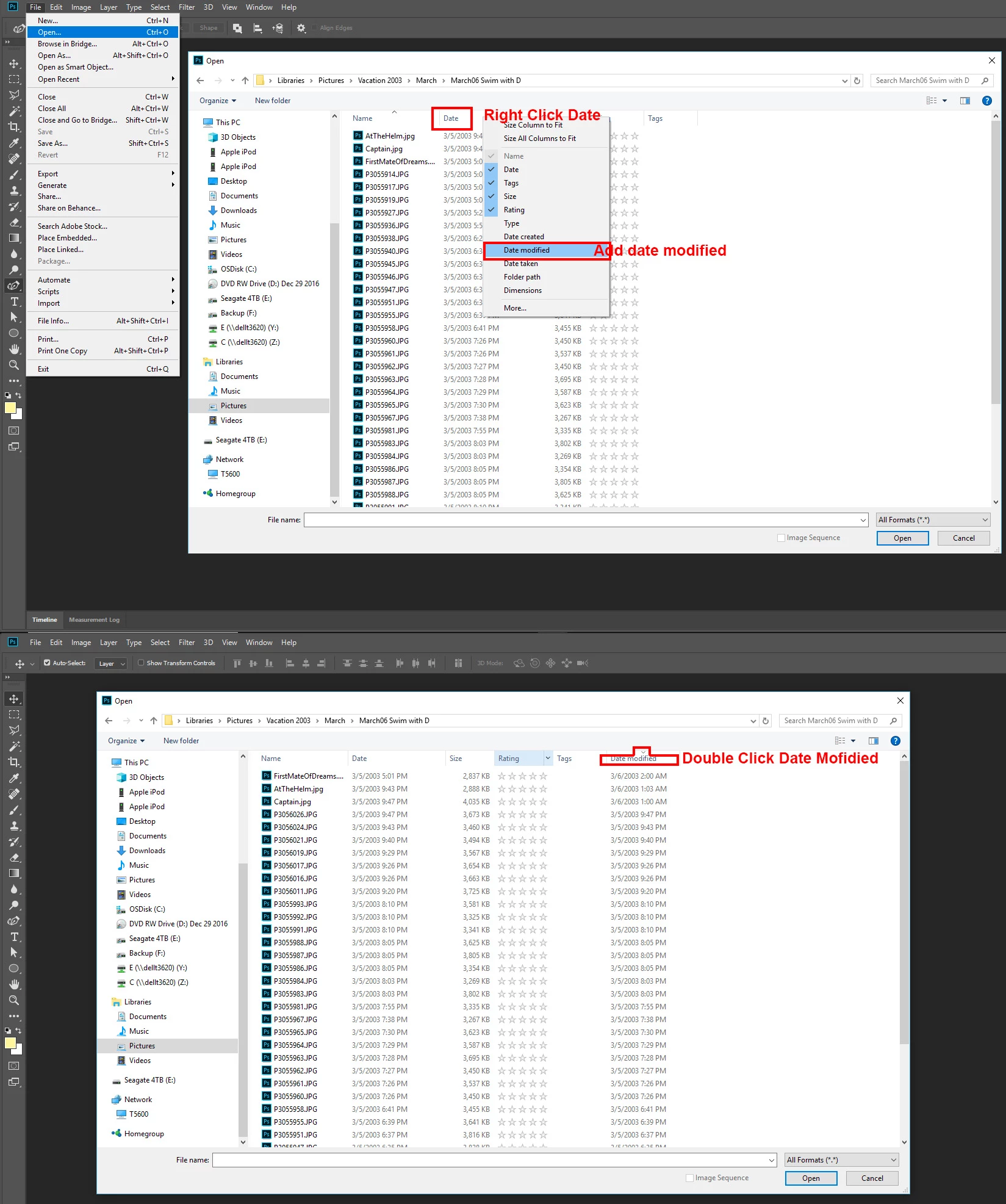
Arrange order when opening documents by Date Modified

  • April 5, 2018
  • 2 replies
  • 690 views

Okay this is really basic but when I go to file-open the window can be arranged Name-Date Added-Size-Kind.  I want to be able to arrange by Date Modified, how do I do this?  I am able to at work.

    This topic has been closed for replies.
    Correct answer JJMack

    2 replies

    Participant
    October 13, 2022

    Yes its an issue to find an important psd document if name is not properly not given with memorable some clues for example 'date'. I am saying this because I am victim of this issue, I saved my step by step logo making artwork without proper name.

    JJMack
    Community Expert
    JJMackCommunity ExpertCorrect answer
    Community Expert
    April 6, 2018

    JJMack
    Participant
    April 7, 2018

    Thanks so much!  Didn't know the Right Click Date trick!

    Participant
    April 8, 2018

    日本語でお願いします

    Windows 10 版のメールから送信

    差出人: stacyn5050

    送信日時: 2018年4月7日 21:46

    宛先: 美保子 大村

    件名: Arrange order when opening documents by Date Modified

    Arrange order when opening documents by Date Modified

    created by stacyn5050 in Photoshop - View the full discussion

    Thanks so much!  Didn't know the Right Click Date trick!

    If the reply above answers your question, please take a moment to mark this answer as correct by visiting: https://forums.adobe.com/message/10299492#10299492 and clicking ‘Correct’ below the answer

    Replies to this message go to everyone subscribed to this thread, not directly to the person who posted the message. To post a reply, either reply to this email or visit the message page:

    Please note that the Adobe Forums do not accept email attachments. If you want to embed an image in your message please visit the thread in the forum and click the camera icon: https://forums.adobe.com/message/10299492#10299492

    To unsubscribe from this thread, please visit the message page at , click "Following" at the top right, & "Stop Following"

    Start a new discussion in Photoshop by email or at Adobe Community

    For more information about maintaining your forum email notifications please go to https://forums.adobe.com/thread/1516624.

    This email was sent by Adobe Community because you are a registered user.

    You may unsubscribe instantly from Adobe Community, or adjust email frequency in your email preferences