
rus5
Known Participant
March 31, 2018
Answered

Art History Brush Tool Presets in PS CC 2018

  • March 31, 2018
  • 1 reply
  • 2909 views

I'm watching an instructional video by Julieanne Kost on the Art History Brush.  She selects "Art History" from from the Tool Preset "flyout" menu and finds a set of stock presets for the tool.  With the Art History Brush selected and any option selected or not selected that I can find anywhere, there are no Art History tool presets at all, and no "Art History" option listed in the "flyout" menu.  Adobe can't have literally REMOVED a set of useful presets in some late version of PS, can they?
This topic has been closed for replies.
Correct answer Jeff Arola

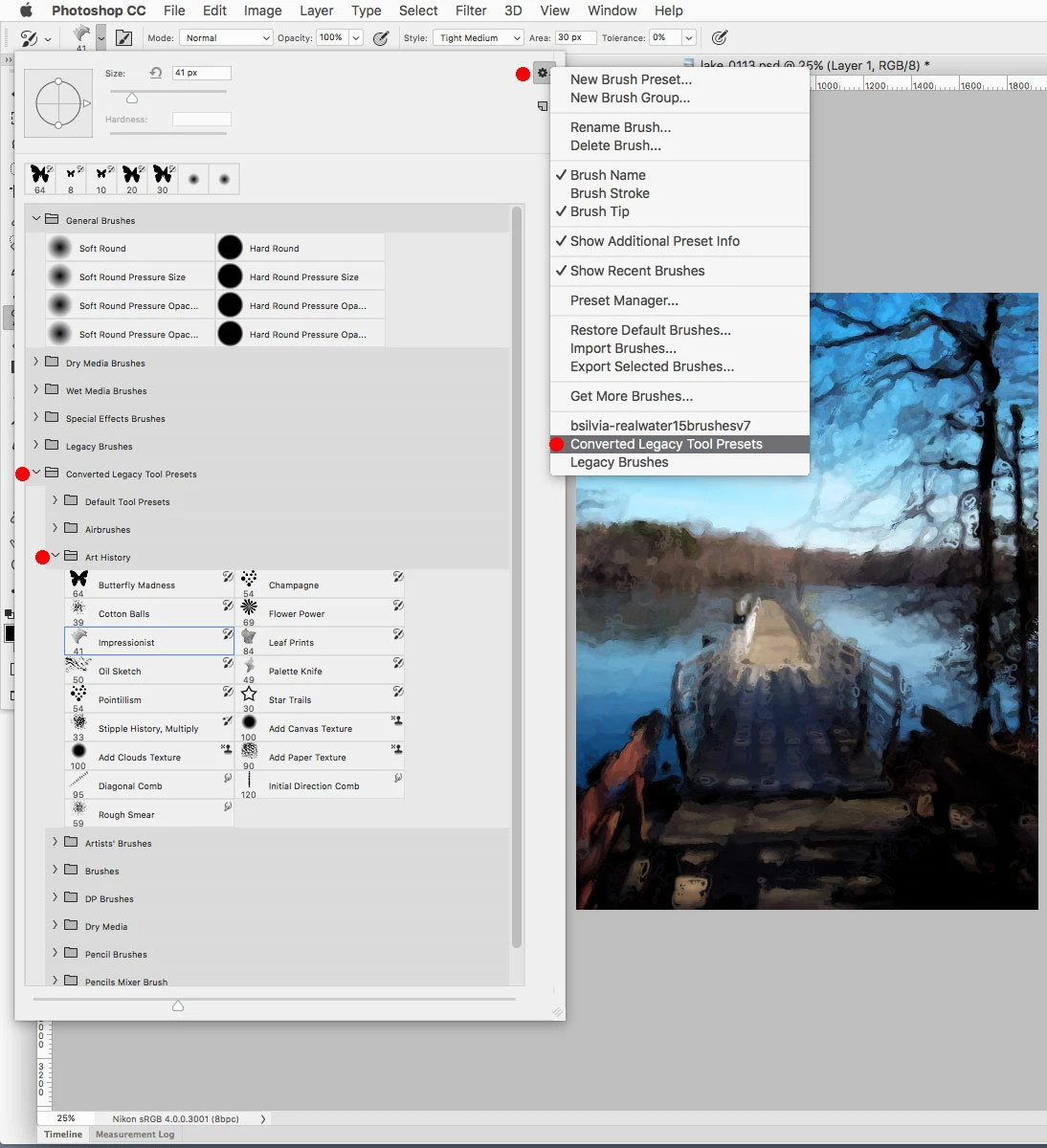
From the brush presets fly-out menu load the Converted Legacy Tool Presets and then you'll see the Art History presets.

1 reply

Jeff Arola
Community Expert
Jeff ArolaCommunity ExpertCorrect answer
Community Expert
March 31, 2018

From the brush presets fly-out menu load the Converted Legacy Tool Presets and then you'll see the Art History presets.

rus5
rus5Author
Known Participant
April 1, 2018

Thank you very much for the response!

I did this and presets did show up in the “Brushes” window but they still do NOT show up in the “Art History Brush” tool preset window.  It remains empty implying there ARE no Art History Brush tool presets.  Am I still doing something wrong?

Jeff Arola
Community Expert
Community Expert
April 1, 2018

Adobe changed things around in photoshop cc 2018 as far as brush and related tool presets are now combined into just brush presets.

I believe you can still save only tool presets for the various brush tools if desired.

Here's the message one gets when saving a Tool Preset using one of the brush tools.

When you load Tool Presets you get a message whether to keep them as tool presets or convert them to brush presets.

more info

New features summary | January 2018 and October 2017 releases of Photoshop CC