
Known Participant
February 28, 2019
Answered

Automate > Batch > Save for Web - different locations

  • February 28, 2019
  • 2 replies
  • 26905 views

Hello,

I want to export 10 different png images using Automate > Batch > Save for Web. I already created an action with the Save for Web function but everything is being stored in the wrong folder.

Here is what I did:

1) I created an action Save for Web where I saved a test image into the folder called "Test"

2) File > Automate > Batch (select source folder called "World", destination should be the same one - I want images to overwrite themselves)

3) Click OK

4) Images are saved to the Test folder (the one I selected during the action creating) but I want them to be saved into the folder I select during Batch options.

Is there any other way to achieve this? Regardless what I select during Batch (destination: None, Save & Exit, Folder) images are still being stored in the folder that was recorded during SfW action.
    This topic has been closed for replies.
    Correct answer Jeff Arola

    When you use Save for Web in an action the folder saved to is the one recorded in the action.

    Automate Batch cannot override this.

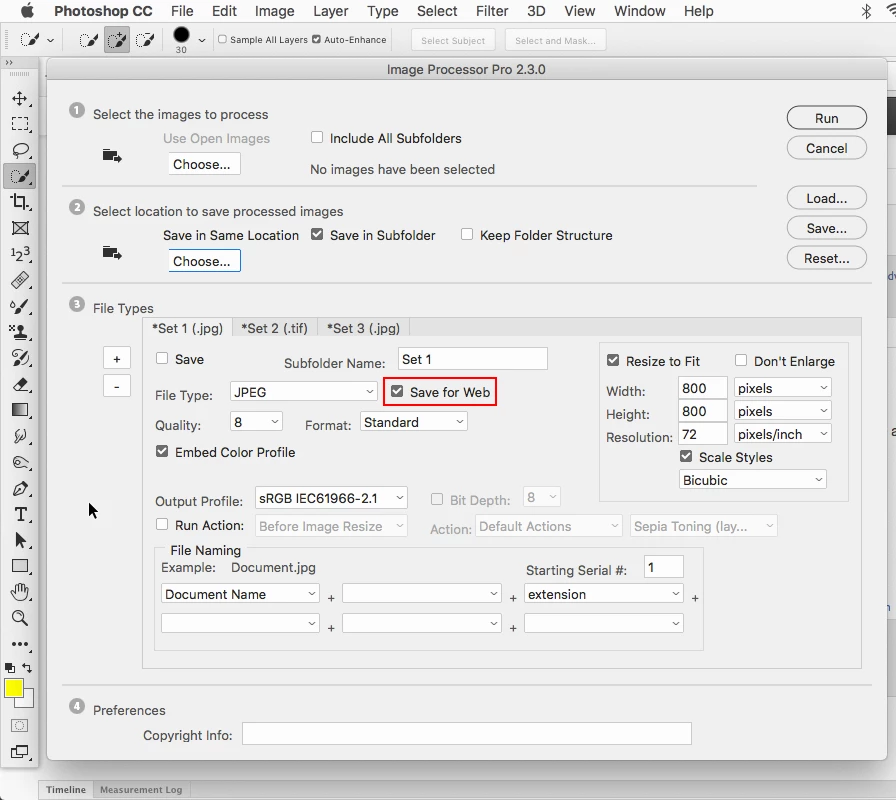
    A much easier way would be to use the Image Processor Pro script which has a Save for Web setting so you don't have to use an action.

    Image Processor Pro 3.2b1 beta released

    How To Batch Process Images in Photoshop Using Image Processor Pro - YouTube

    2 replies

    Jeff Arola
    Community Expert
    Jeff ArolaCommunity ExpertCorrect answer
    Community Expert
    February 28, 2019

    When you use Save for Web in an action the folder saved to is the one recorded in the action.

    Automate Batch cannot override this.

    A much easier way would be to use the Image Processor Pro script which has a Save for Web setting so you don't have to use an action.

    Image Processor Pro 3.2b1 beta released

    How To Batch Process Images in Photoshop Using Image Processor Pro - YouTube

    Participant
    November 19, 2019

    Hi Jeff,

    When I open the Image Processor, the "Save for Web" checkbox isn't there. How come?


    Jeff Arola
    Community Expert
    Community Expert
    November 19, 2019

    The Image Processor Pro script can be downloaded from here:


    https://sourceforge.net/projects/ps-scripts/files/Image%20Processor%20Pro/v3_2%20betas/

    Stephen Marsh
    Community Expert
    Community Expert
    February 28, 2019

    Sounds like you have not ticked the “Override action save as commands” checkbox… However I can’t recall if this works with export/save for web.