
Participating Frequently
May 1, 2020
Question

Brush Cursor Settings Not Working (A bug?)

  • May 1, 2020
  • 4 replies
  • 1749 views

In Prefernces > Cursors window, "Normal Brsuh Tip" acts as "Full Size Brush Tip"! In the attached screenshot, you can see that the brush tip size is the same under both settings.


I'm using Photoshop 21.1.2 (macOS version). Is this a bug or am I missing something?
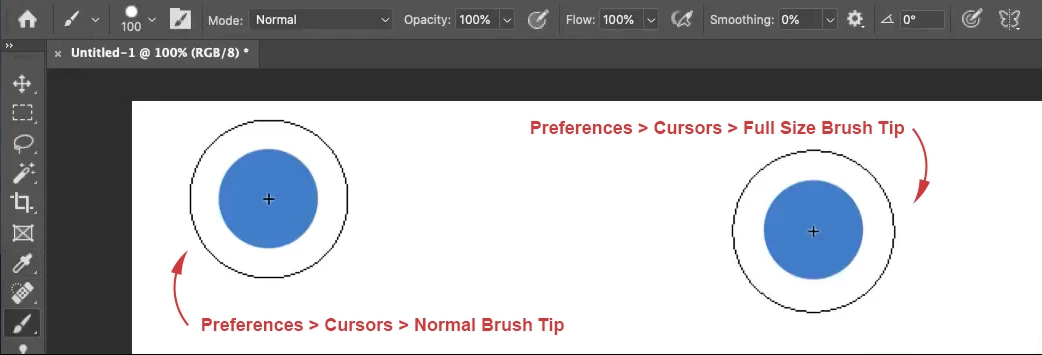


Thank you

This topic has been closed for replies.

4 replies

c.pfaffenbichler
Community Expert
Community Expert
May 15, 2020

So have you set the Cursor to Normal yet? 

c.pfaffenbichler
Community Expert
Community Expert
May 11, 2020

Please provide a screenshot that shows both the Cursor-Preferenes Panel and the Brush cursor in Photoshop at View > 100% with the Options Bar visible. 

PECourtejoie
Community Expert
Community Expert
May 8, 2020

Hi, did you try to reset Photoshop's preferences by holding down Ctrl+Alt+Shift (Pc) Cmd+Opt+Shift (Mac) as you click on Photoshop's icon to start it up.

See: https://helpx.adobe.com/photoshop/using/preferences.html

If you do have access to the menu edit>preferences (Pc)or photoshop>preferences (Mac), it is possible to reset them from the general submenu.

NSS7Author
Participating Frequently
May 8, 2020

I just tried resetting Photoshop using Cmd+Opt+Shift while clicking on its icon for starting. It asked me to confirm the resetting and I confirmed. Unfortunately, that didn't solve the problem,  the brush tip is still larger than its size (even though Normal Brush Tip is selected in preferences).

c.pfaffenbichler
Community Expert
Community Expert
May 1, 2020

Could you please post a screenshot with the pertinent Panels (Toolbar, Layers, Brush Settings, Brushes, Options Bar, …) visible? 

NSS7Author
Participating Frequently
May 8, 2020

Sure, here is the screenshot:

c.pfaffenbichler
Community Expert
Community Expert
May 8, 2020

What is the System Preferences > Accessibility > Display > Cursor setting?