
Qulen
Participating Frequently
January 22, 2019
Question

Brush line 'shaking' after several seconds, cleared by switching windows, then returns?

  • January 22, 2019
  • 6 replies
  • 4830 views

Windows 10, Photoshop CC, Wacom Cintiq 13HD

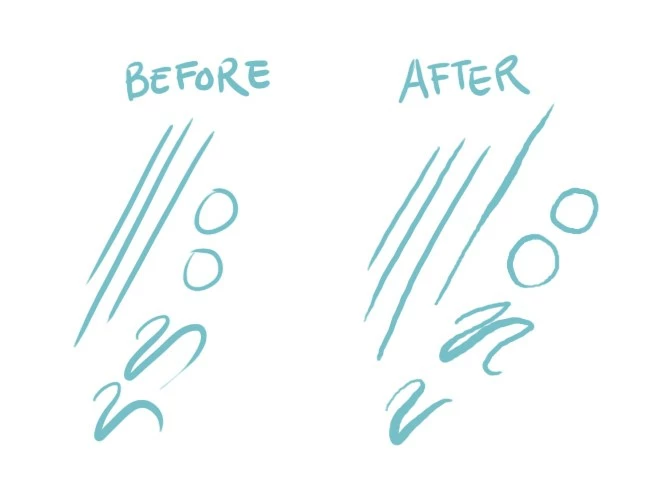
I've recently set up a new computer, moving to Windows after having been on a Mac for several years. Everything works beautifully, apart from the brush function on Photoshop CC. After a few seconds of drawing, the brush starts to shake and wobble (image below), but clears right up again if I switch to another program window and back again. I've reinstalled Wacom drivers, reinstalled CC, and I don't really want to fork out for the smoothing tool that everyone seems to recommend for this (and apparently isn't guaranteed to work). It's not a tool smoothing setting as it's not a consistent issue. I've trawled the Adobe forums but none of the fixes seem to work; am I missing something basic? Help would be appreciated as it's really slowing down my work, thanks!
This topic has been closed for replies.

6 replies

AntonioTierno
Participant
February 8, 2019

Absolutely the same problem with my Wacom Intuos Pro. I think almos all users have same issue but not notice that..

But some options here:

1 - When you use PSUserConfig.txt with UseSystemStylus 0 - you will recive shaking line after few seconds like in this post (This is Fix from many videos and posts)

2 - If you don't use PSUserConfig.txt and Windows Ink is enabled you will have another issue, like no pressure after changing brush and lag before you can change size using Alt + Right Mouse (But with pen button for it)

So people try to fix issue 2 and after that have issue 1..

Examples for issue 2

Brush select or change size

Lag

In my examples I use

- latest graphic drivers

- latesd Tabled drivers

- Advanced Graphics Processor Settings in Photoshop - Drawing Mode - Advanced

Update: In my case - solution is add to registry this key HKEY_CURRENT_USER\Software\Microsoft\Windows\CurrentVersion\Pen /v LegacyPenInteractionModel /t REG_DWORD /d 1 /f

Jeff Bugbee
Community Expert
Community Expert
January 22, 2019

Take a look at this thread and see if any of these settings help:

Wacom intuos jitters only in Photoshop

Jeff Bugbee
Community Expert
Community Expert
January 22, 2019
Qulen
QulenAuthor
Participating Frequently
January 22, 2019

Great, thank you! I'm calling it quits for the night but I'll check these tomorrow and let you know how they go.

Daniel E Lane
Inspiring
January 22, 2019

Since looking at that window, and seeing that it should produce a clean stroke, I'm really leaning on there being something up with your Wacom Tablet. I know it sounds annoying, but have you tried uninstalling all things Wacom from the computer completely, rebooting the computer, then downloading and installing everything fresh from Wacom? BTW, which Wacom tablet are you using? My wife is using one of the small bamboos and she had something similar happen to her.

Qulen
QulenAuthor
Participating Frequently
January 22, 2019

I'm using a Wacom Cintiq 13HD; I don't use the screen function and just have it connected to a monitor as input-only. I did try the full wipe once and it hasn't cleared the issue, but I'm tempted to do it again at this point as I'm rather at the end of my tether with this one!

Daniel E Lane
Inspiring
January 22, 2019

hmmm... this isn't the first time I've seen issues with the CIntiq as well. Lots of people seem to be having a variety of issues with it. Are you using it wired or through bluetooth?

Daniel E Lane
Inspiring
January 22, 2019

Have you gone into your brush settings and looked at what they are doing? Is there some kind of pen pressure thing set up on your Shape Dynamics or Scattering?

Jeff Bugbee
Community Expert
Community Expert
January 22, 2019

Can you check your brush settings and make sure no setting is causing jitter over time or something like that?

Qulen
QulenAuthor
Participating Frequently
January 22, 2019

Absolutely nothing going on here that wasn't a setting on my previous computer, which didn't have this issue.

Daniel E Lane
Inspiring
January 22, 2019

click on the words Shape Dynamics and look in there

John T Smith
Community Expert
Community Expert
January 22, 2019

Do not count on Windows to be fully up to date when it comes to device drivers

Go to the vendor site to be sure you have an updated driver for your graphic adapter

•nVidia Driver Downloads http://www.nvidia.com/Download/index.aspx?lang=en-us

•ATI Driver https://www.amd.com/en/support

There are also intermittent reports that the newest driver is not always the best driver due to driver bugs or compatibility issues, so you MAY need to try an earlier driver version

Qulen
QulenAuthor
Participating Frequently
January 22, 2019

Yep; all drivers are up to date and correct. I've checked on the sites for all of the likely suspects in case of recommended rollbacks and haven't found any.