Hi,
I have troubles with Photoshop CC on Windows 10 64bit
one day after I installed the Windows 10 april update I read a news about that this was a bad idea. And I now totally agree with this.
My first Problem was: when I was editing a picture and doing something simple like adding a rectangle, Photoshop crashes and sends a crash report.
So i thought uninstalling photoshop and reinstalling it might help.
But during the installation, I got the following error multiple Times:
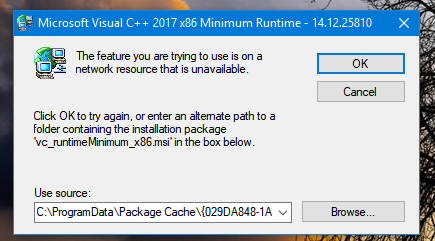
I decided to break the installation and try system recovery to return to a point before the april update.
Of course, Photoshop had to be installed again anyway.
So I installed it but I got the same error message. However, I finished the installation , wondering that this was possible.
Now, Photoshop could be started and seemed not to crash, but many functions were missing such like filter gallery.
However it was late at night and I decided to try to solve that problem another day.
Next day, MS prompted me again to install the april update. And I did it again, since removing it didn't solve my problems.
The next thing I tried was uninstalling this Microsoft Visual C++ runtime. But it is impossible to remove. Whenever I click uninstall in the control panel, I get the error message that the file (C:\ProgramData\Package Cache\***couple of hex-numbers***...) could not be found.
So my next thought was, if this application has a wrong link in the registry, CCleaner should be able to solve this problem.
But CCleaner didn't find that wrong link and even using CCleaner to uninstall the application leads to an error message "File not found".
Does anybody have a clue how to fix this problem?
My last chance would be a complete new installation of Windows 10, but this should really be the last sollution and I would be very happy when this problem could be solved in an easier way. (Since I not only have to reinstall Windows and Photoshop, but a lot other programs I am using.)





 1
Reply
1
Reply


 AdChoices