hayleyb2165913
Participant
August 6, 2017
Answered

Camera Raw 9.12 - Adjustment Brush Pins Missing

  • August 6, 2017
  • 2 replies
  • 3143 views

Hi All,

I am at a loss, recently the pins (marking the adjustments made on the image) in the adjustment brush tab of Camera Raw have disappeared. I have visible adjustments made (i.e. I can hit to preview changes and see that there are visible adjustments on the image) but there are no pins to mark where the adjustment has been made.

This makes it impossible for me to click on a pin to copy the settings to a new brush (on another image, for example) or to switch between pins and perhaps delete an earlier adjustment (would have to clear all and start again).

Is there a way to turn the pins on and off? Or is this something that happened in a recent update? I am using version 9.12, opening images from adobe bridge into ACR to then open into photoshop.

Thanks in advance

This topic has been closed for replies.
Correct answer Trevor.Dennis

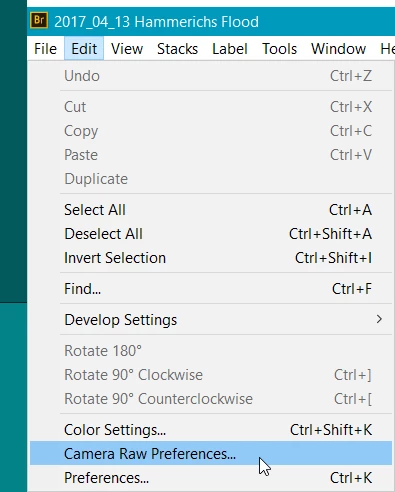
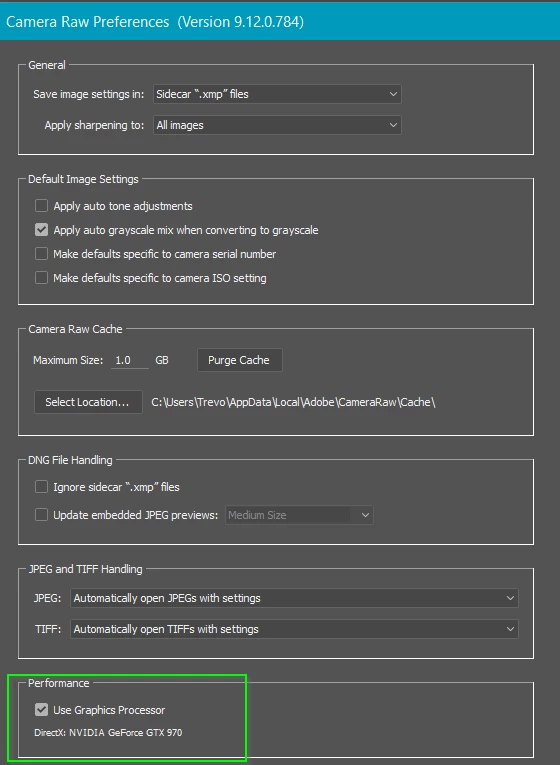
I've had similar problems and had to turn off GPU acceleration in Camera RAW Preferences.  As you can see below, I have re-enabled that feature now after a couple of video card driver updates.  So turn it off and see if it fixes it. If the answer is yes, make sure you have the latest driver for your video card From The Card Maker's Site

If still out of luck, come back and tell us your operating system?

Is it a laptop, or does it have two GPUs?  If yes, how are they set in the GPU preferences?

2 replies

Trevor.Dennis
Community Expert
Trevor.DennisCommunity ExpertCorrect answer
Community Expert
August 7, 2017

I've had similar problems and had to turn off GPU acceleration in Camera RAW Preferences.  As you can see below, I have re-enabled that feature now after a couple of video card driver updates.  So turn it off and see if it fixes it. If the answer is yes, make sure you have the latest driver for your video card From The Card Maker's Site

If still out of luck, come back and tell us your operating system?

Is it a laptop, or does it have two GPUs?  If yes, how are they set in the GPU preferences?

hayleyb2165913
Participant
August 7, 2017

Thanks Trevor.Dennis, that seems to be the issue! I will check if I have the latest driver for my video card and then re-enable. Thanks so much!

Participant
May 24, 2018

I am also having this same problem but I am using Camera Raw 10.3 on a Mac.  Any suggestions about fixing this problem on this system??

Just Shoot Me
Legend
August 6, 2017

Type v or put a check mark in the Overlay option.

hayleyb2165913
Participant
August 6, 2017

Unfortunately that's not the problem, the overlay option is already checked. But the pins still aren't visible.

gener7
Community Expert
Community Expert
August 7, 2017

If this has just been recently happening, I would try resetting Camera Raw Preferences. Here's forum regular Benjamin Root to explain how.

How To: Reset Camera Raw Preferences - YouTube