
shannonw89283903
Participant
November 29, 2017
Question

Can't access brush menu

  • November 29, 2017
  • 1 reply
  • 320 views

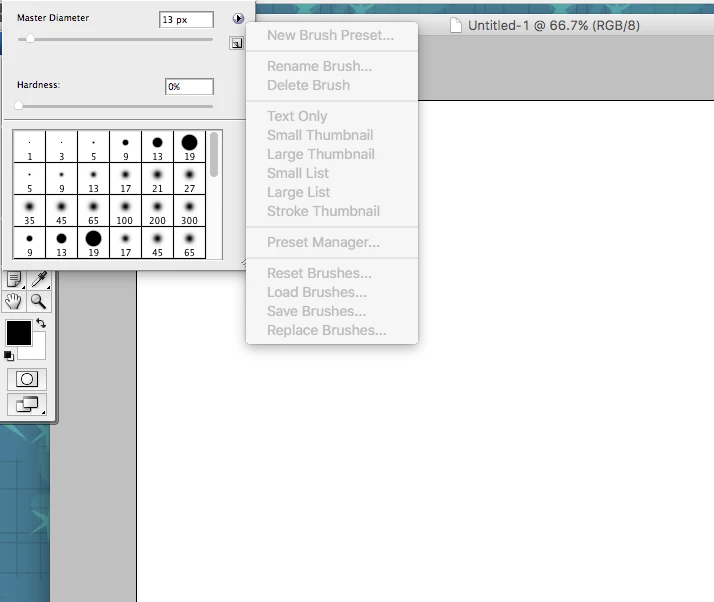
First, forgive me for using an archaic version of PS (CS3). But that shows you how long I've been using this version. I've never seen this before. My brush tool is selected but I can't access any options as they are all grayed out. I reset all preferences and all brushes are in the correct folder where they've always been. Any ideas of what's going on?
This topic has been closed for replies.

1 reply

Jeff Arola
Community Expert
Community Expert
November 30, 2017

That certainly is strange and not even the default brush sets are shown on the list.

What version of mac os x are you using?

I would go to your User /Library/Preferences

and trash the

Adobe Photoshop CS3 Settings folder

Adobe Photoshop CS3 Paths

and the

com.adobe.Photoshop.plist

then hopefully you'll the brush fly-out menu back.

shannonw89283903
Participant
November 30, 2017

Thanks for the reply, Jeff. I followed your suggestion but unfortunately it didn't solve the problem. I have made more observations about this crazy issue though. I see now where I can access the fly-out menu when I don't have a file open. Strange, huh? And the problem occurs in various files, including new files. I can also access the fly-out menu from the actual brush pallet. So thankfully I have that as an option. I may just have to always go that route until I finally go back to Creative Cloud.