
Participant
April 10, 2019
Question

Can't get rid of EMPTY area around image
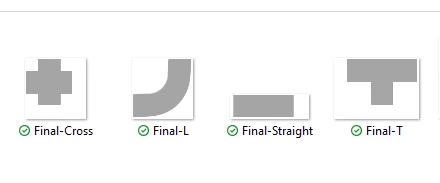
  • April 10, 2019
  • 3 replies
  • 9855 views

I am on Windows, as you can see there is SOMETHING around my images and no it is NOT whitespace. They are all saved as PNG's and whatever whitespace they had was removed using inverse selection. Whenever I drop these images onto a black canvas, I see nothing, but for my specific purposes, there can not be ANYTHING but the actual image. The image's actual border is important.

Please help.

    This topic has been closed for replies.

    3 replies

    davescm
    Community Expert
    Community Expert
    April 10, 2019

    Photoshop always saves images as rectangles. So for irregular shapes, even with transparency, you will have a rectangular image shaped canvas.

    You can minimise the size of the rectangle with Image>Trim

    Dave

    Norman Sanders
    Legend
    April 10, 2019

    A readout of the seven points indicated above are identical: Lightness of 100%, Neutral gray.

    Is the difference you referred to actually an illusion?

    Do the Lab Color values of your original art vary?

    Legend
    April 10, 2019

    Post the ACTUAL files so we can look at them.

    Norman Sanders
    Legend
    April 10, 2019

    The area around the gray bar displays the checkerboard pattern denoting total transparency. Any color surrounding the gray bar that you may see is the color and tone of the layer beneath it.