
Jeg0r
Inspiring
May 27, 2021
Answered

Can't use guides in the Liquify tool

  • May 27, 2021
  • 3 replies
  • 3170 views

Hey!

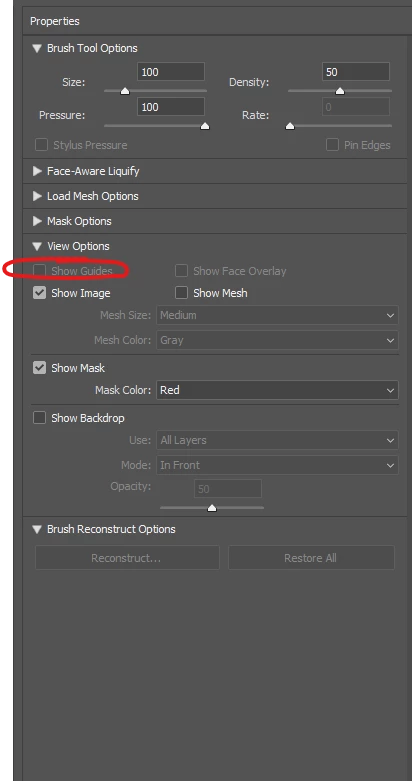
I've noticed that in the latest photoshop update I cannot enable guides in the Liquify tool.

Guides never worked with grayscale images (which is a shame to be honest), but now, they don't even work with RGB images. Tried it on three separate machines, same result. 

Is it a bug, or that's how it is going to be from now on? oO 
Thank you for your help!!

Best 
J

This topic has been closed for replies.
Correct answer Jeg0r

Okay,

The issue was solved. 

Apparently my laptop has not enough VRAM to run newer versions of Photoshop.

Thank you for your answers! 

3 replies

Jeg0r
Jeg0rAuthorCorrect answer
Inspiring
June 2, 2021

Okay,

The issue was solved. 

Apparently my laptop has not enough VRAM to run newer versions of Photoshop.

Thank you for your answers! 

Jeg0r
Jeg0rAuthor
Inspiring
June 8, 2021

Just a quick update. 

A new photoshop update (22.4.2) rolled out today and the issue is fixed in it.

It wasn't my vram afterall. 


Community Expert
May 31, 2021

Try to reset preferences:

https://helpx.adobe.com/photoshop/using/preferences.html


If it doesn't work try to reinstall photoshop with this tool:

https://helpx.adobe.com/creative-cloud/kb/cc-cleaner-tool-installation-problems.html


Akash Sharma
Legend
May 31, 2021

Hi there,


Sorry that the Show Guides option in Photoshop is grayed out in Liquify tool options.


Would you mind sharing the exact version of Photoshop along with your computer's OS? The latest is version 22.4.1.


Are you facing this issue while working with a specific file or file format in Photoshop.


Would you mind restoring the preferences for Photoshop & see if it helps? See this article for reference: https://t.co/ulJI7cGn1G You may want to backup your settings beforehand: https://t.co/4dX7gkr36D


Thanks,

Akash

Jeg0r
Jeg0rAuthor
Inspiring
May 31, 2021

Hello!
I have the latest version, 22.4.1.

I've tried to reinstall it using the cc-cleaner tool, but the issue is still there.

I was pointed out, however, that in the recent photoshop version I cannot enable Use Graphics Procesor and that my issue could be related to that.

I've downloaded an earlier version (22.0) and everything works well in it. 

I wonder if its an issue with the update or my hardware is not capable of handling new version of photoshop? (my specs attached to this message in a .txt file)