
Inspiring
August 29, 2017
Answered

Can't use the crop tool

  • August 29, 2017
  • 3 replies
  • 5666 views

I perplexed:

I pull a side bar of crop tool, and I would think only the side would push in, but the while image gets effected. PS, increases or decreases all sides.

Also, I can't understand why I'm pulling a side and the background is moving around.

Is there an option to use a old legacy version of crop?

Maybe I need a manual on how to use the crop tool. It used to be so intuitive. Thanks.
    This topic has been closed for replies.
    Correct answer c.pfaffenbichler

    Could you please post a screenshot with the pertinent Panels (Layers, Channels, Options Bar, …) visible?

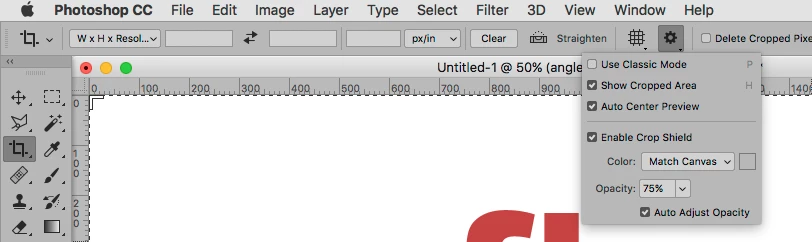
    Have you tried »Use Classic Mode«?

    3 replies

    PECourtejoie
    Community Expert
    Community Expert
    August 29, 2017

    Hello, yes, either you do not like the new crop experience, that is closer to the way it was done in the dark rooms where the image was moved under the crop, so switching to the classic mode as Christoph showed you seems to be the best choice for you.
    Angie suggest to reset of clear your crop, and that can be done from the reset button in the option bar, or through a right-click.

    larry45Author
    Inspiring
    August 29, 2017

    Thanks everyone, yes, I did have a constraint and forgot to hit clear.  You know I think would be a great feature, no,  if PS has those fields lit up in in Red or something, as they populate, as that happens every now and then. Would be a nice feature?

    But this has been a great thread, as I've never even noticed that gear icon with those options before, thanks C.

    So  I may not need classic, but I now know it's there.

    It was also auto- centering, which I've never seen or noticed before. Thanks, PE for info why that is (trying to re-create old dark-era), I would have never guessed, and I owned many darkrooms.

    It's all good but sometimes too much technology can makes things maddening, but my fault...

    angie_taylor
    Legend
    August 29, 2017

    Go to the control panel and click the Clear button to make sure you Crop tool is not constrained.

    hope this helps,

    Angie Taylor – Creative  cabin

    c.pfaffenbichler
    Community Expert
    c.pfaffenbichlerCommunity ExpertCorrect answer
    Community Expert
    August 29, 2017

    Could you please post a screenshot with the pertinent Panels (Layers, Channels, Options Bar, …) visible?

    Have you tried »Use Classic Mode«?