
Participant
November 18, 2016
Answered

Change default settings for PS Timeline

  • November 18, 2016
  • 1 reply
  • 8222 views

Every time I need to use the Timeline, the settings default to something I never ever use. I have to:

1. Click Window > Timeline

2. Click Create Frame Animation

3. Change the loop setting (from Once to Forever)

4. Change the frame duration to something a bit longer

If the settings would stay the same as I left them, I could eliminate the last three steps and save myself some time and frustration. Is there any way to do this?

I am using Photoshop CS6 Extended, but I'm sure this applies to other recent versions too.

Thanks,

Chris
This topic has been closed for replies.
Correct answer JJMack

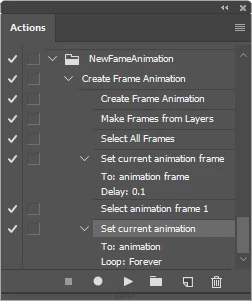
The timeline is used to edit videos and frames animations.  If you want to create a new frame animation  with settings other then the Adobe Photoshop defaults the you listed.  You may be able to record an action to setup that frame animation. using the steps you want the animation to have done when creating your frame animation. Then use that recorded action when you create a new frame animation. I have not tried something like:

Action steps

1. Click Window > Timeline

2. Click Create Frame Animation

3. Fly-out menu Make frames from Layers

4. Select all frames

5. Change the frame duration to something

6. Select frame 1

7. Change the loop setting (from Once to Forever)

1 reply

JJMack
Community Expert
JJMackCommunity ExpertCorrect answer
Community Expert
November 19, 2016

The timeline is used to edit videos and frames animations.  If you want to create a new frame animation  with settings other then the Adobe Photoshop defaults the you listed.  You may be able to record an action to setup that frame animation. using the steps you want the animation to have done when creating your frame animation. Then use that recorded action when you create a new frame animation. I have not tried something like:

Action steps

1. Click Window > Timeline

2. Click Create Frame Animation

3. Fly-out menu Make frames from Layers

4. Select all frames

5. Change the frame duration to something

6. Select frame 1

7. Change the loop setting (from Once to Forever)

JJMack
Participant
November 20, 2016

Hi JJMack –

Thanks for the suggestion. That is probably as close to a solution as I'm going to get.

I'll leave this thread open for a day or two to see if anyone has any "hackier" solutions (just talking off the cuff) like editing an XML file that tells Photoshop what settings to apply to a tool/window.