
Inspiring
January 22, 2017
Answered

Changing Default dictionary in Photoshop CS6

  • January 22, 2017
  • 2 replies
  • 2288 views

I've exhausted every avenue I can find to change the default dictionary in the workspace: typography from US English (now that's an oxymoron if I ever saw one!) to British English. Every time I open a document I get US English as the dictionary. It matters not if I open a photo or something with text in it. Sometimes when I'm in a hurry, I forget the default dictionary is American and get a blast from clients for my spelling.  Can someone please inform me how to change the default dictionary so that new documents all display British English?
This topic has been closed for replies.
Correct answer davescm

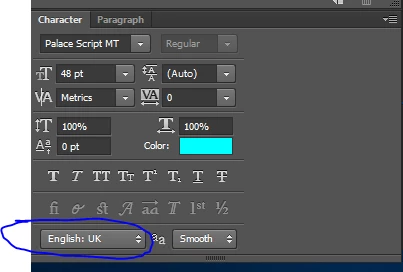
Just change it in the Character Panel and it should stick

Dave

2 replies

davescm
Community Expert
davescmCommunity ExpertCorrect answer
Community Expert
January 23, 2017

Just change it in the Character Panel and it should stick

Dave

jeanninem15434265
Participant
October 26, 2018

I am having the same problem and the setting is not sticking. It's fine when I look at the character palette. But when I go to spell check it goes back to Spanish. See both images.

#1

#2

gener7
Community Expert
Community Expert
January 23, 2017

The Dictionary setting is designed to be a "sticky". If you open a file that has US English setting saved in it, it will change your UK setting to US and you have to manually move it back.