
Participant
September 21, 2020
Answered

Clipping mask stuck in grayscale

  • September 21, 2020
  • 1 reply
  • 6714 views

I am trying to add color around the inside edges of the text using a clipping mask. After I applied the clipping mask to a layer of text it changed the color mode to gray scale. As you can see I have a light shade of red selected yet it appears to be gray. The mask is working as intended, but I can not use color when trying to fill in the text.
This topic has been closed for replies.
Correct answer davescm

Your screenshot shows you are painting on a normal mask. A mask is a grayscale channel that is used to set the layers transparency, so you can only paint it in shades of grey. That will result in degrees of transparency for the associated layer.


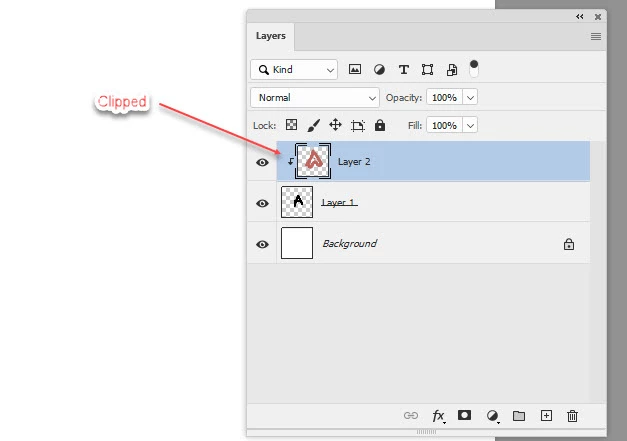
To do what you are trying to do and clip a layer with coloured brushstrokes to an existing layer then:

1. Add a new layer above the layer to which you want to add the color.

2. Alt click on the border between the two in the layers panel and a small downturned arrow will appear showing that the layer is clipped to teh layer below.

3. Paint your colour on that new layer.


Dave

1 reply

davescm
Community Expert
davescmCommunity ExpertCorrect answer
Community Expert
September 21, 2020

Your screenshot shows you are painting on a normal mask. A mask is a grayscale channel that is used to set the layers transparency, so you can only paint it in shades of grey. That will result in degrees of transparency for the associated layer.


To do what you are trying to do and clip a layer with coloured brushstrokes to an existing layer then:

1. Add a new layer above the layer to which you want to add the color.

2. Alt click on the border between the two in the layers panel and a small downturned arrow will appear showing that the layer is clipped to teh layer below.

3. Paint your colour on that new layer.


Dave