
aciua77310619
Participating Frequently
March 1, 2021
Question

COLOR change after save in PHOTOSHOP

hello everyone

i need your help please 

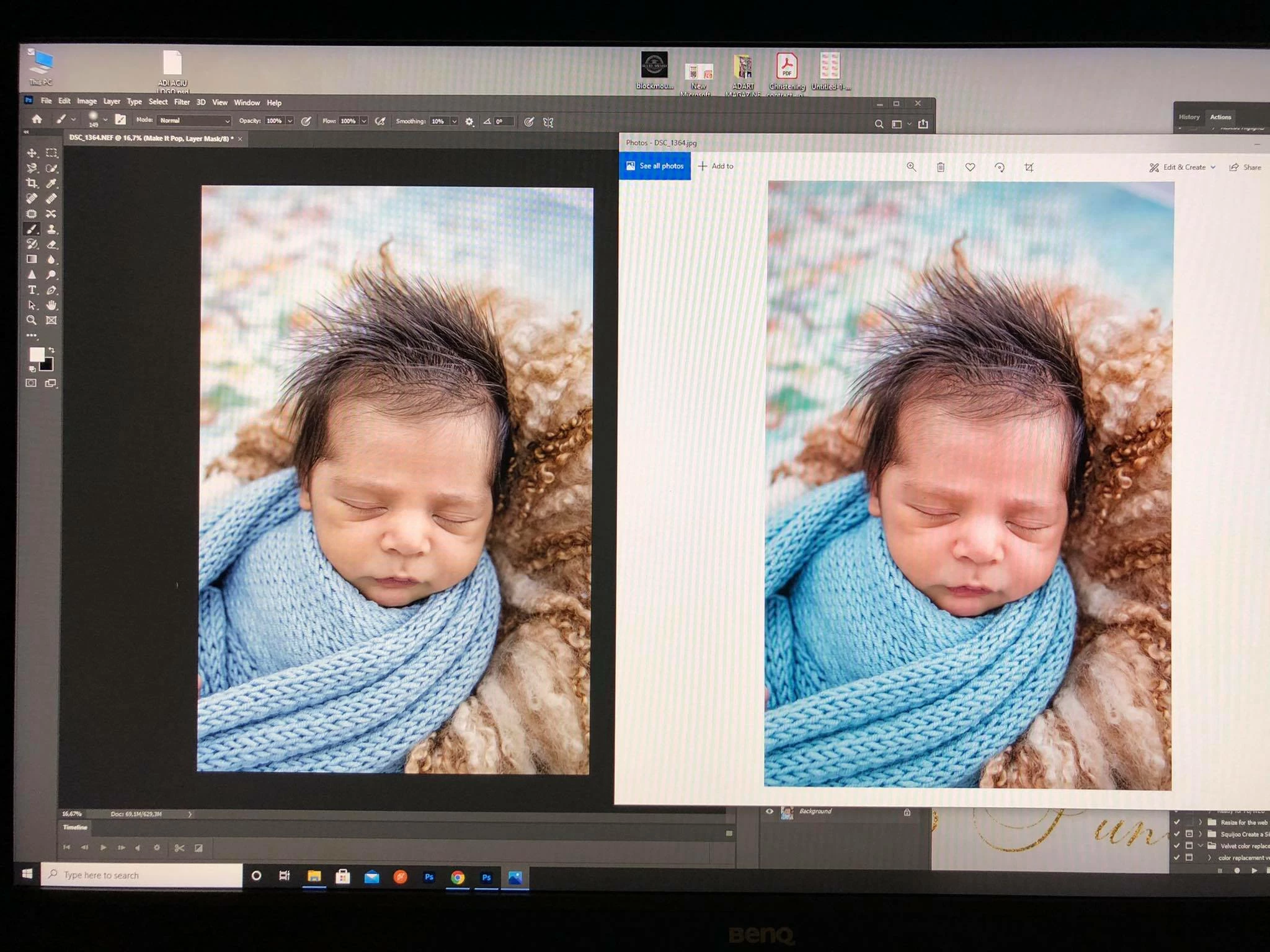
i am usig last version of photoshop and something strange is happening when i edit photos i see them in one way (as color) and after i save it in the folder is very colorful. 

i work with raw files, i open them in camera raw than open in photoshop like i always did 

what changed ?
Ce sujet a été fermé aux réponses.

2 commentaires

happie_97
Community Expert
Community Expert
March 2, 2021

Have you tried any of the troubleshooting strategies that Per and D said? They are absolutely correct in what they are saying. I know you said things changed for you over night so you want to know the answer.

Even if it doesn't make sense to you, it more than likely has to do with color management or the way that Windows previewer is displaying the images. I would suggest trying all the suggestions and then seeing if that fixes or helps the issues. 

Per Berntsen
Community Expert
Community Expert
March 1, 2021

Photoshop is color managed, and uses the monitor profile to display correct colors.

This means that colors are converted from the document profile to the monitor profile.

The Photos app is not color managed, and will not display correct colors.

When viewing images in applications without color management on a wide gamut monitor (which you seem to have), colors  will inevitably display over saturated.

The only solution is to only use color managed applications to view your work.

Windows doesn't come with a color managed image viewer, so you have to use third party software.


Here are some options:

  1. FastStone image viewer. Free for personal use. Color management must be enabled under Settings > CMS, and both boxes must be checked,
  2. ACDSee. Not free. Color managed out of the box.
  3. Irfanview. Free for none commercial use. Color management must be enabled under Options > Properties/Settings.
  4. Bridge. Included in your Creative Cloud subscription.
aciua77310619
Participating Frequently
March 1, 2021

with FastStone i also see the photos very saturated 

aciua77310619
Participating Frequently
March 3, 2021

If FastStone still displays over saturated with color management enabled, and after a restart, you most likely have a defective monitor profile.

Here's what FastStone's color management settings should look like:


If your settings are like above, follow D Fosse's advice, and try setting the monitor profile to Adobe RGB.

Close all color managed applications.

Press the Windows key + R, type colorcpl in the box and press Enter.

Add the Adobe RGB profile, then set it as default.

(sRGB is used in the screenshot below, but you should use Adobe RGB since you have a wide gamut monitor.)


The problem was the COLOR MANAGEMENT

 at the ICC Profile mine was writting the monitor details and not sRGB 

it works fine with sRGB now there 

thank you very much 


I watched videos about this and normally the photoshop is saing that you have a defective monitor. Mine was not telling me any error 

When you are writting "defective monitor" for most people that will mean "the monitor has to be fixed or buy a new one" not that somewhere is clicked wrong something 

Not everybody knows the terms you professionals use, to know to serch what each thing means 

I am photographer that i know how to edit my photos in photoshop, not how to fix photoshop problems because i never had any problem so i had no idea what went wrong without making any change

So that why i ask tell me exactly what i have to chek and how shoul the thinks look like so i can fix the problem.