
Participant
April 12, 2017
Answered

Color Lookup files missing

  • April 12, 2017
  • 4 replies
  • 5473 views

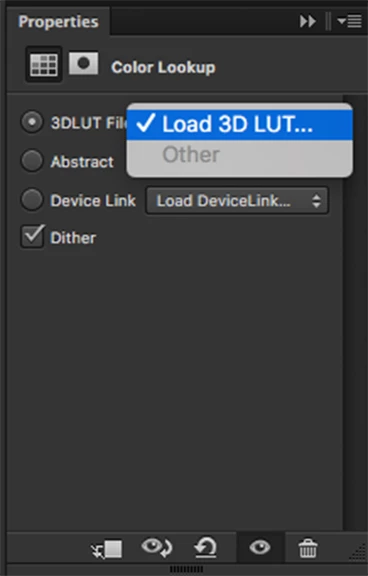
I just bought a new computer and reinstalled Photoshop to it, however, I noticed I'm missing some of the preinstalled files for Color Lookup. I've uninstalled and reinstalled it multiple times, but still nothing. I have the first drop down menu with everything added, but not the last two.

I'm using Windows 10.
    This topic has been closed for replies.
    Correct answer virginiar26753301

    Contacted Adobe through their chat service. They were able to assist me and ended up putting the profiles directly onto my computer and in the color folder. Don't know why they didn't load to begin with, but the issue is resolved. Wish I could give an answer to this for people dealing with the same issue. If you are, just contact them and they'll handle it.

    4 replies

    sanh45292158
    Participant
    July 13, 2019

    can you please give me a copy and paste of the default files

    virginiar26753301AuthorCorrect answer
    Participant
    April 12, 2017

    Contacted Adobe through their chat service. They were able to assist me and ended up putting the profiles directly onto my computer and in the color folder. Don't know why they didn't load to begin with, but the issue is resolved. Wish I could give an answer to this for people dealing with the same issue. If you are, just contact them and they'll handle it.

    Participant
    April 30, 2018

    Any chance you can give me a copy of those? I'm having the same problems.

    Sebastian Bleak
    Community Expert
    Community Expert
    April 12, 2017

    Hi

    Have you reset your preferences? I know you've already tried an uninstall/reinstall but when things start to act weird in Ps, that's the first thing I do. If you haven't tried it, give it a shot then uninstall/reinstall. I got my fingers crossed that they load up for you, hope this hleps

    Participant
    April 12, 2017

    Yes, I also did that. Still not working. I plugged in my older computer, the one I was replacing, and Color Lookup works fine on there.

    Inspiring
    April 12, 2017

    The 3D LUT presets are located in your Photoshop application folder > Presets > 3DLUTs. They are part of the standard installation. If they are not there you might want to uninstall and reinstall Photoshop.

    Participant
    April 12, 2017

    The other two dropdown menus, which contain other colors, are not in that folder. And as said, I've uninstalled and reinstalled multiple times, so this copy/paste answer isn't exactly helpful to me.