
Inspiring
July 25, 2018
Question

Color picker accuracy

  • July 25, 2018
  • 9 replies
  • 8362 views

Hi,

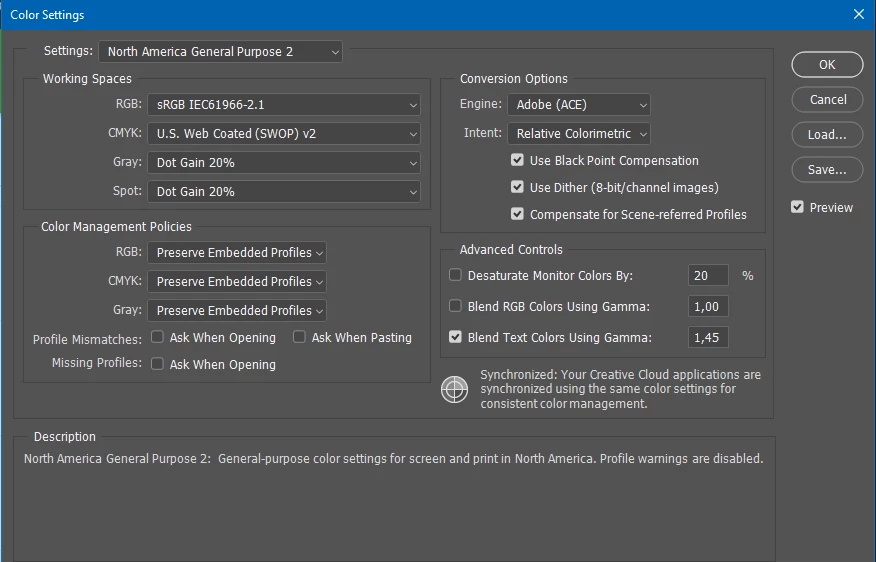
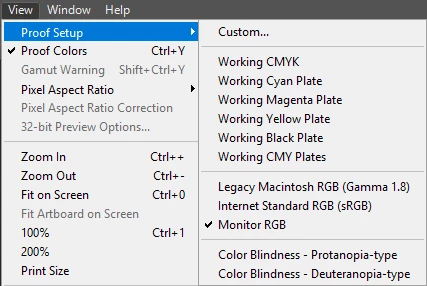
I wonder how accurate the color picker is when picking colors from a screen grab for instance? I notice that sometimes I get a slightly different result on the grabbed graphic compared to what the color really is in the code. This applies to grabs from webpages viewed with a browser and mobile screens viewed on a mobile phone. On webpages I normally grab with the prt sc key on the keyboard and on mobile phones I grab by the phones inbuilt function buttons. Both grabs generate authentic sRGB right? I'm always in sRGB color mode in PS. See my color settings. I've tried switching between Working CMYK and Monitor RGB in my Proof Setup as attached, but that doesn't affect the color picker results. As mentioned sometimes I get the correct color code but other times I don't. What's going on?
    This topic has been closed for replies.

    9 replies

    Bob_Hallam
    Legend
    July 26, 2018

    One other variable that might be affecting your comparisons is display brightness, since the brighter the display the greater the potential gamut, if display brightness is less than needed to match sRGB or becomes greater than needed (not sure who sets the manufacturer's tolerance) that variable will change the display gamut and thus make your measurements less accurate than if the brightness was at it's calibrated level. 

    ICC programmer and developer, Photographer, artist and color management expert, Print standards and process expert.
    rob day
    Community Expert
    Community Expert
    July 26, 2018

    On OSX that's not a factor. Changing the brightness or even the monitor profile has no affect on the captured hex values.

    Here I've changed the system's monitor profile and as long as I don't make a conversion the hex values match the HTML code's values:

    Bob_Hallam
    Legend
    July 25, 2018

    One caveat on IOS that is not in Android is the use of Night Shift technology with adjusts the displayed values to remove the metemeric environmental lighting effects associated with color constancy.  Turn that off in Settings and that may level the playing field a bit more for you.  

    ICC programmer and developer, Photographer, artist and color management expert, Print standards and process expert.
    Bob_Hallam
    Legend
    July 25, 2018

    Heads up on round tripping color (source profile - capture profile - back to source profile) as noted in some of the suggestions. 

    This will be closer than not round tripping but there are rounding errors so Asterix pricing applies ( your results may vary - substantial penalty for early withdrawal, some side effects may occur- etc.)   And these depend on the accuracy of the monitor profile.  So do make sure you have a good matrix based ICC version 4 profile installed and use a good toolset to maintain it or you will not get close using this method at all.  

    So the real question your asking isn't how accurate the color picker is, but how much the color actually changes going from sRGB to display profile and still produces an appearance match.....

    ICC programmer and developer, Photographer, artist and color management expert, Print standards and process expert.
    D Fosse
    Community Expert
    Community Expert
    July 25, 2018

    As Dave said in post #5:

    Assign the monitor profile, then convert to sRGB.

    That's the proper way to deal with screenshots.

    JJMack
    Community Expert
    Community Expert
    July 25, 2018

    They also seem to be using Phone web page screen grabs using the phones built in screen capture feature.  Are all Phones, Windows and Mac displays colors the same? May need to be handled device by device.

    JJMack
    perrybrusAuthor
    Inspiring
    July 25, 2018

    - I never get a color conversion prompt when I open my grabs in PS. The sRGB mode is not in conflict with what I sample then if I assume correctly. So the spaces are identically matched.

    Just to be clear, if you set the capture's window info in the lower left corner to Document Profile it shows as sRGB?


    Yes rob day. If you wanna see my general color settings it's in my original post.

    rob day
    Community Expert
    Community Expert
    July 25, 2018

    Both grabs generate authentic sRGB right? I'm always in sRGB color mode in PS

    Not necessarily. On OSX the capture gets assigned the system's monitor profile.

    So set your info in the window's lower left corner to Document Profile. The color picker picks using the front document's assigned profile, or the Color Settings' Working Space if there's no assignment or no document is open.

    If the capture opens with a profile assignment that is not sRGB, convert to sRGB before sampling color. If it opens with no profile assignment, I'm not sure what you would do. Maybe assume it is the system's monitor profile and assign that followed by a conversion to sRGB?

    Terri Stevens
    Legend
    July 25, 2018

    When you capture images from phones and even web pages they are only approximately in the sRGB color space so if you are not getting accurate Hex values it's not surprising. There are a few things you could try , as mentioned 'point sample' or you'll get an averaged value. Be aware Hex values change in different color spaces-I think I'm right in saying, but Dag will correct me if I'm wrong. Also try this: Set Photoshop up like this with 'Web Color Sliders' showing.

    Put a web page side by side with Photoshop on the screen on the same monitor. Choose the 'Eyedropper Tool' and hold down the mouse button, drag the mouse across to the adjacent browser window and you'll see Photoshop is sampling colors in the browser window in Hex. You can in fact sample any screen color from within Photoshop. If you look at the code for the webpage it should agree with the value in the Photoshop color palette for simple things like text and banners but there will be variations in continuous tone images. Afraid I can't give you a way of doing this for a phone.

    Terri

    Community Expert
    July 25, 2018

    Its tricky with the color picker,  because as like Scooter said,  there's tiny variations, especially in lower resolution images. 

    davescm
    Community Expert
    Community Expert
    July 25, 2018

    On webpages I normally grab with the prt sc key on the keyboard and on mobile phones I grab by the phones inbuilt function buttons. Both grabs generate authentic sRGB right?

    Screen grabs, grab in monitor RGB space but dont assign a color profile. So when you take a screen grab - assign monitor RGB then convert to sRGB

    Dave

    ScooterD76
    Legend
    July 25, 2018

    Keep in mind that a solid color in a photo or graphic is going to have tiny variations that aren't obvious to the naked eye. ( Noise and compression artifacts ) Depends on what you are working with. Sometimes the clone stamp is a better option...

    JJMack
    Community Expert
    Community Expert
    July 25, 2018

    JJMack
    perrybrusAuthor
    Inspiring
    July 25, 2018

    Hi, your reply didn't contain any text but are you trying to say I should experiment with the point sample size? Doesn't seem to affect much. I'm always on default and that is just "point sample" with no specific setting. Anyhow, when I sample the same grabs with different settings they are still slightly off in color compared to what it really is in the code. It's impossible to identify a pattern in that as it varies greatly. Could be 19 samples in a row that is full color match and then suddenly a couple that doesn't match.