
louisc84906725
Participant
November 5, 2017
Answered

Color Range slide bar greyscaled issue.

  • November 5, 2017
  • 2 replies
  • 2166 views

Hi everyone.

I'm Louis, and here is a question that already drives me mad, which is that I can't adjust slide bar of Highlight option in Color Range. Please see image shown below.
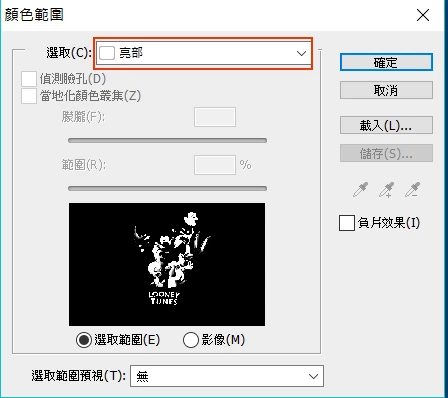
I'm using Chinese version, so you might get a little confused about the UI, but it's the same as Eng version. The red frame indicates Highlight in Chinese.

As you can see, the slide bars are all greyed scaled, and I have been trying to make it work with some tweak, including change photo bits and some other methods, but just won't work. Please help me deal with it.

Much appreciated.

This topic has been closed for replies.
Correct answer Chuck Uebele

Jeff is correct, until recently, the you couldn't adjust the highlight option with color selection, so unless you're using a recent version of Photoshop, those sliders won't work.

2 replies

Chuck Uebele
Community Expert
Chuck UebeleCommunity ExpertCorrect answer
Community Expert
November 7, 2017

Jeff is correct, until recently, the you couldn't adjust the highlight option with color selection, so unless you're using a recent version of Photoshop, those sliders won't work.

louisc84906725
Participant
November 7, 2017

Hi, thank you for your advice.

I've made the same conclusion as you. So, right now I'm using version CS6, and my friend, CC. With the same setting, his one works and mine doesn't. Therefore, I knew that it is the difference between versions.

Anyway, I am really grateful to you commenting on my question. Thank you again.

Jeff Arola
Community Expert
Community Expert
November 5, 2017

To be able to adjust the sliders, click with the Eyedropper on the color in your image your trying to Select.

The other choices besides Sampled Colors are preset selection ranges that can't be adjusted.

https://helpx.adobe.com/photoshop/using/selecting-color-range-image.html

louisc84906725
Participant
November 6, 2017

Hi Jeff.

I tried and still got nowhere near to move the slide bar.

Thanks still. =)

Louis.

Jeff Arola
Community Expert
Community Expert
November 7, 2017

What version of photoshop and operating system are you using?

What is the image mode and bit depth of the document?

Image>Mode

Maybe resetting the photoshop preferences will fix it.

Go to Edit>Preferences>General, click on Reset Preferences on Quit and restart photoshop.