
Participant
May 23, 2021
Question

Colors are off when PS CS2021 manages colors while printing

  • May 23, 2021
  • 3 replies
  • 1661 views

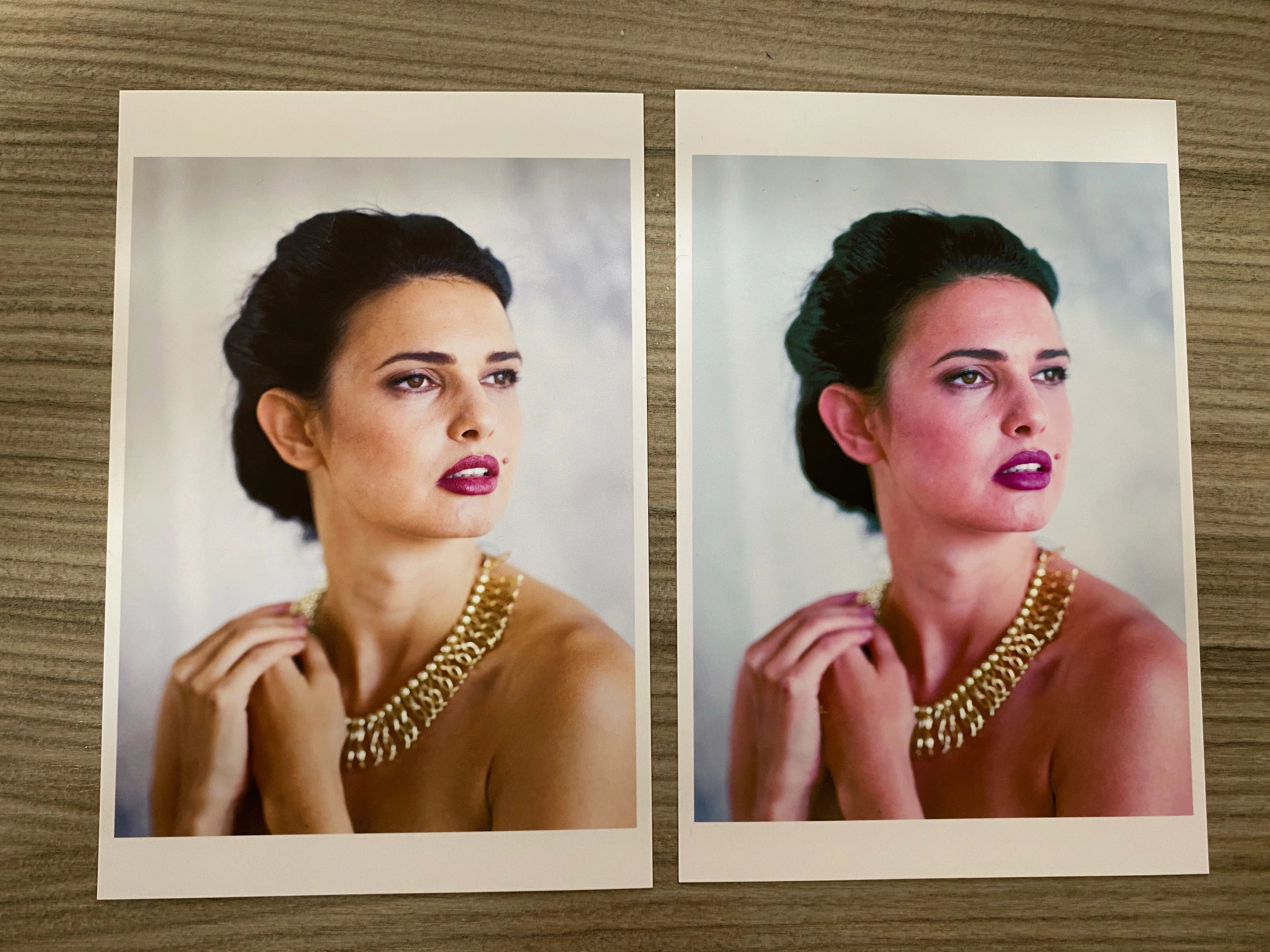
I print with a Canon Pro-1000. I have been doing this for quite some time and I achieved excellent results with Photoshop managing the colors and combining with the profile of my papers. Recently, however, the colors do not match when Photoshop manages the colors. I get a pretty good result when the printer manages the colors. I have installed the latest printer driver, the printer firmware is up to date and to be on the safe side I have also reinstalled Photoshop 2021. But without success. Can anyone help me? Attached is an example: on the left the printout where the printer managed the colors and on the right the printout where Photoshop managed the colors in combination with the correct paper profile
This topic has been closed for replies.

3 replies

TheDigitalDog
Inspiring
May 23, 2021

You should always test output using good color reference images designed for that task. The color reference images RGB values are such they are set for output and are editing and display agnostic. Test the output this way and examine for the same color issues so we know it's not your image specific issues causing the problems:

http://www.digitaldog.net/files/2014PrinterTestFileFlat.tif.zip

Seeing the output would help figure out what's 'off' here. 

Author “Color Management for Photographers" & "Photoshop CC Color Management/pluralsight"
davescm
Community Expert
Community Expert
May 23, 2021

Neil/Andrew - Thanks for coming in on this one. I use Windows not Macs but am I right in thinking that there was an issue a while back on Macs where the wrong print drivers were being picked up and used (Airprint)? If so, could that have a bearing on what tribuut is seeing?


Dave

TheDigitalDog
Inspiring
May 23, 2021

@davescm wrote:

Neil/Andrew - Thanks for coming in on this one. I use Windows not Macs but am I right in thinking that there was an issue a while back on Macs where the wrong print drivers were being picked up and used (Airprint)? If so, could that have a bearing on what tribuut is seeing?


Dave


Depends on how one 'updates' a printer driver. If you allow Apple to do it, you will likely get the wrong (Gutenprint) driver. So one should always download the drivers from the manufacturers site and not from Apple. 

Author “Color Management for Photographers" & "Photoshop CC Color Management/pluralsight"
NB, colourmanagement
Community Expert
Community Expert
May 23, 2021

Hi

thanks for the nudge Dave

tribuut

SO - somethings changed? and that’s broken printing for you. Have a think about what that might be?


I've never had any problems with 'Photoshop Manages Color' as long as the right (good quality/accurate) icc paper profile is chosen and the right media type is selected in the driver options.

I guess you were successfully using an icc paper profile installed by Canon?

Generally with 'Photoshop Manages Color', Photoshop switches off driver colour management for you.

[i.e. greys the options out]


Using 'Photoshop Manages Color' gives you the opportunity to select an icc paper profile of choice [and the rendering intent]. That's it's advantage, of course that means you can also print accurately on third party papers as long as you have a good profile, etc. 


Using 'Printer Manages Color' means that the printer software automatically selects a paper profile based on the media setting you use in the driver. [we don't know the rendering intent, its likely to be perceptual but I wouldn't bet on that]


IF you like the result from 'Printer Manages Color' you could just use 'Printer Manages Color' and have nice prints.

However there seems to be a reason why you'd like to use 'Photoshop Manages Color', perhaps 'Printer Manages Color' is OK but not JUST right.


IF you know exactly what icc paper profile the 'Printer Manages Color'  process is automatically selecting, then selecting that in 'Photoshop Manages Color' and selecting the right media settings should mean the prints match. 

If they don't match then carefully go through your settings and try both relative (with and without BPC) and perpetual in the 'Photoshop Manages Color' dialog.


Please let us know how you get on.


I hope this helps
neil barstow, colourmanagement net :: adobe forum volunteer
google me "neil barstow colourmanagement" for lots of free articles on colour management
[please only use the blue reply button at the top of the page, this maintains the original thread title and chronological order of posts]


davescm
Community Expert
Community Expert
May 23, 2021

When you use Photoshop to manage colours have you also made sure that all colour management in the print diver is turned off. If not, the colour trnsforms could be happening twice resulting in bad colour.


Dave

tribuutAuthor
Participant
May 23, 2021

Thanks davescm. I've tried that but it didn't work to my regret....

davescm
Community Expert
Community Expert
May 23, 2021

Ok - I don't use a Mac , I'm a Windows user, but I'll tag @NB, colourmanagement who has experience with print set up on the Mac.


Dave