
samuelc67982262
Participant
March 21, 2019
Answered

Colour Picker fills in secondary colour rather than primary

  • March 21, 2019
  • 1 reply
  • 6038 views

Evening everyone,

When I select a colour with the colour picker, rather than the colour going into the primary slot, it goes into the secondary slot, and for the life of me I can't find out how to change it back.

Any help would be greatly appreciated!

Thanks,


Sam
    Correct answer davescm

    Hi,

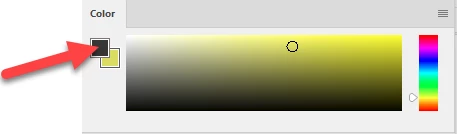
    Open the colour panel and double click where shown below:

    Dave

    1 reply

    davescm
    Community Expert
    davescmCommunity ExpertCorrect answer
    Community Expert
    March 21, 2019

    Hi,

    Open the colour panel and double click where shown below:

    Dave

    samuelc67982262
    Participant
    March 21, 2019

    You legend! I knew it would be something simple! Thanks so much

    davescm
    Community Expert
    Community Expert
    March 21, 2019

    You're welcome

    Dave