
Rob A1
Participating Frequently
March 26, 2017
Answered

Colour picker tool setting background

  • March 26, 2017
  • 1 reply
  • 7438 views

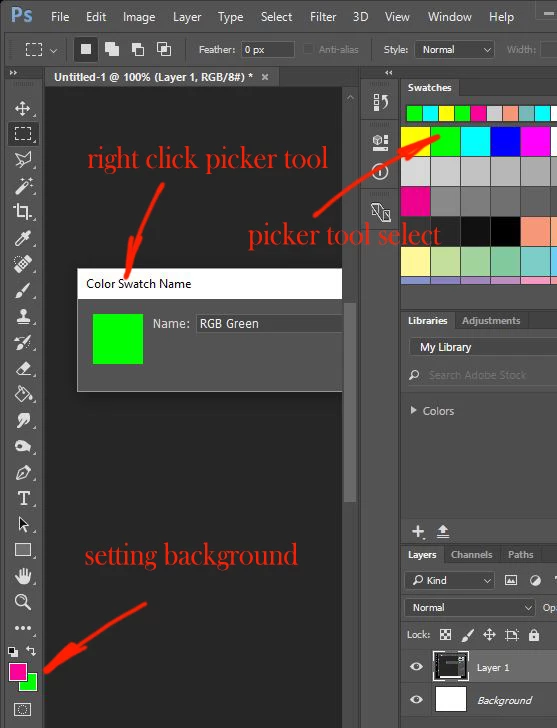
As I scroll over the colour swatches the picker tool will set the background colour.

Also ALT over an image to select a colour sets the background colour.

As stands I have to X to or arrow between backround foreground to reverse foreground/background before using paintbrush, flood tool etc.

I believe I might have inadvertently set the background as the active layer? or have I somehow toggled the picker to set background?

How do I get the picker to revert to setting Foreground colour?
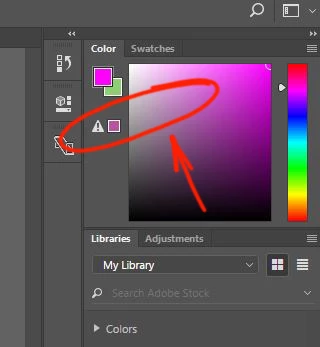
I have jiggled around in the colour palate and found a warning triangle.

I dont know what I did but the picker tool reverted to setting the foreground layer.... or made the foreground active so the picker wrote to that?

So I have blundered out of the problem but I'm completely clueless and there is probably a simple process that I should understand.
I use a lot of SHIFT and CTRL-a,s,d,z,x,c,v, a lot of ALT select and do it pretty quickly. I think I probably ham fingered something.

I would really appreciate an explanation.

Thanks
    This topic has been closed for replies.
    Correct answer davescm

    Hi

    I moved your post to the Photoshop forum.

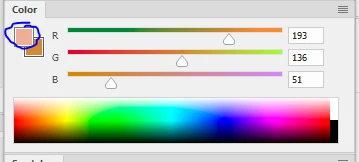
    Simple fix - In the Color panel click on the foreground square

    Dave

    1 reply

    davescm
    Community Expert
    davescmCommunity ExpertCorrect answer
    Community Expert
    March 26, 2017

    Hi

    I moved your post to the Photoshop forum.

    Simple fix - In the Color panel click on the foreground square

    Dave

    Rob A1
    Rob A1Author
    Participating Frequently
    March 26, 2017

    Thanks Dave. Simple. Nightmare if you dont know about it.

    Only in Essentials workspace, not in painting, photo, or the other workspaces.

    I read somewhere about Backround/Foreground fixed as active, but couldnt find anything that would toggle it. Anything in that?

    davescm
    Community Expert
    Community Expert
    March 26, 2017

    Thanks Dave, really appreciated the help. To be honest even though I reset to foreground, I didnt know what it was that I had done or tapped with the wacom that had toggled it back to the normal setting.

    No formal training here so I fall into holes sometimes that do my head in.

    I understand paint is applied to the active foreground/background. The picker tool selects from the active foreground/background. Colour replacement brush, clone brush etc.

    Just to be clear, I am not talking about the tools source settings

    Even though I could toggle between the foreground background colours (see below) in the picker tool it didnt set whether the picked colour applied foreground or background.


    Ok

    So for clarity

    Your brush will paint with the foreground colour and, on a background layer, the eraser will paint with the background colour (on other layers the eraser deletes.

    The colour picker will pick either the foreground or the background depending on which square you click before using it.

    So click here :

    and foreground picker opens

    Click here :

    and background color picker opens

    Just clicking with the eye dropper will set foreground or background according to the last use of the color picker tool as above i.e. once set to pick background colours it will stay set that way until you set it to pick the foreground.

    I hope that helps

    Dave