
Participant
February 12, 2017
Question

Contiguous selection by color

  • February 12, 2017
  • 2 replies
  • 1377 views

Hello everyone.

I need your help for a script. I saw many examples of selection by color or position (x, y), but in this case what I want is a random selection of a specific but continuous color.

For example, I have a figure with three white objects, if I use the magic wand with continuous select, I would only select one object,
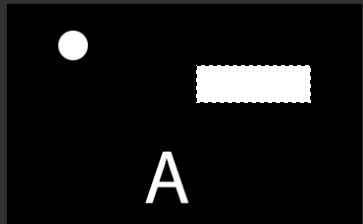
but with the current script select all white objects,

but I only want one.

thanks for your help....

This topic has been closed for replies.

2 replies

JJMack
Community Expert
Community Expert
February 13, 2017

You should see that I was right the script is using select color range.  It is not using the Magic want tool in with the contigious option.  You would need the change the selection method. You would also need some way to pass the script  where you want to sample like setting sone color sample points before running the script.with the layer targeted.

JJMack
DjosAuthor
Participant
February 13, 2017

ok...Here is another way, but for this you have to enter the x:y coordinates, but I would not know how to get only the pixels that contain the white color

var xP = 400;//example

var yP = 700;//example

function MagicWand(x,y) {

var idsetd = charIDToTypeID( "setd" );

    var desc425 = new ActionDescriptor();

    var idnull = charIDToTypeID( "null" );

        var ref134 = new ActionReference();

        var idChnl = charIDToTypeID( "Chnl" );

        var idfsel = charIDToTypeID( "fsel" );

        ref134.putProperty( idChnl, idfsel );

    desc425.putReference( idnull, ref134 );


    var idT = charIDToTypeID( "T   " );


        var desc426 = new ActionDescriptor();

        var idHrzn = charIDToTypeID( "Hrzn" );

        var idPxl = charIDToTypeID( "#Pxl" );

        desc426.putUnitDouble( idHrzn, idPxl, xP );  //pixel position

        var idVrtc = charIDToTypeID( "Vrtc" );

        var idPxl = charIDToTypeID( "#Pxl" );

        desc426.putUnitDouble( idVrtc, idPxl, yP ); //pixel position


    var idPnt = charIDToTypeID( "Pnt " );

    desc425.putObject( idT, idPnt, desc426 );

    var idTlrn = charIDToTypeID( "Tlrn" );

    desc425.putInteger( idTlrn, 1 );

    var idAntA = charIDToTypeID( "AntA" );

    desc425.putBoolean( idAntA, true );


executeAction( idsetd, desc425, DialogModes.NO );

}

MagicWand()

JJMack
Community Expert
Community Expert
February 13, 2017

As I wrote you  could drop some bread crumbs like color sample points. However if you have to do that because you can not automate the x,y position you might just as well use the magic wand manually.  Only if you know some x,y point would you automate the selection you want.

JJMack
JJMack
Community Expert
Community Expert
February 13, 2017

It does not sound like the script is using Action Manager code the use the Magic wand tool in contiguous mode.  It using select color range or the magic wand without contiguous.  You did not post the script's code

JJMack
DjosAuthor
Participant
February 13, 2017

ok, this is the script code by "dominique filiol"
https://forums.adobe.com/message/8513288#8513288

This code selects everything with a specific color, but I only want one.

"

//RechercheBlanc.jsx

//RechercheBlanc.jsx

//Recherche une couleur

var chercheCouleur = new SolidColor();

chercheCouleur.rgb.red=255;

chercheCouleur.rgb.green=255;

chercheCouleur.rgb.blue=255;

selectColorRange(chercheCouleur);

function selectColorRange(scObj)

{

    var desc = new ActionDescriptor();

    desc.putInteger( charIDToTypeID( "Fzns" ), 0 );

    var cDesc = new ActionDescriptor();

    cDesc.putDouble( charIDToTypeID( "Rd  " ), scObj.rgb.red);

    cDesc.putDouble( charIDToTypeID( "Grn " ), scObj.rgb.green);

    cDesc.putDouble( charIDToTypeID( "Bl  " ), scObj.rgb.blue );

    desc.putObject( charIDToTypeID( "Mnm " ), charIDToTypeID( "RGBC" ), cDesc );

    desc.putObject( charIDToTypeID( "Mxm " ), charIDToTypeID( "RGBC" ), cDesc );

    executeAction( charIDToTypeID( "ClrR" ), desc, DialogModes.NO );

}

"