
etio70698034
Participant
February 6, 2017
Answered

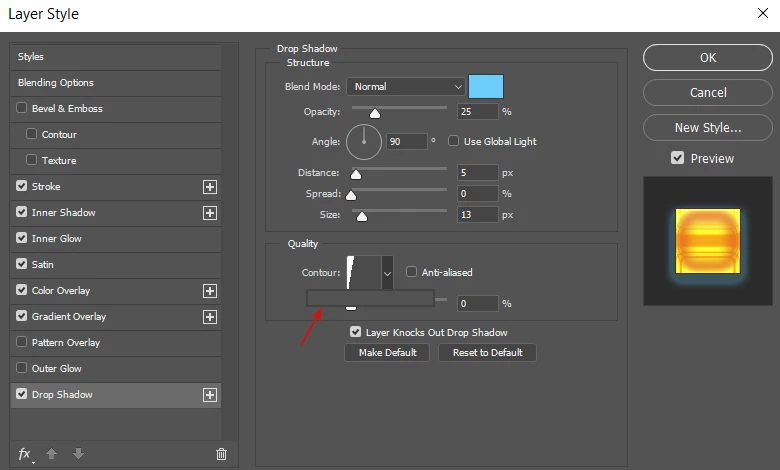
Contours library very minimized and not showing any contours

  • February 6, 2017
  • 3 replies
  • 642 views

Hello,

It's been a few days that my contours library very minimized and not showing any contours.

I tried:

-Restarting

-Updating photoshop

-Reset to default

Nothing helped...

Does someone have any suggestions?
    This topic has been closed for replies.
    Correct answer Jeff Arola

    Resetting the photoshop preferences by going to Edit>Preferences>General, clicking on Reset Preferences On Quit and then restarting photoshop will hopefully fix the issue.

    3 replies

    Jeff Arola
    Community Expert
    Jeff ArolaCommunity ExpertCorrect answer
    Community Expert
    February 6, 2017

    Resetting the photoshop preferences by going to Edit>Preferences>General, clicking on Reset Preferences On Quit and then restarting photoshop will hopefully fix the issue.

    Simmer1
    Community Expert
    Community Expert
    February 6, 2017

    Hi Etio,

    Try resetting your contour:

    Thanks,

    Sim

    etio70698034
    Participant
    February 6, 2017

    This menu is not visible and you can see in the print screen I atached

    Simmer1
    Community Expert
    Community Expert
    February 6, 2017

    Hi Etio,

    I see what you mean, the contour window is not opening properly. It seems as though you have a bug.

    You can report your bug here: Photoshop Family Customer Community

    Thanks,

    Sim

    Kanikas
    Legend
    February 6, 2017