
Inspiring
January 17, 2020
Answered

Convert image to Gustave Dore style?

  • January 17, 2020
  • 2 replies
  • 2963 views

Hi. Is it possible to convert an image into the style of Gustave Dore? Like only use 2 colors to represent an image, but use patterns of various density to indicate different shades of gray? Like the one below.
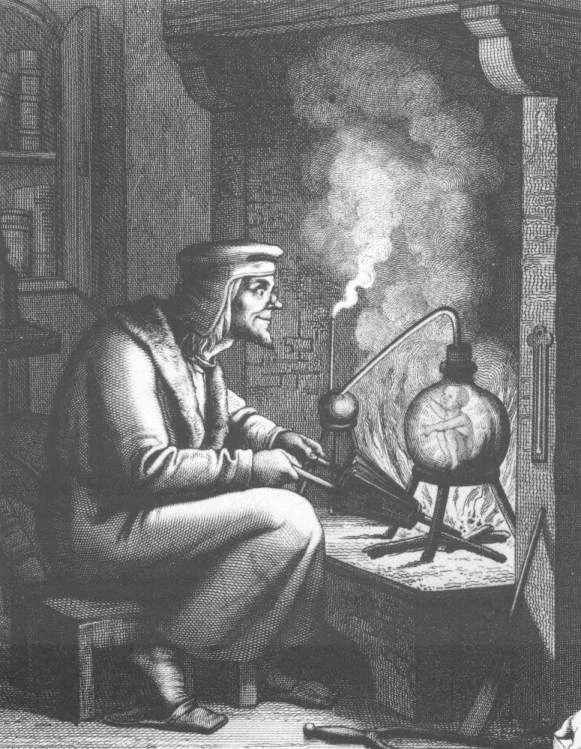
I really like this kind of style. Thanks!

This topic has been closed for replies.
Correct answer Leslie Moak Murray

I will mostly convert photos but yeah like engraving


Here is a tutorial to do just that:

https://we.graphics/blog/turn-a-photo-into-an-engraved-illustration-using-photoshop/ 


And here is an action for it:

https://blog.spoongraphics.co.uk/freebies/free-engraved-illustration-effect-action-for-photoshop 


And here is a filter:

https://www.behance.net/gallery/16968201/Engrave-Photoshop-Filter-Freebie 

2 replies

Leslie Moak Murray
Community Expert
Community Expert
January 17, 2020

Are you talking about art or photos? He was an artist.

Inspiring
January 17, 2020

Art. I attached an example


Leslie Moak Murray
Community Expert
Community Expert
January 17, 2020

So then do you mean you drew something and you want it to look like an engraving?

Chuck Uebele
Community Expert
Community Expert
January 17, 2020

Can you post an example or a link?

Inspiring
January 17, 2020

My bad. Example provided