Inspiring
January 28, 2017
Answered

Creating/Importing Custom Materials for 3D Library?

  • January 28, 2017
  • 2 replies
  • 4821 views

In my other 3D apps, I can create custom materials (from photos) for 3D image mapping. In PShop CC, I only see an option to download materials online. I tried dragging a TIFF image into the materials folder, but that of course did not work. Is it possible to create a 3D image map (or bump map) from a photo and and make it a MATERIAL in the 3D material library?

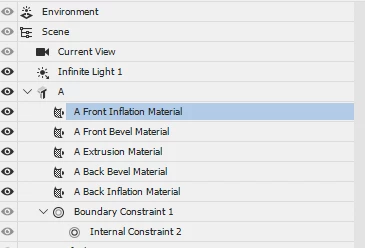
I see options to add materials in various ways to 3D surfaces of my extruded text. What is the correct procedure to project a photographic image onto a 3D surface, such as the front inflation material?

I inadvertently added an image map to the extrusion, but it was not project properly and was distorted. In my other 3D apps, it is possible to project an image map onto all sides of extruded text (planar projection) so that the image is projected into the surface normals for each plane (front, sides, etc) Is that possible with PShop CC?

thanks
    This topic has been closed for replies.
    Correct answer davescm

    Hi

    I see options to add materials in various ways to 3D surfaces of my extruded text. What is the correct procedure to project a photographic image onto a 3D surface, such as the front inflation material?

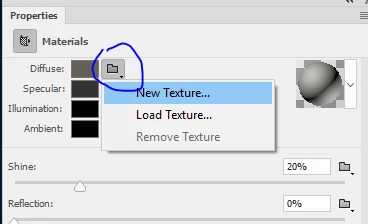
    To map for example a Photograph onto a surface, select the material in the 3D panel then in the Properties panel click on the folder next to "Diffuse" and choose New Texture.

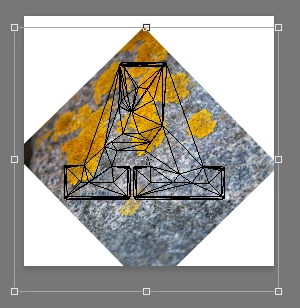
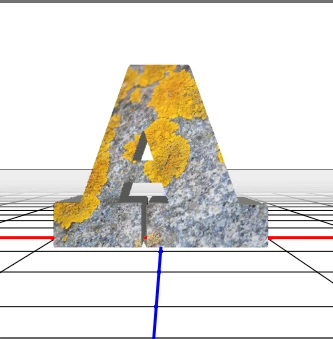
    This will open a .psb file with the UV mapping shown. Add your image as a new layer above that - I like to bring it in as a smart object that I can manipulate to fit onto the UV. As with any other 2D image the tools to warp and transform are all available to you.

    When you are done - close and save the .psb

    In my other 3D apps, it is possible to project an image map onto all sides of extruded text (planar projection) so that the image is projected into the surface normals for each plane (front, sides, etc) Is that possible with PShop CC?

    It depends on how the mesh and model is built. With the Text extrusions the Materials for front and Extrusion are mapped separately. So you can have a different texture mapped onto the extrusion from the front. It is not as simple as just unfolding the mesh in the way you would do it in Blender for example.

    Some of the other models - e.g. cylinder and cube - can be unwrapped fairly simply. You can map an image fairly simply onto a sphere for example and view from the inside to look around.

    Is it possible to create a 3D image map (or bump map) from a photo and and make it a MATERIAL in the 3D material library?

    I have covered how to use an image above. You can create a bump map from an image using Filter - 3D - Generate Bump Map. You can then use the bump map by clicking on the folder  next to the "bump" slider in textures and clicking on Load Texture or New Texture. If you pick new texture you will open a flat layer with the UVs so you can manipulate your bump map as required

    Hope that helps

    Dave

    2 replies

    davescm
    Community Expert
    davescmCommunity ExpertCorrect answer
    Community Expert
    January 28, 2017

    Hi

    I see options to add materials in various ways to 3D surfaces of my extruded text. What is the correct procedure to project a photographic image onto a 3D surface, such as the front inflation material?

    To map for example a Photograph onto a surface, select the material in the 3D panel then in the Properties panel click on the folder next to "Diffuse" and choose New Texture.

    This will open a .psb file with the UV mapping shown. Add your image as a new layer above that - I like to bring it in as a smart object that I can manipulate to fit onto the UV. As with any other 2D image the tools to warp and transform are all available to you.

    When you are done - close and save the .psb

    In my other 3D apps, it is possible to project an image map onto all sides of extruded text (planar projection) so that the image is projected into the surface normals for each plane (front, sides, etc) Is that possible with PShop CC?

    It depends on how the mesh and model is built. With the Text extrusions the Materials for front and Extrusion are mapped separately. So you can have a different texture mapped onto the extrusion from the front. It is not as simple as just unfolding the mesh in the way you would do it in Blender for example.

    Some of the other models - e.g. cylinder and cube - can be unwrapped fairly simply. You can map an image fairly simply onto a sphere for example and view from the inside to look around.

    Is it possible to create a 3D image map (or bump map) from a photo and and make it a MATERIAL in the 3D material library?

    I have covered how to use an image above. You can create a bump map from an image using Filter - 3D - Generate Bump Map. You can then use the bump map by clicking on the folder  next to the "bump" slider in textures and clicking on Load Texture or New Texture. If you pick new texture you will open a flat layer with the UVs so you can manipulate your bump map as required

    Hope that helps

    Dave

    chrisa61464837
    Participant
    May 16, 2018

    Thanks Dave, I've been looking for a way to do this for a little while now.  This makes perfect sense and I'll use it from now on.  Chris

    davescm
    Community Expert
    Community Expert
    May 16, 2018

    You're welcome

    Dave

    Trevor.Dennis
    Community Expert
    Community Expert
    January 28, 2017

    davescm will be along to answer your question shortly.