Participant
October 29, 2019
Answered

Crop Tool does not crop to specified size

  • October 29, 2019
  • 3 replies
  • 6004 views

When I select the Crop Tool, I set the WxH.  I stretch the crop guide over the area I want, then crop it the image.  However, it does not crop it to the size I set.

For example, my image is 17" x 24" and I set the crop for 8.5" x 11".  I move the crop guide over the area I want to keep in the image, then I crop it.  Instead of the image being 8.5" x 11, the image size is 7" X 9".

Why isn't it cropping it down to the size I specified in the WxH fields?

This topic has been closed for replies.
Correct answer phildeman

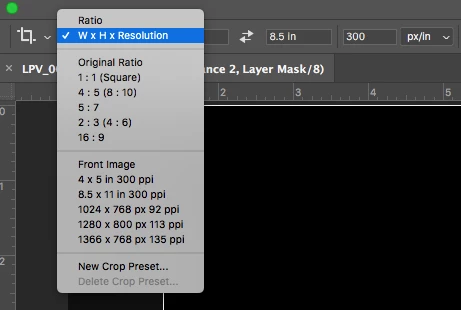
I resolved my delima.  After selecting the Crop Tool, the WxH fields appear near the top.  To the left of the WxH fields is a dropdown.  It was defaulted to the Ratio option.  I changed the option to W x H x Resolution.  That option allowed me to crop the image properly.


3 replies

phildemanAuthorCorrect answer
Participant
October 31, 2019

I resolved my delima.  After selecting the Crop Tool, the WxH fields appear near the top.  To the left of the WxH fields is a dropdown.  It was defaulted to the Ratio option.  I changed the option to W x H x Resolution.  That option allowed me to crop the image properly.


D Fosse
Community Expert
Community Expert
October 29, 2019

Photoshop doesn't work with physical sizes as such. It works with pixels.


Size is a secondary, derived measurement determined by the pixels per inch (ppi) number. If you want a certain size, you need to keep a close eye on the ppi value. If they are different, size changes - even though the pixel sizes remain constant.


Read it literally: pixels per inch. It means exactly what it says.

phildemanAuthor
Participant
October 29, 2019

Thanks for your immediate response.  FYI, I did not have this problem with PS C6.  It worked just fine when I sized the crop WxH using inches.


JJMack
Community Expert
Community Expert
October 30, 2019

Can you post the screen captures that I requested.  I do not see your problem in CC 2019 version 20.0.6. The screen captures I posted were done using Photoshop CC 2019 version 20.0.6 on Windows 10 pro and worked correctly using inches.

JJMack
JJMack
Community Expert
Community Expert
October 29, 2019

Can you post screen capture of your cropping process with the  rulers visible and set to inches and the crop option tool bar visible. Two screen capture. One with the crop setup before you press enters to commit the crop. then After you press enter where the crop gets committed. For example like this:

JJMack