
Participating Frequently
September 18, 2020
Resuelto

Crop Tool Not Working Properly.

  • September 18, 2020
  • 3 respuestas
  • 9853 visualizaciones

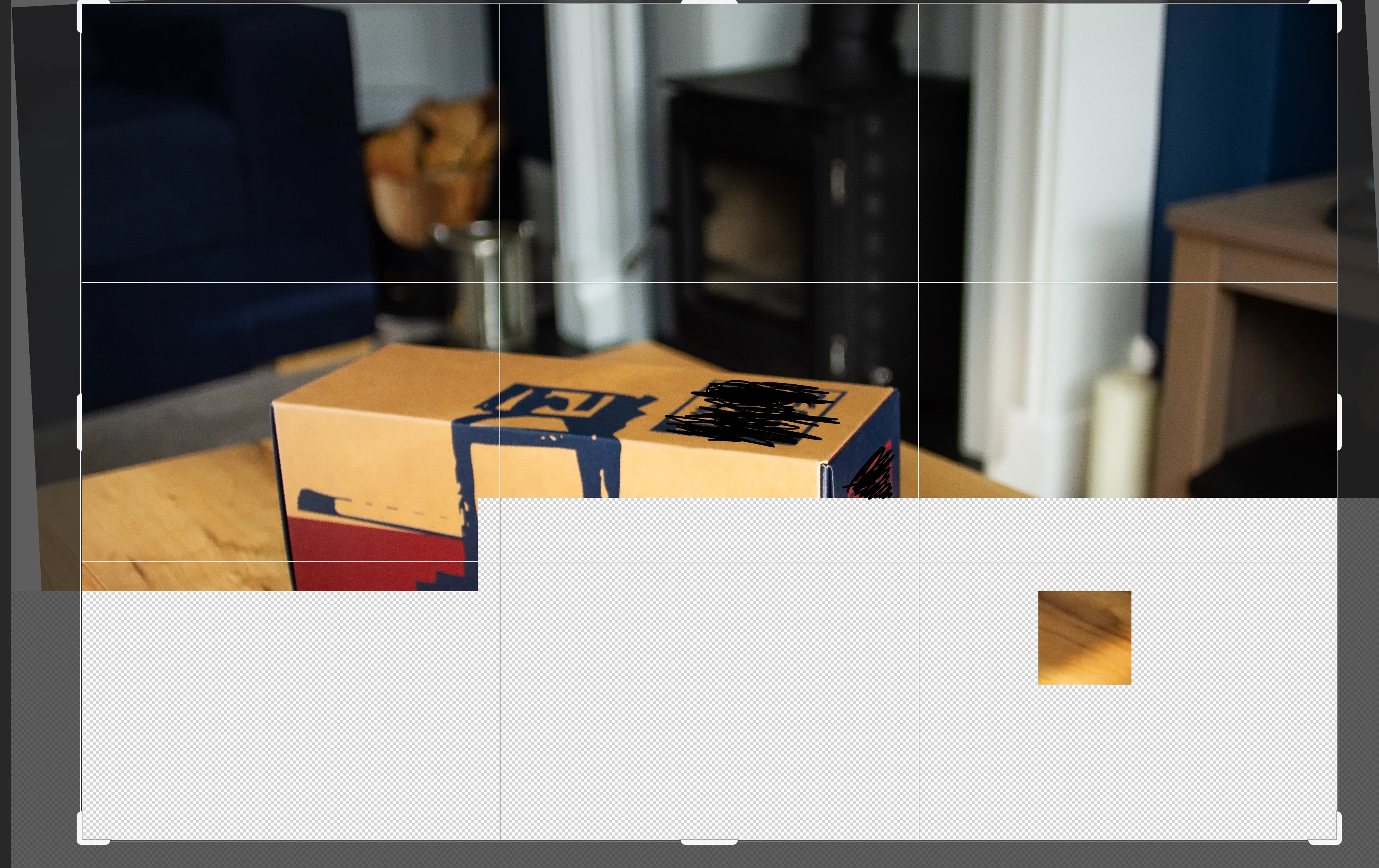
I've noticed that when cropping or rotating in PS 2020 the app goes haywire and often shows a little countdown timer like it's waiting to do something, then when it does wake up I get half the image missing and it's replaced with a chequerboard pattern. I often can't even use the tool because I can't see what I want to straighten up. I wouldn't mind but I've got an iMac Pro maxed out in all areas so I shouldn't be seeing screen draw issues. Any ideas?
Este tema ha sido cerrado para respuestas.
Mejor respuesta de c.pfaffenbichler

That hasn't helped, I've tried all kinds or restoring and trashing but it still does it I have 6 iMacs that are all doing the same thing. All running Catalina.

Also when I crop, that little box follows the cursor around the screen.


Does turning off »Use Graphics Processor« in the Performance Preferences (Photoshop > Preferences > Performance > Graphic Processor Settings) and restarting Photoshop have any bearing on the issue? 

3 respuestas

Leif Robertson Fifer
Inspiring
November 30, 2022

this ansswer is incorrect

c.pfaffenbichler
Community Expert
Community Expert
December 1, 2022

Care to elaborate? 

Participant
September 21, 2020

I have a slightly different problem with the cutter tool. I use wacom graphics tablets, the driver is updated to the latest version. as I move the edges for cropping, the image starts to flicker. I contacted wacom support and they have not encountered any problems with the graphics tablets or pens. I have tried using other photo editing programs and the problem is not there. Wacom support suggests to me that it is a photoshop cc problem (others have reported this to wacom). I have disabled the use of the graphics processor but the problem is still present. I am attaching a short video where you can see what I'm talking about. Please help me. Thank you.
Leonardo

Leonardo

 
c.pfaffenbichler
Community Expert
Community Expert
September 21, 2020

What are the versions you use? 


Have you done a search over on feedback.photoshop.com? 

If you find a thread that matches your OS and Photoshop versions (at least roughly) see if a solution is given and add your vote. 

https://feedback.photoshop.com/conversations/search?q=photoshop%20screen%20flicker&page=1&sortKey=RELEVANCE&sortOrder=DESC

c.pfaffenbichler
Community Expert
Community Expert
September 18, 2020

What have you done for trouble-shooting so far? 

If resetting the Tool does not help Restoring Preferences after making sure all customized presets like Actions, Patterns, Brushes etc. have been saved might be a good starting point:

https://helpx.adobe.com/photoshop/kb/basic-trouble-shooting-steps.html


Please post screenshots on the Forum directly. 

DMM-18Autor
Participating Frequently
September 18, 2020

This behaviour happens across all the macs in our department, I would say it's a bug but I will try and restore the preferences.

c.pfaffenbichler
Community Expert
Community Expert
September 19, 2020

Please post screenshots on the Forum directly. 

What do the checkerboards look like exactly?