
Participating Frequently
November 24, 2019
Answered

Custom Shapes Have Disappeared? [2019]

  • November 24, 2019
  • 6 replies
  • 36811 views

I have several custom made outlines that I named and saved as Custom Shapes.  I have used these shapes repeatedly in the past, but now when I click on the Custom Shape Tool they are no longer listed - they have unexplicably disappeared.  Normally I would just redraw the shapes, but these are complicated outlines that took hours to draw the first time around.  Is there anyway to figure out how to recover these?  I don't understand why Photoshop would have deleted them?  Thanks for your help!
This topic has been closed for replies.
Correct answer gener7

Go to Window > Shapes, they should be stored there. Photoshop never deletes Custom Presets.

6 replies

gener7
Community Expert
Community Expert
December 30, 2023

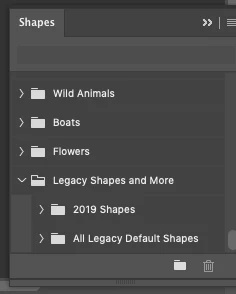
Recently I decided not to import my settings for Photoshop 2024. There was just too much accumulated bloat from previous versions slowing everything down. So after opening the Shapes Panel, I went to the Panel menu and clicked on Legacy shapes and more.


The folder was added, but at the bottom of the list where I had to scroll all the way down to get at it.


So I just dragged the folder to the top, and now they are readily available.

I also checked large thumbnail view for a better look at the shapes.

Participant
December 30, 2023

I have got the legacy shapes to appear on the menu but when youleft click nothing appears.  Thanks


jane-e
Community Expert
Community Expert
December 30, 2023

@pete31668485ovqd 


What version of Photoshop do you have?


  • Open the Shapes panel from the Window menu (not options bar)
  • Open the Shapes panel menu (lines in upper right)
  • Scroll down to Legacy Shapes and click the disclosure triangle

Take a screenshot and use the Insert Image button to insert it into a Reply window


Jane


Participant
December 30, 2023

thanks Jane.  I wasn't clicking the arrow before but the word,  (expecting it to open as it usually does.)   Now i can get to being artistic thanks very much.


Participant
February 2, 2022

https://www.youtube.com/watch?v=WcJYH6VizkY If anyone is still struggling with this here is a link to how to restore all shapes. I've just done it and its a quick fix. 


Thanks

Mark 

Participant
December 12, 2020

I'd just like to give a comprehensive answer in any case that someone still has this issue as I have just come across it nearly a year after this was posted when I updated to the newest version of PS. You have to go into program files > adobe > adobe photoshop > scroll down or search for Legacy Shapes and more.csh file > drag it into the shapes window in photoshop and they should show up. 

Gerhard_Draws
Known Participant
February 17, 2021

Hi, I'm working on a Mac, same issue. Can't find the legacy shapes. The folder you guys refered to are empty and I don't have the option of adding Legacy shapes in the shapes menu.

I'm stuck with these new completely useless shapes they added in (trees, flowers, BOATS???)


The ONLY time I'm using these shapes are for the simple things like envelopes, arrows etc... don't see the use of adding boats and flowers...


Can I download the legacy file for mac somewhere?

PECourtejoie
Community Expert
Community Expert
March 16, 2021

Hello, you do need to open the Shapes panel, found in the Windows menu.

In there, you will find legacy shapes in its hamburger local menu, on the top right.

this entry is NOT found in the shapes drop down of the Option bar, or when doing a right-click with the shapes tool active.


DianeCourt
Participant
December 1, 2019

I have the same prolbem. All legacy shapes have disappeared. The only shapes available are leaf trees, wild animals, boats, and flowers.

DianeCourt
Participant
December 1, 2019

Apparently all of the earlier (legacy) shapes are in a folder by that name.  Here's how to find them: In Photoshop -Go to the "Window" option in the top menu bar of your screen (between View and Help). 2) Click Shapes to add it to active panels (or the panel dock). Click the menu icon in the upper right corner and scroll down to "Legacy Shapes and More" You'll find the shapes from previous versions there I had two subfolders: "2019 Shapes" and "All Legacy Default Shapes" - each with its own subfolders. The simple and complex shapes I've used for years were in the "All Legacy Default Shapes" in recognizable folders (tiles, arrows, symbols, music, nature, etc.)

Hope that works for you!

FallCrestAuthor
Participating Frequently
December 1, 2019

Thanks for your reply - unfortunately I don't have Shapes listed when I click menu > Window.  It seems very strange because I have updated Photoshop, but when I click on Window it brings up the list of options in alphabetical order and my list jumps from "Properties" to "Styles" with no "Shapes" in between.  Any suggestions on why "Shapes" is missing?

gener7
Community Expert
gener7Community ExpertCorrect answer
Community Expert
November 24, 2019

Go to Window > Shapes, they should be stored there. Photoshop never deletes Custom Presets.

FallCrestAuthor
Participating Frequently
November 24, 2019

Thanks for your response - unfortunately I don't see Shapes listed as an option when I click on the Window tab.  When I click on Window there is a long list of options in alphabetical order, "Properties" is followed by "Styles" with no "Shapes" listed.  Maybe I'm missing something?

gener7
Community Expert
Community Expert
November 24, 2019

What version of Ps did you upgrade to? 21.0.1 is the latest.