Participant
November 14, 2017
Answered

Different color result, same HEX value

  • November 14, 2017
  • 3 replies
  • 11921 views

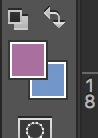
I'm using the same HEX value in one project:

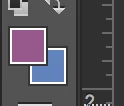
When I use that same color in another file, this is how the color becomes. Is opaque.

Both files are in RGB mode. 8 bits/channel.

If somebody experienced this odd behavior and have an idea what could it be, please let me know.

Thanks!

This topic has been closed for replies.
Correct answer davescm

Hi

The hex value is just a way of expressing RGB (or CMYK) values in base 16 i.e. 00 to FF instead of 0-255.

However an RGB (or CMYK) value without an associated color space (which tells a color managed application what real world color that value represents) is meaningless.

So the same Hex RGB(or CMYK) value can represent two different colors in two different color spaces.

Similarly, the same real world color can be represented by two different Hex RGB (or CMYK) numbers in two different color spaces.

Common document color spaces are sRGB, Adobe RGB, ProPhoto and similarly a number of differing CMYK spaces.

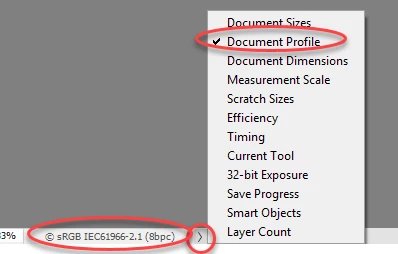
The most likely explaination for the symptoms you see are that the documents have differing color spaces (described by their color profiles) Go to the bottom of the Photoshop window and choose Document Profile to see the space each document is using.
Dave

3 replies

htmgarciaAuthor
Participant
November 15, 2017

Thanks Dave and D Fosse! I appreciate it.

D Fosse
Community Expert
Community Expert
November 14, 2017

Numerical values mean nothing until they refer to a specific color space (sRGB, Adobe RGB etc). The color space is what defines the numbers as a certain color.

A given set of RGB numbers will produce different colors in different color spaces.

Hex is just a different (and outdated) notation for RGB numbers. They are the same thing. But traditionally, hex refers to sRGB.

EDIT: Dave beat me. Trust me, he's dead right...

davescm
Community Expert
davescmCommunity ExpertCorrect answer
Community Expert
November 14, 2017

Hi

The hex value is just a way of expressing RGB (or CMYK) values in base 16 i.e. 00 to FF instead of 0-255.

However an RGB (or CMYK) value without an associated color space (which tells a color managed application what real world color that value represents) is meaningless.

So the same Hex RGB(or CMYK) value can represent two different colors in two different color spaces.

Similarly, the same real world color can be represented by two different Hex RGB (or CMYK) numbers in two different color spaces.

Common document color spaces are sRGB, Adobe RGB, ProPhoto and similarly a number of differing CMYK spaces.

The most likely explaination for the symptoms you see are that the documents have differing color spaces (described by their color profiles) Go to the bottom of the Photoshop window and choose Document Profile to see the space each document is using.

Dave