
Known Participant
August 27, 2018
Question

Difficulty getting ExtendScript to target Photoshop CC 2018

  • August 27, 2018
  • 7 replies
  • 4719 views

Hi, I'm hoping someone here can help me please.

I consider myself to be new to JavaScript and ExtendScript, but I have had a success or two creating 2 or 3 scripts to automate tasks in PhotoShop. But now I've run into a problem, came here at the suggestion of Adobe Support after a frustrating and fruitless call with them.

In the past few days I have been unable to get ExtendScript to target Photoshop for the purpose of debugging my next script.  I'm uncertain of specific dates, but I have had this work in the recent past - last script is dated August 2, 2018.

My problem: I start with a document open in PhotoShop CC 2018 (19.1.6, not sure why the terminology works this way) and a script open in ExtendScript.  I check that the target bar in ExtendScript says "Adobe Photoshop CC 2018 (120.032)", and the connection link is green.  When I try to start steppin through the script, I immediately get this error message
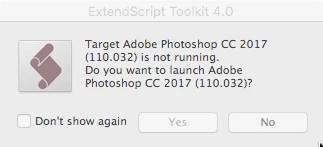
I have Photoshop 2017 installed, but I have the same problem trying to use it for this script work.  I I target Photoshop 2017 in the ExtendScript target bar, I get the same error message, but for Photoshop CC 2018.  I do not believe the problem is in the script because I get exactly the same results when the only script open in ExtendScript is "Layer Comps to Files", one of the standard Adobe scripts in the Photoshop Presets folders.

The first support person I spoke to today claimed that the only reason I have ExtendScript is a legacy license for PhotoShop Extended CS4.  Hard to believe that, as this ExtendScript was installed this morning and acknowledges the existence of both Photoshop 2017 and 2018.  A second support person told me there is no official support for ExtendScript, the only place I'm going to get any help is in the forums.  Perhaps he's right, but neither response helps me.

Any help or suggestions would be appreciated.

Should I be using a different scripting editor/debugger?  I'm a novice, and would need one that already understands the Adobe DOM's.  What are other users doing to autmoate tasks that exceed what's possible with a PhotoShop Action?

I am running ExtendScript 4.0 (re-installed this morning using the Creative Cloud App), PhotoShop CC 19.1.6 (update via CC in the past day or two) on Mac OS 10.13.6.  Both the ExtendScript re-install and Photoshop update took place after my last debugging effort.

Thanks in advance.

==> corrected typo

This topic has been closed for replies.

7 replies

Participating Frequently
January 10, 2021

SOLVED 

For Targeting Photoshop cc 2018   You Must Go To 

Edit > Preferences > Favorites

Click Add

Then Select  Scripts Folder at : 

C:\Program Files\Adobe\Adobe Photoshop CC 2018\Presets\Scripts

check Recursive folders and ignore files start with dot

click ok

select adobe photoshop cc 2018 from target list

click anchor button if not green

then click start running the script (play icon)

in this way, adobe extend script and photoshop interact each other

Participating Frequently
January 10, 2021

ryan_edwards
Inspiring
November 27, 2018

I would recommend just being more generic with it.

I myself run a few versions installed.

I just pick my 'default' program (PC user) / set a file type association to a specific photoshop...

and any subsequent scripts I write I always just type
#target photoshop

...and my OS takes over runs the code out in my default Photoshop I have set.  I change my default version quite a bit in a week.

(which you mentioned trying this target earlier, but I am not sure what photoshop you have set outside the script)

I just think if you let your OS decide ahead of time... the script will get routed to the default 'photoshop' you have set for .psd files, etc.The script(s) will launch that version of CC you have selected... no need to get specific in the script.


hopefully helps out

Known Participant
September 4, 2018

I'm providing this update in case someone else runs into this problem.

What I have is a work-around, NOT a fix.

I now have ESTK V4 working correctly (as far as I can tell) targeting Photoshop 2015.5.  I did have to remove the target string from my script, but I'll get over that.

I decided to try older version of Photoshop in desperation rather than genius, and decided to start with 2015.5, which identifies itself to ESTK as Adobe Photoshop CC 2015.5 (100.032).

Thanks to everyone who tried to help.

Chuck Uebele
Community Expert
Community Expert
August 28, 2018

I do use ESTK for debugging, but I don't use the step into stuff. I just add $.writeln() comments to see what results I'm getting. Most likely not the most efficient way of debugging, but I don't do a lot of it.

Chuck Uebele
Community Expert
Community Expert
August 27, 2018

#target photoshop-120

Will target just PS 2018, but it's best not to have to use that as it will only run with 2018

Known Participant
August 27, 2018

Thanks, much appreciated.  I'll try that and report back.  I had no idea you could identify a target that precisely.  I appreciate you pointing out that specifying the target that way will make the script release-specific.

Chuck Uebele
Community Expert
Community Expert
August 28, 2018

That is mainly used for startup scripts that need to target a particular version of PS. It's not something you want to use that often, unless you need to target a particular version of PS. The versions go in jumps of 10, to 2017 would be 110, and when 2019 comes out, it will be 130, and so on.

Known Participant
August 27, 2018

Thanks for your response.

Here's some more information:

1. I opened "Layer Comps to Files.jsx" from the Adobe Photoshop 2018 Presets folder.  Line 36 in that script reads #target photoshop.  If I start debugging at this stage, I get the error message described earlier.

2. If I delete line 36 (without saving the script) and then start debugging, there is no change in behaviour - I get the same error messages.

3.  The ExtendScript target bar is a fixed drop-down list.  I don't see a way to type other content there, or just make it blank.

4.  Although I have a license for PhotoShop CS4 Extended, it is not loaded on my machine, so there should be no way for ExtendScript to divine its existence.  The only other Photoshop license I have is for PhotoShop Extended CS3, which also is not installed.

5.  I have only one instance of ExtendScript installed - using the Creative Cloud App this morning.  It identifies itself as 4.0.0.1

Thanks

Kukurykus
Legend
August 27, 2018

Perhpas reinstalling your latest Ps release will solve problem (if you installed meantime earlier vers. that you deleted later).

Known Participant
August 27, 2018

Thanks for your response, but I don't understand.  Are you suggesting I can fix my problem by re-installing the latest Photoshop CC 2018, that identifies as 19.1.6 in its "About" dialog?

Kukurykus
Legend
August 27, 2018

I think targeting just photoshop (without any number) will open that Photoshop that is writen as main in Registry. So if I have CS6 Extended and CC 2018 it opens that second. If I want first I would either start script without targeting it (what I do) or probably use some number of Ps version I don't know. I think the other question is with ESTK 3.8 which irrespectively to latest Ps installed, rather opens CS6 EXTENDED than CC 2018, but I'm not sure. Probably that number of version you use after target should be somehow different.