
Inspiring
June 4, 2018
Answered

Directory of the Recent Files list?

  • June 4, 2018
  • 1 reply
  • 18514 views

I'm trying to help my sister recover some accidentally deleted files on her Windows 10 computer. Inside Photoshop some of the files are shown in the Recent Files list but it doesn't actually show you what the directory was only the file name. Of course these files won't open because they were accidentally deleted so I'm hoping I can open the Recent Files list and see the full paths where the files were previously located. Problem is I don't know where in the AppData folder the recent files list would be. I'm in AppData\Roaming\Adobe\AdobePhotoshopCS6 but haven't had any luck finding the list.

She's using Photoshop CS6.

Thanks!
This topic has been closed for replies.
Correct answer davescm

Not to sound rude but did you miss the part where I said I have 26 years of computer experience? As I said in the OP, the files were deleted. I'm trying to figure out what the directory was before they were deleted as I do not know where they were deleted from. Hence why I wanted to figure out where the source file for the Recent Files list is so I can know what directory the photo was previously in.


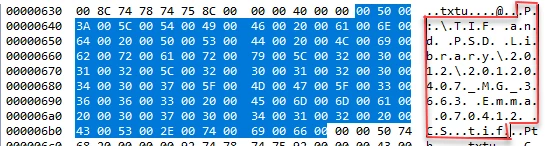
Well with your "26 years of computer experience" use a hex editor and open

C: > Users > Username > AppData > Roaming > Adobe > AdobePhotoshop CC 2018 > Adobe Photoshop 2018 Settings >   MachinePrefs.psp

The paths are in there - example below for P : TIF and PSD Library 2012 20120407_MG_3663 Emma 070412 CS

Dave

1 reply

John T Smith
Community Expert
Community Expert
June 4, 2018

What about the Windows recycle bin... did the deleted files go there?

Inspiring
June 5, 2018

Apologies, I didn't explain the situation properly. I'm an advanced computer user with more than 26 years of experience. If it were something simple like the files being in the recycle bin I'd have covered it already.

What happened is she created a new folder in file explorer and then moved some photos into it but then accidentally hit CTRL + Z a few times and it removed the folder. When you do that it bypasses the recycle bin all together unfortunately which is really irritating. But they might have just been moved back to the original location. Unfortunately she doesn't know where that is... her computer skill level is so limited that she refers to software based on their icon so "The Mountain Viewer" for Windows Picture Viewer and "The Pink Flower Program (which I have no idea what that one is).

Because of this I had the idea that since Photoshop used to know where the files were, maybe I could look in that location but photoshop only tells you the file name not the directory in the Recent Files list. If I can fine the source file of the list though and open it in a text editor it should have the full directory path there.

Problem is I don't know the location of the Photoshop Recent Files list in AppData. It will be some sort of cache file or something similar.

davescm
Community Expert
Community Expert
June 5, 2018

I'm impressed Dave, how the heck did you know that? Sounds to me as if the OP needs a data recovery program if the recycle bin has been by-passed. I use Ontrack Easy Recovery. It would recovery the deleted files if they haven't been over written yet, but isn't cheap at £57 for the home version.


It wasn't hard Terri. I just looked for which files Photoshop was updating every time it closed. Then I took a quick look at them with Visual Studio's binary editor until I spotted my recently opened files.

Dave