
Participant
December 27, 2019
Answered

Disable the distance indicator next to the cursor in Photoshop

  • December 27, 2019
  • 1 reply
  • 2037 views

Hello all,


I have two questions:

1) What is the name of that pop-up next to the cursor that tells me how far I drag during move, crop, and marquee select?

2) It's an eyesore. How do I disable it? 


To be specific, I mean this thing: 


Thank you for your time, and have a Happy New Year!

- Adam


{Thread renamed by moderator}
Correct answer Sahil.Chawla

Hi Adam,

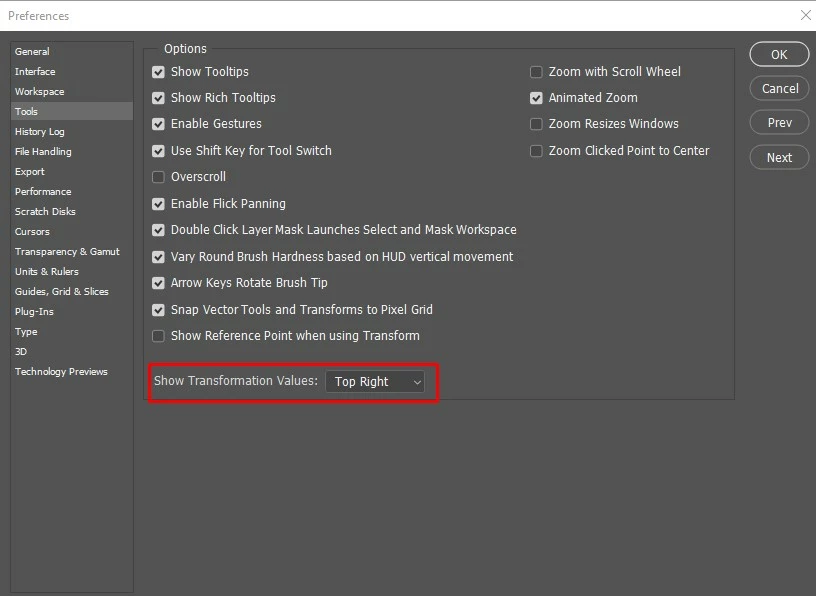
You can disable the Transformation Values by going into Photoshop's Preferences > Tools and change the Show Transformation Values drop down to Never, then click OK.


Regards,
Sahil

1 reply

Sahil.Chawla
Adobe Employee
Sahil.ChawlaCorrect answer
Adobe Employee
December 27, 2019

Hi Adam,

You can disable the Transformation Values by going into Photoshop's Preferences > Tools and change the Show Transformation Values drop down to Never, then click OK.


Regards,
Sahil

Participant
December 27, 2019

Thank you very much, Sahil! That worked! 🙂


So it's "Transformation Values", eh? I definitely didn't know that.