
August 20, 2017
Question

Disabling Ligatures in a TrueType Font CS6
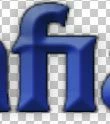
  • August 20, 2017
  • 2 replies
  • 2322 views

I am editing a logo in Photoshop CS6 and letter combinations such as fi appear as you see above. The font does not behave this way in programs like Word. This is a TT font, so the option to disable ligatures in the Character Panel are greyed out. The font is Albertus Extra Bold, this does not happen in Albertus Medium.

This topic has been closed for replies.

2 replies

Abambo
Community Expert
Community Expert
August 23, 2017

My Albertus Extra Bold does not do that:

And BTW, no TT font has ligatures enabled on my system.

ABAMBO | Hard- and Software Engineer | Photographer
August 20, 2017

My current ad hoc fix is to change the kerning between the 'f' and 'i' to 30, which is the minimum required to avoid the joining of the two letters, but there must be a way to prevent this entirely...

PECourtejoie
Community Expert
Community Expert
August 22, 2017

Hello, a wild guess, disabling the "ligatures" from type>opentype (I know you use TT) as there is nothing in the preferences about it either.

another workaround: If the space you create is too big, what about adding a space, then working in the kerning the opposite way?