
Doc_Pit
Inspiring
July 3, 2019
Answered

Downsizing images

  • July 3, 2019
  • 2 replies
  • 1493 views

This isn't a question.  It's just something I want to share in the event that it may be interesting to someone other than myself.

I've been working to develop a competence at compositing.  I may take a photo of an animal, place it on a much larger blank canvas, and attempt to build a scene.  That can lead to very large files that might be fine if they were displayed as large exhibition prints but would need to be radically reduced if printed in a book for example.  Maintaining detail becomes a concern. 

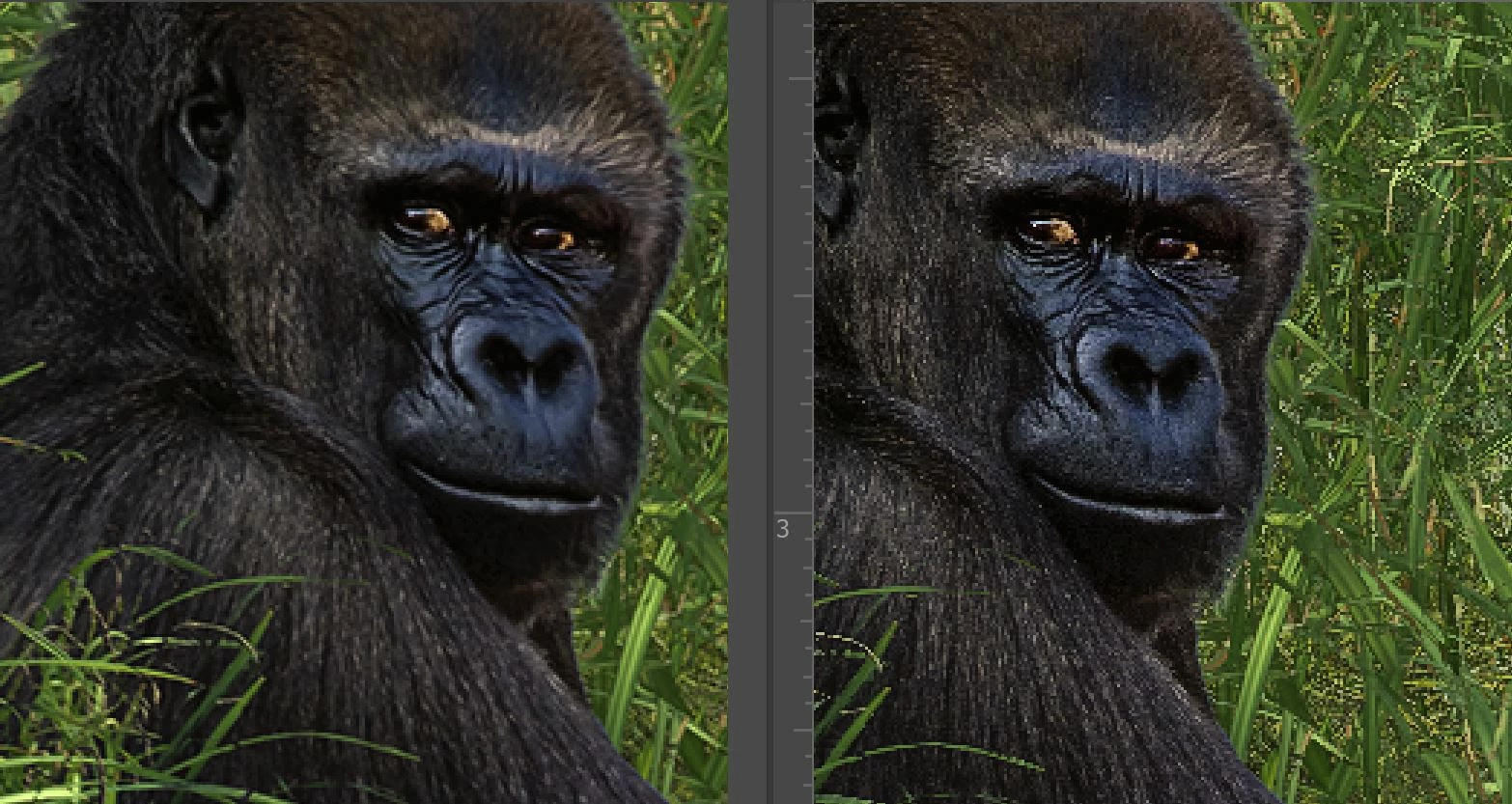
The images below show the result of reducing an image to approximately 25% of its original dimensions (like reducing a 40x40 to 10x10 at 300 ppi).  The image at L was reduced using PS bicubic sharper with resampling.  The image at R was reduced using Photozoom lanczos.  The images are magnified to 300%.  Yes, I know, no one views images at 300%.  But a few of us at the compulsive edge of the lunatic fringe obsess about these things anyway.  I was surprised at how much sharper the lanczos image is.  (BTW, I found this article helpful: Image Resizing for the Web and Email )
    This topic has been closed for replies.
    Correct answer D Fosse

    Sharper maybe, but with very obvious artifacts. It's clear that they have turned all the dials up to 11. I can almost smell the smoke...

    Photoshop could never do that. It's not acceptable. If that's what you want, nothing stops you from doing that kind of sharpening with available tools, but not straight off the table.

    That said, Bicubic Sharper never looked any good and I avoid it at all costs. I prefer Bicubic Smoother - no sharpening - and then run it through the ACR filter for final post-resample sharpening.

    2 replies

    Stephen Marsh
    Community Expert
    Community Expert
    July 5, 2019

    This free plug-in may be of interest to some:

    C3C Image Size – Telegraph

    D Fosse
    Community Expert
    D FosseCommunity ExpertCorrect answer
    Community Expert
    July 3, 2019

    Sharper maybe, but with very obvious artifacts. It's clear that they have turned all the dials up to 11. I can almost smell the smoke...

    Photoshop could never do that. It's not acceptable. If that's what you want, nothing stops you from doing that kind of sharpening with available tools, but not straight off the table.

    That said, Bicubic Sharper never looked any good and I avoid it at all costs. I prefer Bicubic Smoother - no sharpening - and then run it through the ACR filter for final post-resample sharpening.

    Doc_Pit
    Doc_PitAuthor
    Inspiring
    July 4, 2019

    In addition to building a competence with PS, I'm trying to develop an ability to really SEE an image.  The artifacts that are obvious to you are not obvious to me.  Can you point-out what, exactly, you are seeing that looks funky?  That would be much appreciated.

    D Fosse
    Community Expert
    Community Expert
    July 4, 2019

    Well, it's actually all over the place. This is just a random pick, I could really go anywhere:

    What happens here is that image integrity is completely broken up into random pixels. Note the stray pixels scattered all over, almost like noise or dead pixels.

    This might work under certain special circumstances, I don't know. But what I'd do in that case is overlay it over the original and carefully mask it in gradually, in select areas, being careful to not go all the way. View at 100%, the only reliable way to judge sharpness.

    I still think this is vastly overdone, and there are better ways. Reproduction size plays a big part in judging the best sharpening. What works for one size may not work for another.