
lwt89
Known Participant
December 11, 2017
Resuelto

Drop shadows wont follow mask

  • December 11, 2017
  • 1 respuesta
  • 634 visualizaciones

What setting did i accidentally click or unclick to have this happen? You can see here that Ive masked out my object which is just some random paralleogram i drew to test this. This shape has a drop shadow. So ive masked out the shape but the drop shadow remains. Normally if i mask my object the drop shadow takes on the shape of the masked out object. Thanks i advance!

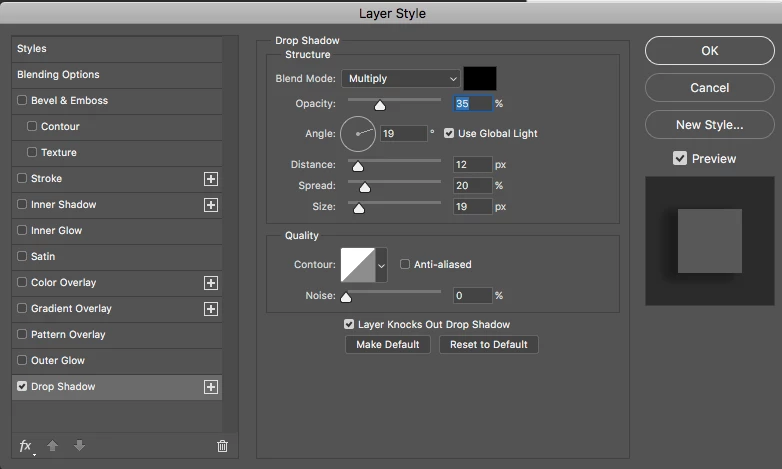
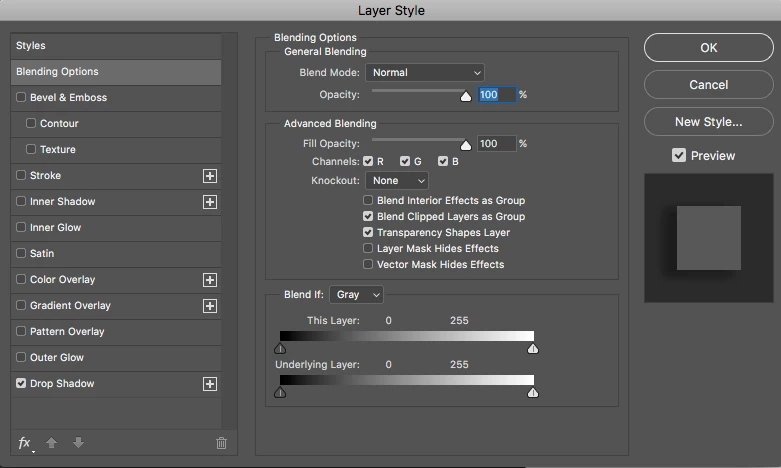
Here are my settings if this helps.
    Este tema ha sido cerrado para respuestas.
    Mejor respuesta de davescm

    Hi

    Check your mask. If you used a black brush with just under 100% opacity (say 99%), or 100% opacity with a color that is just above black  then you would see the effect you are seeing - the shape would be hidden but the drop shadow will remain.

    Dave

    1 respuesta

    davescm
    Community Expert
    davescmCommunity ExpertRespuesta
    Community Expert
    December 11, 2017

    Hi

    Check your mask. If you used a black brush with just under 100% opacity (say 99%), or 100% opacity with a color that is just above black  then you would see the effect you are seeing - the shape would be hidden but the drop shadow will remain.

    Dave

    lwt89
    lwt89Autor
    Known Participant
    December 11, 2017

    Thats it!! The color was just a hair above black!! THANKSSS

    davescm
    Community Expert
    Community Expert
    December 11, 2017

    You're welcome

    Dave