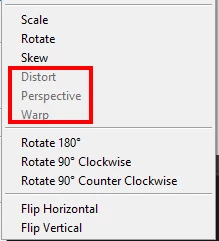
I have Photoshop and do not install AI. Photoshop does not really fully support Illustrator files. You can Place in some Illustrator file in Photoshop like .AI . and .svg file. The Smart object layers created will be sort of a Vector smart Object. You can scale the object like vector grapjics however Transforming will be limited to scale,rotate and skew but other features like perspective, warp and distort will not be available.
Photoshop can not handle all Illustrator type layers. If you do open and Illustrator File in Photoshop it will open as a Raster layer no vectors at all. You can Have Photoshop open the image the size you need howevet in Photoshop all you wil have is a single raster layer.
There is a Third Plugin that can open most of what is in a SVG file as vector layers into Photoshop. There are some limitation. Illistrator is Adove Vector Application where Photoshop deals mostly with Pixels. There some Vector tools in Photoshop Layers like Text and Shaper are vector layers and other layer can have vector layer mask.
You may be able to recreate you company logo in Photoshop with Photoshop vector tools and vector layer types. Post a link to your Illistrator Logo file. If You can create Large Raster image of you logo in Illustrator like Png, Jpeg or Tiff. Photoshop can work withe these well. Document file types like eps and pdf files can aslo be open as Raster layers the size you need by Photoshop.

 AdChoices