jillf50926706
Participant
March 27, 2019
Question

Empty workspace Photoshop cs6

  • March 27, 2019
  • 3 replies
  • 1851 views

Whenever I open a file, it shows up on the panel, but the workspace is empty
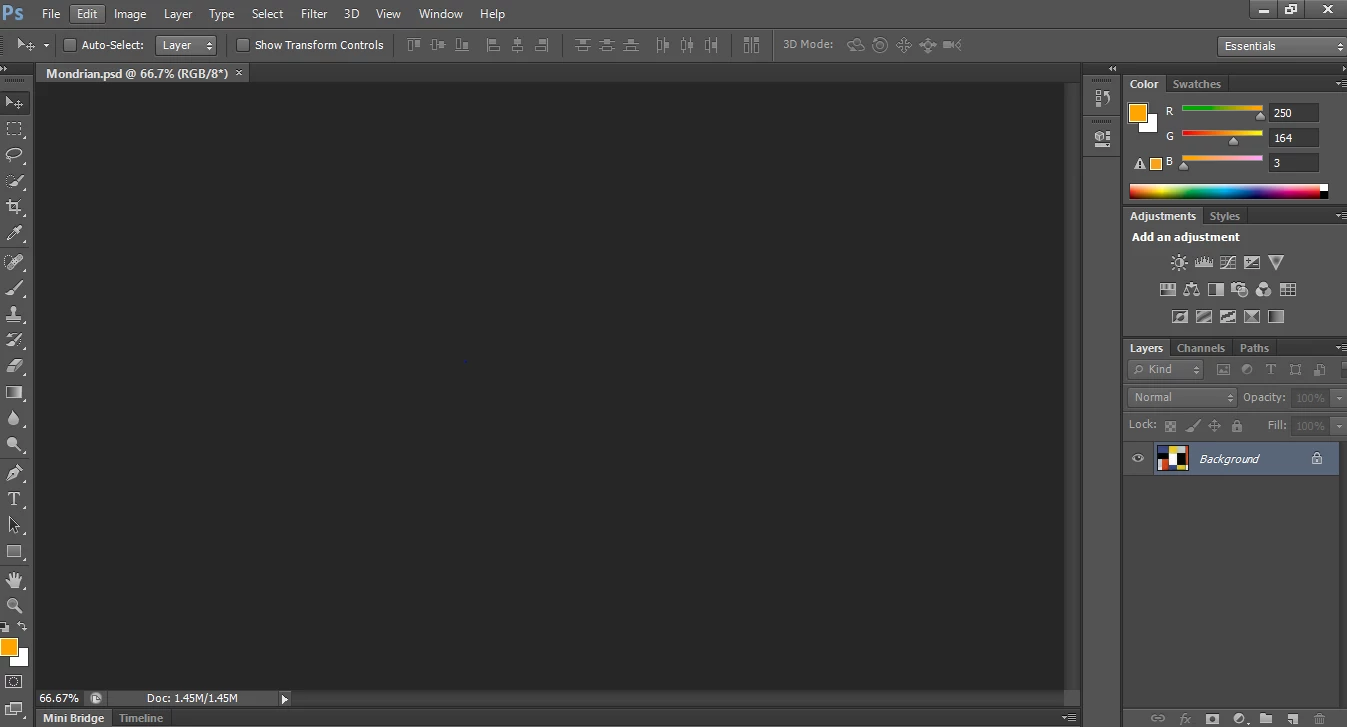
    This topic has been closed for replies.

    3 replies

    Michael J. Hoffman
    Community Expert
    Community Expert
    March 27, 2019

    Can you try to disable GPU acceleration (Edit> Preferences > Performance) to see if that makes a difference? Have you updated your graphics driver recently?

    Troubleshoot Photoshop graphics processor (GPU) and graphics driver issues

    MIke

    March 27, 2019

    Hi

    Have you tried resetting Photoshop preferences

    To restore preferences quickly using a keyboard shortcut: Press and hold Alt+Control+Shift (Windows) or Option+Command+Shift (Mac OS) as you start Photoshop. You are prompted to delete the current settings. The new preferences files are created the next time you start Photoshop.

    Norman Sanders
    Legend
    March 27, 2019

    If things worked normally in the past and just started happening, reset Preferences.
