
januska
Participating Frequently
May 30, 2021
Answered

Evening Out Skin Tone

  • May 30, 2021
  • 8 replies
  • 12060 views

I'm relatively new to Photoshop but am picking it up fairly quickly. I have a photo to edit - the subject is very pale, her make-up is a wee bit uneven, and the highlight on her cheek is hotter than I'd like (even after adjusting white balance, exposure and contrast). I've done massive searches on youtube to find suggestions for fixing these issues, but there are myriad ways to correct this - at varying degrees of difficult. What I'd like to ask all of YOU is what process do YOU use? I'm (obviously) looking for something not terribly convoluted.

This topic has been closed for replies.
Correct answer D Fosse
quote

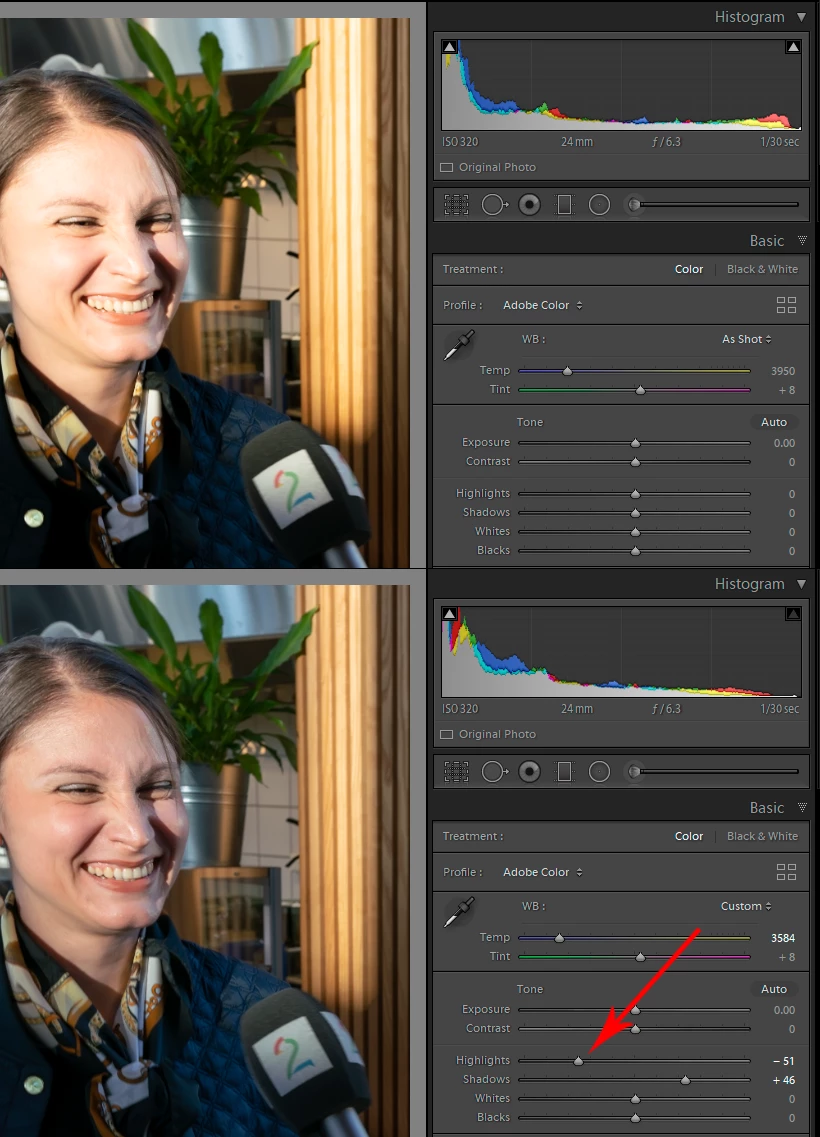
the highlight on her cheek is hotter than I'd like (even after adjusting white balance, exposure and contrast).


By @januska


If by "hot" you mean actually burned out and clipped to white, you can't do anything in the RGB file except rebuild it. The information is gone.


But the raw file, if you can go back to that, may still contain the information. This screenshot is from Lightroom, but ACR works the same way:


8 replies

januska
januskaAuthor
Participating Frequently
June 6, 2021

Thank you - all of you! 

Zesty_wanderlust15A7
Known Participant
May 31, 2021

I use "everything" but Frequency Separation...


Dodge & Burn (which already solves a lot)


Then, to taste, any or more of these...

Saturation correction

Curves layer

Selective Color layer

Hue/Sat layer

Gradient Map method

LUTs

Skin smoothening plugin


When I wanted to start learning FS is when I saw most pros already came back from it (since 2014-ish).

Meanwhile a few PS panels have made improvements to the method though.

I'd still say: read/view the warnings against it.  I don't consider it a beginner's technique, unless you see what is going wrong (many don't).


A similar thing is going on now with a skin evening panel. People are applying the gradient all over the body and people look weirdly evened out. AFAIK, gradient map methods are more meant for subtle local corrections, and preferably not even for the face.


I *am* interested in FS for some quickie work, or "when it's really needed." I do also agree that if you have the eye, you can make anything work.


The "pros" may often use the method you can do inside Capture One first. I think that might be similar to what a LUT can do, i.e., pulling some wrong colors towards the right color.

Zesty_wanderlust15A7
Known Participant
May 31, 2021

And all healing tools, of course 🙂

januska
januskaAuthor
Participating Frequently
May 31, 2021

Thank you - ALL of you! - for your suggestions and your support! As I am still learning, I am going to try all of these suggestions and see what works best for this particular photo. I really appreciate hearing from all of you!

J E L
Community Expert
Community Expert
May 30, 2021

I would do most of the adjusting in the RAW file with the adjustment brush, placing pins on the areas that need correction by changing the tint, temperature, exposure, and other settings with the sliders and then painitng in the adjustment (mask on). With this method, I’d try to make the subject’s face and neck areas appear more in the same color range so there isn’t so much separation in the skin tones. Placing pins on the highlighted cheek area and making these adjustments would also work with this method. Any makeup adjustments I’d do in Photoshop with the clone stamp or content-replace tools. I’d also try some eye brightening to see if that helps overall. Let us know what you end up going with!

januska
januskaAuthor
Participating Frequently
May 31, 2021

Thank you!

Chuck Uebele
Community Expert
Community Expert
May 30, 2021

Can you post your image? Really hard to give the best solution without seeing what's needed. 

januska
januskaAuthor
Participating Frequently
May 30, 2021
Bonnie_002-2_Edit.jpg
Nancy OShea
Community Expert
Community Expert
May 31, 2021

Hi End Skin Retouching with Two Layers.


Nancy O'Shea— Product User & Community Expert
D Fosse
Community Expert
D FosseCommunity ExpertCorrect answer
Community Expert
May 30, 2021
quote

the highlight on her cheek is hotter than I'd like (even after adjusting white balance, exposure and contrast).


By @januska


If by "hot" you mean actually burned out and clipped to white, you can't do anything in the RGB file except rebuild it. The information is gone.


But the raw file, if you can go back to that, may still contain the information. This screenshot is from Lightroom, but ACR works the same way:


Stephen Marsh
Community Expert
Community Expert
May 30, 2021

Take a look at the raw conversion first, there is more latitude for highlight adjustment than in the rendered file. You can then look at the Image > Adjustments > Shadows/Highlights command in Photoshop and selective masking, also perhaps optionally using blend modes such as darken.

Chuck Uebele
Community Expert
Community Expert
May 30, 2021

Frequency Separation is most likely the best method for evening out skin tones. For a beginner, it might seem too convoluted, but it's worth learning.  There are lots of tutorials on it.

januska
januskaAuthor
Participating Frequently
May 30, 2021

Thank you!