
Inspiring
March 31, 2018
Answered

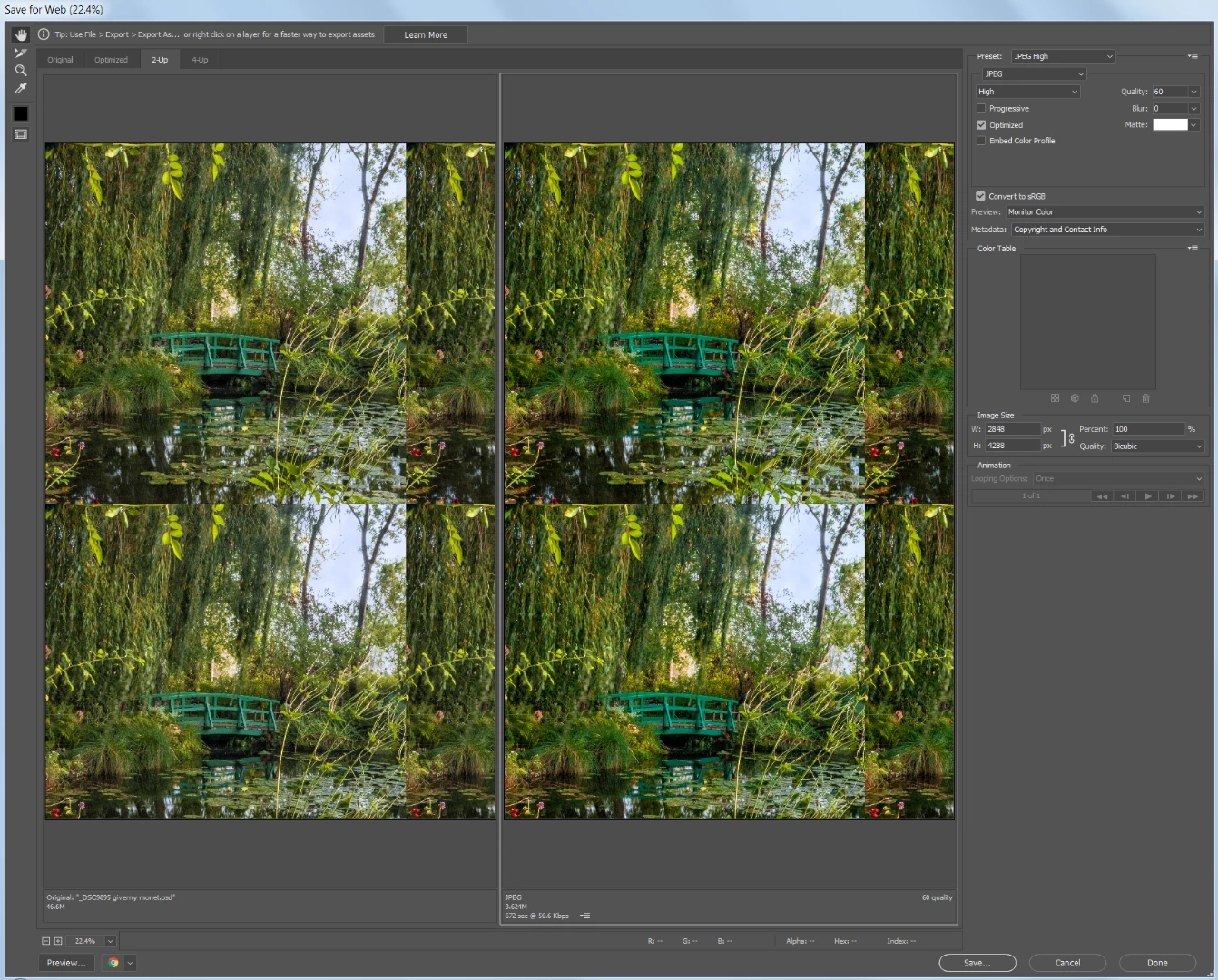
Export to Save for Web Legacy is tiling

  • March 31, 2018
  • 4 replies
  • 2121 views

Even when I choose Fit in View or Fit on Screen, the image is tiling. And no matter which zoom percentage, part of the image is cut off.

This started happening only recently, maybe when I updated Photoshop. It never used to do this and I can't find a setting to turn off tiling.

Is there a way to stop the preview from tiling and show just one complete image?
    This topic has been closed for replies.
    Correct answer barbara_a7746676

    Try resetting Photoshop preferences file. If that doesn't work, try uninstall/reinstall with the Adobe CC Cleaner tool.

    4 replies

    Inspiring
    April 5, 2018

    It's happening again!!!

    When I use Save for Web (legacy) all images are tiling and are cut off so that the whole image does not show.

    Is a bug? Is anyone else experiencing this?

    JJMack
    Community Expert
    Community Expert
    April 5, 2018

    post a screen capture

    JJMack
    Inspiring
    April 5, 2018

    This is one example. It happens with all images and with all views (2 up, 4 up, original, opimized).

    This is the complete image:

    100% Optimized view:

    Fit on Screen Optimized view:

    Original set to Fit in View:

    If I change to 50% or lower view it stop tiling and shows the whole image, but it is harder to see details at that view:

    I see that another person had this issue, but their question was never answered. Save for web saving file tiled (image attached)

    barbara_a7746676
    Community Expert
    barbara_a7746676Community ExpertCorrect answer
    Community Expert
    March 31, 2018

    Try resetting Photoshop preferences file. If that doesn't work, try uninstall/reinstall with the Adobe CC Cleaner tool.

    Inspiring
    March 31, 2018

    Uninstall/Reinstall did the trick. Thanks!

    gener7
    Community Expert
    Community Expert
    March 31, 2018

    Click on the "Optimized" Tab at the top. You somehow got the 2 up tab (2 windows tiled vertically) arrangement.

    Gene

    Inspiring
    March 31, 2018

    Tiling happens in every tab, not just 2-up.

    gener7
    Community Expert
    Community Expert
    March 31, 2018

    If something like this shows up again, a simple trick to try out is to hold down the Alt key on the keyboard which will change the Cancel button to Reset not only for SFW but for most any dialog.

    It may, but not always save a reinstall.

    JJMack
    Community Expert
    Community Expert
    March 31, 2018

    You previewing 2 Up and we have no idea as to what your image look like. Can you cancel out of Save for web and use menu view fit on screen (Ctrl+0) and post a screen capture so we can see you document full image.

    JJMack
    Inspiring
    March 31, 2018

    Nothing special about that image, Tiling happens with every image.