Exit
  • Global community
    • Language:
      • Deutsch
      • English
      • Español
      • Français
      • Português
  • 日本語コミュニティ
  • 한국 커뮤니티
0

extending complex background

Community Beginner ,
Jan 18, 2019 Jan 18, 2019

Hi,

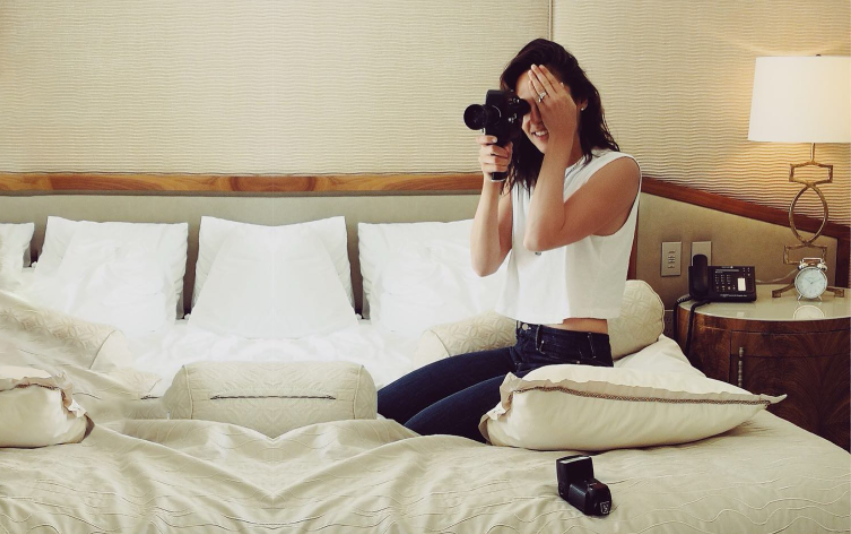
I want to extend this image to a 1920 x 1080 image but I'm not to sure how to do it. My idea is to get a different image and put the lady on that new image. I just wanted some advice for doing this process or an alternative to use the original image.

Thank you

36539271_565438780517267_3670775111847247872_n.jpg

712
Translate
Report
Community guidelines
Be kind and respectful, give credit to the original source of content, and search for duplicates before posting. Learn more
community guidelines
Adobe
Adobe Employee ,
Jan 18, 2019 Jan 18, 2019

Hi Egnazio,

I used the content aware crop to extend a image a little bit then create a new document size 1920 X 1080 and dragged and drop the extended image onto it.

Untitled-1.jpg

Regards,
Sahil

Translate
Report
Community guidelines
Be kind and respectful, give credit to the original source of content, and search for duplicates before posting. Learn more
community guidelines
Community Beginner ,
Jan 19, 2019 Jan 19, 2019

Thank you Sahil. This was very helpful. What processe would I take to extend an image like this to much larger panaramer sizes?

Thank you. 

Translate
Report
Community guidelines
Be kind and respectful, give credit to the original source of content, and search for duplicates before posting. Learn more
community guidelines
Community Expert ,
Jan 19, 2019 Jan 19, 2019

Another idea for seamlessly adding content on the left, is to mirror the image.  You can a pillow width no problem, and if you are happy to remove the lady's legs, you can get another pillow width.

You could even tweak out some of the resulting symmetry with Liquify

Translate
Report
Community guidelines
Be kind and respectful, give credit to the original source of content, and search for duplicates before posting. Learn more
community guidelines
Community Expert ,
Jan 19, 2019 Jan 19, 2019

Everything depend on what you want to achieve but here is one way how to replace background:

  • Select subject and mask it.
  • Place new background in the same document and position it below original image with masked subject.
Translate
Report
Community guidelines
Be kind and respectful, give credit to the original source of content, and search for duplicates before posting. Learn more
community guidelines
Community Beginner ,
Jan 20, 2019 Jan 20, 2019

Hi Bojan.

I was wondering whether it's possible to convert this image into a large panorama?

Translate
Report
Community guidelines
Be kind and respectful, give credit to the original source of content, and search for duplicates before posting. Learn more
community guidelines
Community Expert ,
Jan 20, 2019 Jan 20, 2019
LATEST

I am not sure what exactly you want to ask. You can "move" subject into any other image including panoramic image. Just consider ambient, light direction, proportions etc. In essence you can capture on your own image that you need or purchase/download it from stock sites.

Translate
Report
Community guidelines
Be kind and respectful, give credit to the original source of content, and search for duplicates before posting. Learn more
community guidelines