
Participating Frequently
August 25, 2016
Answered

Extensions not showing up in windows menu

  • August 25, 2016
  • 2 replies
  • 18320 views

Hello,

I have asked this question in another way before but I just noticed something else...

I have a stand alone version of Photoshop CS6 extended and I am trying to use Adobe Extension Manager CS6 to use with it.  After downloading the Adobe Extension Manager from the Adobe website I see that my Photoshop CS6 does not appear in the list on the left.  I also see that when I pull down my windows menu in Photoshop CS6 that the Extensions option is not available.  Is this because the Extension Manager is not working properly or is this because my version is a stand-alone version and cannot accept any extensions?

I have been told several different things and one is that because I have a stand alone version I cannot use anything else with it, ie Extension Manager, other plug-ns, etc.   Is this correct??   If so am I beating my head against a brick wall here?  If this is not correct then I will plod on until I find a solution.

Thanks for any help I can get.
This topic has been closed for replies.
Correct answer JJMack

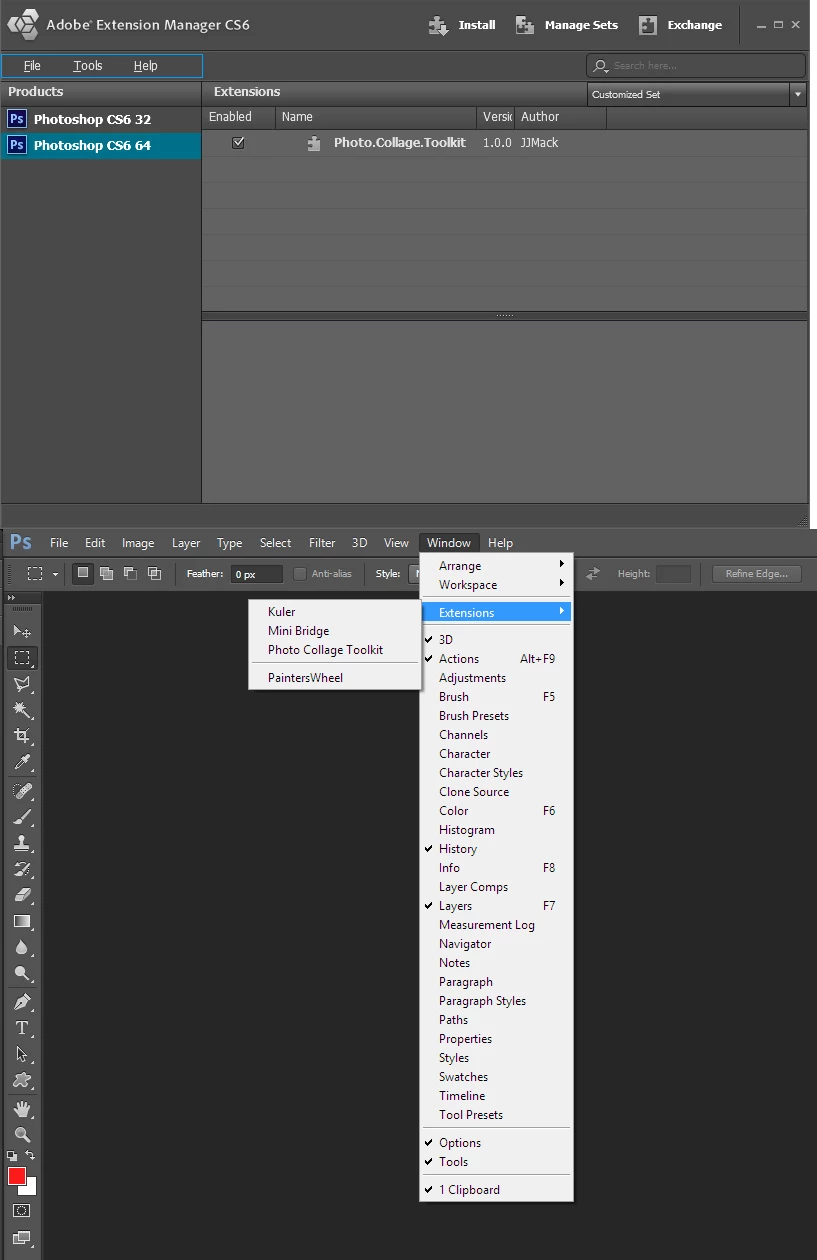
I have never heard the term stand alone version associated with Photoshop as far as i know all versions of Photoshop are installed into an install tree are run stand alone from other versions.  In fact I have many version of Photoshop installed. including CS6 32bit install and CS6 64bit install.  The both show in CS6 Extension manager and Extension installed show in  CS6 menu Windows>Extensions>Names.  In fact CS6 Mini Bridge should be installed by default.

2 replies

mglush
Community Expert
Community Expert
August 26, 2016

You wrote:

I have been told several different things and one is that because I have a stand alone version I cannot use anything else with it, ie Extension Manager, other plug-ns, etc.   Is this correct??   If so am I beating my head against a brick wall here?  If this is not correct then I will plod on until I find a solution.

-----

Keep plodding--the Extension Manager was around long before CS6--I have been using it since CS 4 (at least).

By stand alone, are you saying that you only have Photoshop CS6 or that you have the CS6 suite (not a subscription)?

Did you check your Preferences Panel--under Plug-ins is an option to click to allow your Extension to connect to the internet--is that turned on? See below.

If this isn't the answer--don't give up! We will keep looking!

Michelle

Deyvian
Participant
April 4, 2020

It worked! Thanks!

JJMack
Community Expert
JJMackCommunity ExpertCorrect answer
Community Expert
August 25, 2016

I have never heard the term stand alone version associated with Photoshop as far as i know all versions of Photoshop are installed into an install tree are run stand alone from other versions.  In fact I have many version of Photoshop installed. including CS6 32bit install and CS6 64bit install.  The both show in CS6 Extension manager and Extension installed show in  CS6 menu Windows>Extensions>Names.  In fact CS6 Mini Bridge should be installed by default.

JJMack
John Waller
Community Expert
Community Expert
August 26, 2016

I have never heard the term stand alone version associated with Photoshop

Usually used to emphasize that their version is not part of a Creative Suite, therefore not bundled with other apps.

Some people assume that not being included in a Creative Suite means their standalone version is crippled in some way or unable to access certain features or some crucial add-ons are not included, none of which is true to my knowledge.