
Participant
July 1, 2019
Question

Fading Cloth

  • July 1, 2019
  • 5 replies
  • 956 views

Hey guys I'm working on a project right now and I wanted to up my level of realism in my texture. I wanted to know if any of you have found a way to create a faded cloth look.

Ill show you what I mean.
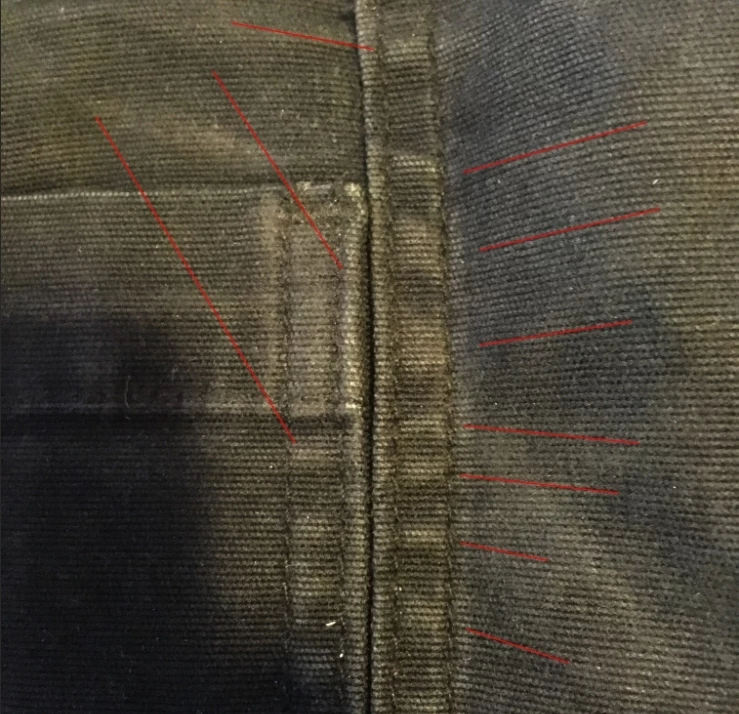
If you look at the image, I'm trying to create those faded bumps and the faded lines by the edges of the pockets. I'm hoping to find a procedural way to create this because I have a lot to do.

Anything Helps

Cheers

This topic has been closed for replies.

5 replies

Participant
July 2, 2019

Hey guys I just got on and saw all of the great feedback that I was getting, davescm​ had more of the idea what I was looking to do. Unfortunately I don't have access to the original models, so I can't use substance painter. But Ill keep it in my tool box for whenever I actually get around to modeling. I'm definitely going to check out the youtube videos and see what I can come up with and what seems to work best with my work flow.

Thanks for all the responses and cheer fellas.

Trevor.Dennis
Community Expert
Community Expert
July 2, 2019

Rader_of_the_Lost_Ark  wrote

If you look at the image, I'm trying to create those faded bumps and the faded lines by the edges of the pockets. I'm hoping to find a procedural way to create this because I have a lot to do.

I am a big fan of using the Dodge and Burn tools directly onto a raster layer.  It might not be non-destructive without resorting to copied layers and layer masks, but nothing else gives you quite the same control.  Try using the Dodge tool set to Shadow, Midtones, and Highlights to see how it makes a big difference to the effect.  I used Midtones below.

This is something else I picked up from Bert Monroy a very long time ago.  I used the 50% grey layers prior to this, but from an illustrator's point of view, you can't beat the D&B tools. 

One trick to remember is that if you need fine control, make a clipping path and stroke it with the relevant tool.  You need to set up the tool before doing this (size, hardness, tonal range, strength).  I will have done this on the seams on my denim illustration.  Another thing I use is to stroke a selection with black or white choosing 'Center'.  Then blur the stroke, reload the selection and delete onside of it.  That's how this fade from a hard edge was done

BTW, we are always looking for more people to join in with our (Dave's) Something For The Weekend threads.

Something for the weekend - Part 78 - The gate.

Trevor.Dennis
Community Expert
Community Expert
July 2, 2019

I think I could do that.  I did this Denim texture six years ago, and I've learned a few tricks since then

Have you seen Bert Monroy's giant Times Square illustration?

https://www.bertmonroy.com/timessquare/timessquare.html

If you are not familiar with it, you can keep zooming way way in revealing more and more layers of detail.

Zoom in to the Knoll brothers in the lower center to see how Bert does denim.  He has detailed tutorials on the entire illustration on what used to be Lynda.com, and I think comes under LinkedIn Premium now.

The basic fade effect was mainly down to Render Clouds in my illustration.  You can use Render Clouds in a Curves layer's layer mask, for instance, or use it directly with the light and dark colours.  With the more linear pattern of your sample image, you would need to use a Displacement Map to get realistic contours, and you'd need more control on shading than Render > Clouds would give you, so that would be Dodge & Burn tools.

If you have specific questions, I am sure one of us will try and answer.

mglush
Community Expert
Community Expert
July 2, 2019

Hi!

If you are looking to do the texture yourself in Photoshop, I would recommend looking into one of Bert Monroy's books or check out some of his tutorials--he is a master at Photoshop realism. Here is a link to his YouTube channel:

Bert Monroy - YouTube

And here is a screenshot of just a few of the tutorials he has posted:

Enjoy!

Michelle

davescm
Community Expert
Community Expert
July 1, 2019

Hi

Nice job on that texture !

If you are painting that on a 3D model, I would look to do texturing like that in Substance Painter where you can combine painting with smart masks which will use the models edges (and, using anchors, any painted bumps that you add to the height or normal maps) to simulate edge wear.

(Adobe now own Allegorithmic)

Dave