myronm79299567
Inspiring
January 4, 2018
Question

feathering error

  • January 4, 2018
  • 3 replies
  • 1741 views

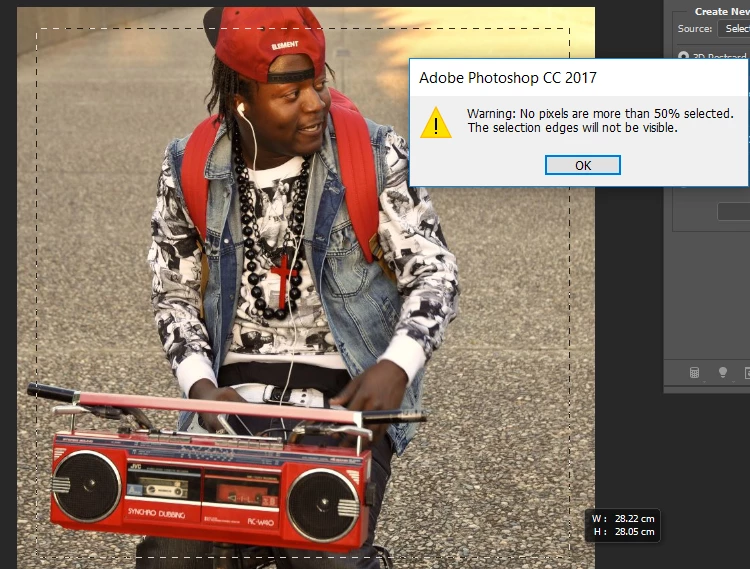
Hi i am trying to follow this you tube tutorial How to Blur Edges in Photoshop CS5 - YouTube

to feather or blur the edges of my photo but this error keeps coming up? Please help.
    This topic has been closed for replies.

    3 replies

    Norman Sanders
    Legend
    January 4, 2018

    The Feather Radius is set to too high a value. Set it to a lesser number of pixels

    Terri Stevens
    Legend
    January 4, 2018

    That message simply means that Photoshop cannot accurately display the selection and is not necessarily an error. The acid test is to complete the tutorial and see whether the edges of the image are blurred.

    Terri Stevens
    Legend
    January 4, 2018

    Looking at your tutorial, it is really very out of date, these days nobody should be deleting pixels as it's a permanent modification and guessing what the feathering setting should be by trial an error is not necessary. Here is an alternative method that will do exactly the same thing but without destroying any pixels

    1) Start with your image open in Photoshop

    2) Make a selection-incidentally it can be elliptical or any shape

    3) Press 'Q' on the keyboard to go into Quick Mask mode and it will look like this unless you have changed the default rubylith color

    4) Go to the filter menu and select 'Gaussian Blur'  A feather is just a blurred edge essentially

    5) Use the radius slider to soften the edge of the selection. You will be able to see visually the effects of the feather like below

    6) Press Q to exit the quick mask mode and click on the marked 'layer mask' icon.

    7) You can now see the effect of the feathering applied

    8) Finally create a new layer and place it below the master image. Fill with your chosen color and you have your completed image with soft edges.

    myronm79299567
    Inspiring
    January 4, 2018

    The thing is i cannot select the square around the object with the rectangular marque tool without the error message coming up and

    unselecting my crop even once i click okay. Any fix?

    jane-e
    Community Expert
    Community Expert
    January 4, 2018

    The first thing to check is your Layers panel, which is not visible. Are you on a layer with pixels?
