
PaulK59
Participating Frequently
November 13, 2017
Answered

File Icons CC2018 Mac High Sierra

  • November 13, 2017
  • 4 replies
  • 17396 views

Hi,

I hope someone can help me with this problem.

I am running Mac High Sierra and CC2017 was working fine, I updated to CC2018 and now all my file icons look like this:

I have tried uninstalling and re-installing CC2017 and CC2018 but the icons refuse to change (Illustrator .eps look the same as well).

I have even installed a fresh copy of High Sierra and restored everything else from time machine.

Your help would be much appreciated.

Thanks, Paul.
This topic has been closed for replies.
Correct answer graphic mac

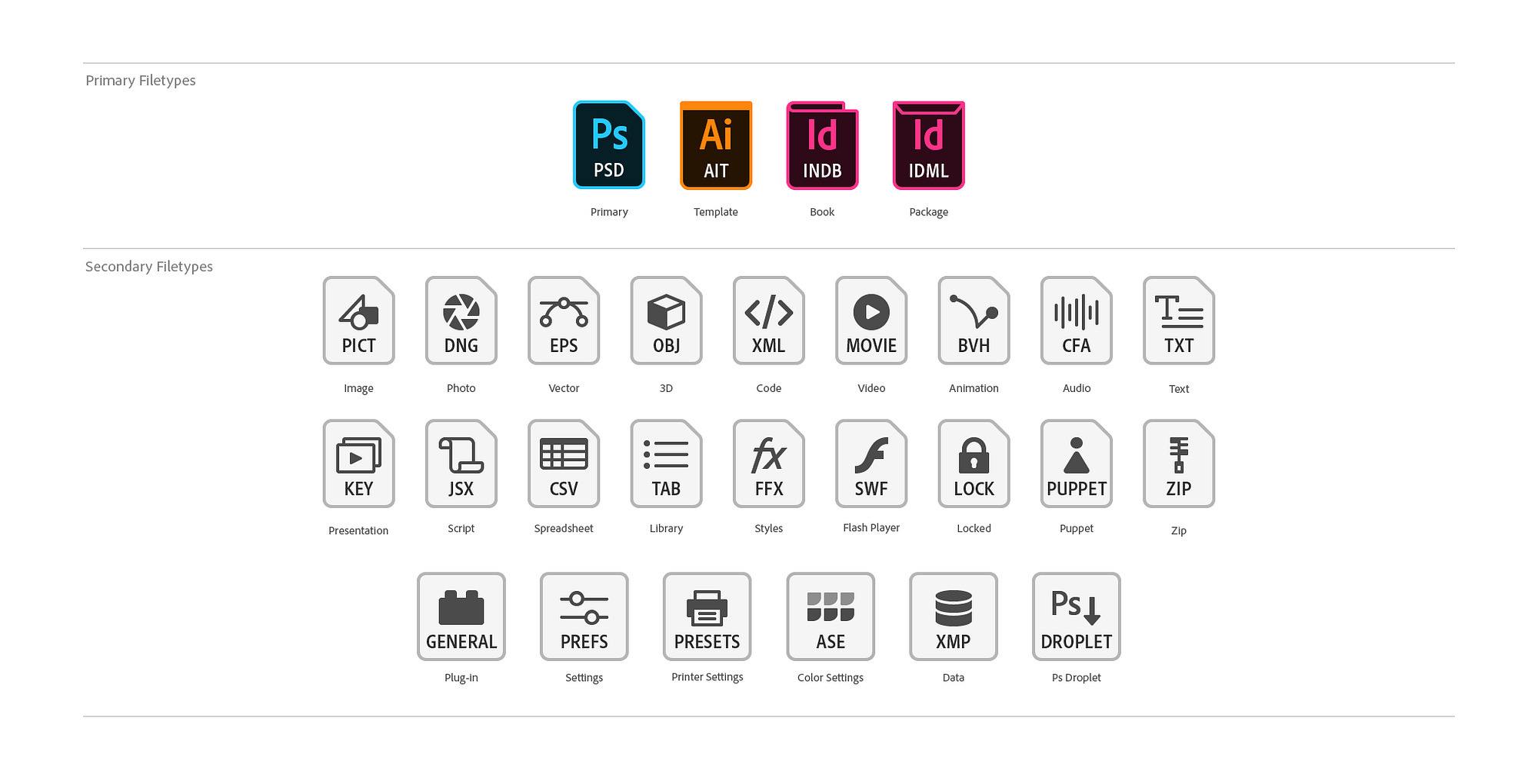
For everyone following and replying: He is NOT referring to image previews in the Finder Icons. He's talking about the design of the icons themselves.

-------------

There is no problem here. Those are Adobe CC 2018's new icons. I answered your post at MacRumors about this, but here it is again for anyone wanting some background (it's actually an interesting read for designers):

Background on the new icons.

1*uW13VmhKXBJ5b9PskucqBQ.png

4 replies

bellevue scott
Inspiring
November 19, 2017

To be fair, the problem with icon previews between Adobe and Apple has been an ongoing battle for years. Somewhere back in time, I'm not sure when, it's been a few years now, Apple changed the specification for icon preview implementation, and Apple and Adobe have been in a pissing contest ever since. I would have to go back and look for all the details, but I do remember Chris Cox of Adobe being very knowledgeable on this issue, and insisting that Adobe had implemented previews the way Apple wanted, but that Apple wouldn't budge. And none of this would surprise me, as Apple has been pissing on Adobe for years now.

While I noticed the new Adobe icons after a recent update (not sure if it was 10.12.x or PS2018 that caused it), what really matters is the lack of icon preview, and that's been going on for a long time. It's caused issues with my work flow, and I'm sure many others as well, and it keeps getting worse. I've often now got directories where I can't see half of the icon previews, so I need to open a file to see what's in it. But again, this has been going on for a long time. If previews worked correctly, you wouldn't see the new icons anyway, you would see a preview, which is what we all really want to see anyway.

But all of this really points to Apple, as Adobe has no interest in breaking icon previews and appears to have tried, with little or no cooperation from Apple. Just my two cents.

graphic mac
Inspiring
January 28, 2018

https://forums.adobe.com/people/bellevue+scott  wrote

...While I noticed the new Adobe icons after a recent update (not sure if it was 10.12.x or PS2018 that caused it), what really matters is the lack of icon preview, and that's been going on for a long time. It's caused issues with my work flow, and I'm sure many others as well, and it keeps getting worse. ...

This confuses me, because while the icons for the file formats has changed over the years, the Icon Preview functionality has always been available for supported file formats (basically, anything that Photoshop can open), and has always worked perfectly, if not a tad slowly, on macOS.

I've never had a TIF, JPG, PNG, GIF, PSD, EPS, AI, or any other common image format that didn't offer icon previews of the file in the Finder. Like I said, sometimes it's annoyingly slow for the previews to populate the icons if the folder has tons of image files in it, but it has always eventually worked as long as you have the Finder preferences set to Show Icon Previews.

I've worked on hundreds of Macs in dozens of organizations and I've just never seen it NOT work. The one thing I have seen is when folders full of images that exist on a Windows-based server on a slow network take forever... and I mean for-absofreakinglutely-ever to have the image previews populate the icons. Many times it requires closing and re-opening the folder to kind of kick it in the pants... but eventually they worked.

gener7
Community Expert
Community Expert
January 28, 2018

PSB is one image file format that OSX will not render thumbnails for. I have to rely on John Ellis' PSB Quicklook plugin.

MacLady
Participant
November 19, 2017

I am running Mac OS 10.13.1 High Sierra and using Photoshop CS3 v 10.0.1. Before I upgraded to High Sierra, all was well. Now, if I bring a jpeg into Photoshop, make changes, and then save the file, the resulting file icon is the generic jpeg one. This is true if the file is on my desktop or in a Finder window (list view or icon view). If I select the file and do command-I to get a Get Info window, I can see the preview picture at the bottom of the Get Info window. This is what I did to make the preview photo show up on the file icon:

  1. Select the file - either on the desktop or within a folder.
  2. Command-I to open the Get Info window.
  3. Click on the little generic icon at the top left of the Get Info window.
  4. Command-X.
  5. The little icon at the top left of the window won’t change, but the file icon you see on the desktop or in a Finder window will change.

This works for me. Perhaps this will work for you also.

Participant
January 30, 2018

it works for me, but is there not a change in the setting which allow not to do it for each image individually?

graphic mac
Inspiring
January 30, 2018

Yes. The Finder Preferences has the option to turn on or off Show Icon Previews. But that seems to be the issue being discussed here... it works perfectly for most people, but for many other it does not.

graphic mac
graphic macCorrect answer
Inspiring
November 14, 2017

For everyone following and replying: He is NOT referring to image previews in the Finder Icons. He's talking about the design of the icons themselves.

-------------

There is no problem here. Those are Adobe CC 2018's new icons. I answered your post at MacRumors about this, but here it is again for anyone wanting some background (it's actually an interesting read for designers):

Background on the new icons.

1*uW13VmhKXBJ5b9PskucqBQ.png

PaulK59
PaulK59Author
Participating Frequently
November 14, 2017

Hi, just read your other reply, thank you.

gener7
Community Expert
Community Expert
November 13, 2017

Go to the Finder menu  View > Show View options and adjust the icon size from small to large to see if you can get the icons to render.

PaulK59
PaulK59Author
Participating Frequently
November 13, 2017

Hi, just gave that at go and it just makes the white icon bigger and smaller.

Thanks.

gener7
Community Expert
Community Expert
November 13, 2017

Let's try this:

  1. Open to the Preferences folder of your home directory
    (your home > library > preferences)
  2. Delete com.apple.finder.plist
  3. Right click on Finder icon and select Relaunch. (You can also open the force quit window and relaunch Finder.) Or restart your Mac.

Note: You may see some previews and not others.. if it seems that your Photoshop file preview thumbnails are fine, this could be because Photoshop saves a preview intentionally where as other applications are showing previews differently.